2.1 Configurable REST API Request and Response Parameters Using User Defined Tables
Overview
Business and operations users can configure REST API input parameters through OFSLL User Defined Tables without changing the code for each parameter update. At runtime, the APIs read the UDT configuration and process requests accordingly.
Scope & Approach
- Configure API metadata in OFSLL User Defined Tables.
- Configure request parameters (name, type, required, source, mapping).
- Configure source table reference and query conditions in User Defined Table
Configuration Required
- User configures: User Defined Tables and User Defined Table Parameters.
- This configuration is required for both input parameters.
- Source table/view reference.
Runtime behavior
- API receives request.
- Service loads User Defined Table configuration by API code.
- Validates request using configured input rules.
- Fetches data using configured source table/mappings.
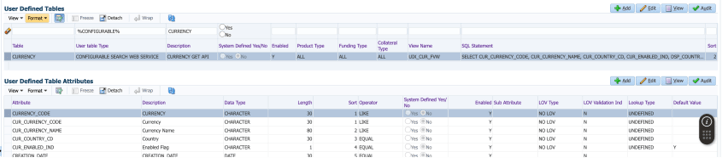
Example 1: API - Currency GET Service (View: UIX_CUR_FVW)
- currencyCode (Mandatory, string, maps to CURRENCY_CODE)
- countryPair (optional, string, maps to COUNTRY_CODE)
- currency <- CURRENCY_CODE
- currencyPair <- CURRENCY_PAIR_CODE
- 0effective date & Time <- Effective Date & Time
- Rate <- Rate with decimals
- Enabled <- Enabled Flag
Figure 2-1 User Defined Table Configuration for the Currency GET Service
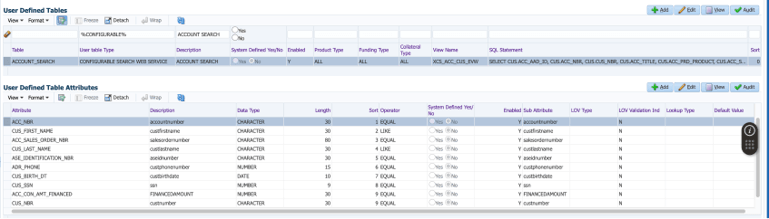
Example 2: Account SEARCH Service: View →XCS_ACC_CUS_EVW
Figure 2-2 User Defined Table Configuration for the Account Search Service
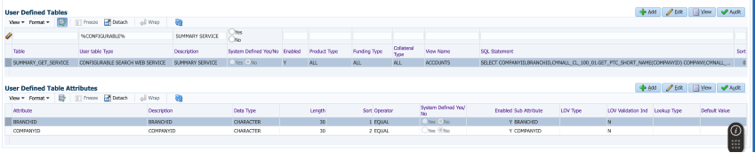
Example 3: Servicing and collection summary API: View Accounts
Figure 2-3 User Defined Table Configuration for the Servicing Summary Service
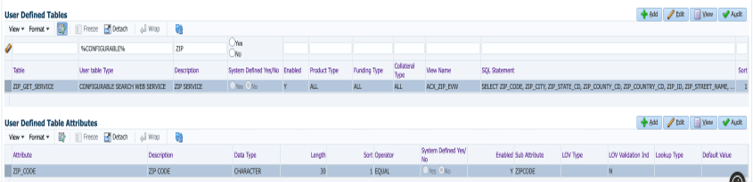
Example 4: ZIP_GET_SERVICE API: View ACX_ZIP_EVW
Figure 2-4 User Defined Table Configuration for the ZIP GET Service
Parent topic: Release Enhancements