2.2 Trade Transaction – Multi currency with different companies
Overview
This enhancement supports TRADE transactions between accounts held by different companies and denominated in different currencies. It covers simple, split, combine, and split-combine trades, including reversals initiated from either the source or destination account. Multicurrency TRADE Enquiry is not supported.
Scope
- The scope of this change is to allow TRADE transaction on different companies having different currency.
- (TRADE Enquiry for multi currency not supported). Following scenarios are handled:
- Trade Posting
- One Source to One Destination (Simple Trade)
- One Source to Multiple Destinations (Split)
- Multiple Source to One Destination (Combine)
- Multiple Sources to Multiple Destinations (Split - Combine)
- Trade Reversal
- From Source account
- From Destination Account
- Trade Posting
Changes
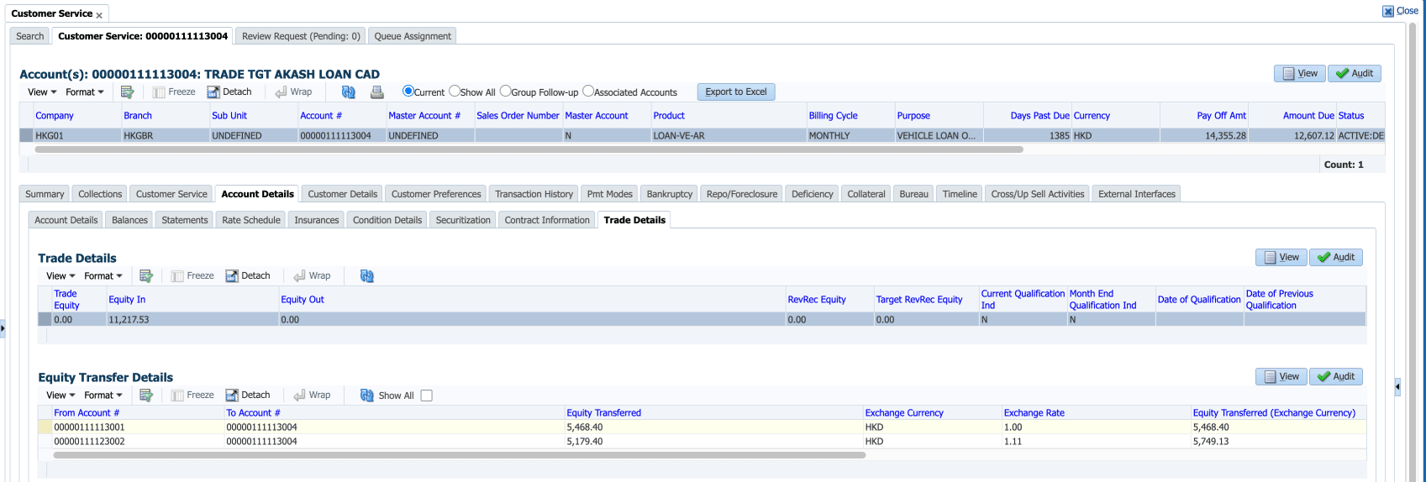
- Introduced the below new display columns in Customer Service >Account Details > Trade Details>Equity Transfer Details.
- When a trade transaction is posted involving source and destination accounts with different currencies, the system will apply the exchange rate effective (based on GL Date) at the time the transaction is initiated.
- If no exchange rate maintained for the currency combination, system will raise an error 'Currency Exchange rate record not found' and system should not allow to post the transaction.
- In case of transaction sent for authorisation, date of transaction posting is considered for exchange rate, not the authorisation date.
- In case of reversal, it will not further consider any exchange rates and simply post the trade reversal based on 'Equity Transferred'.
- Backdating TRADE also will follow the same approach, except it refers to the exchange rate applicable based on 'Transaction Date'.
- If the source account currency and destination account currency are same, then Exchange rate will be displayed as 1.
- While posting Trade Reversal on any of the source accounts as part of Split-Combine Trade, system Reverses the Trade txn from other source accounts as well.
Following dependencies & Impact handled
- AOB - If the source and target account currencies are different, system validates the amount → Amt Receivable (comes from itemization) & Equity (generates by txn) If the amounts are not matching, raise the existing error 'Trade Mismatch' and system will continue to create new accounts, but will not post the TRADE transaction. 1. Example: Source Account Amt Receivable = 1000 Rs (Source account currency = ISD), Destination Account currency = $, Currency Exchange Rate = 100, Transfer value = 1000/100 = 10$. 2. In case of TRADE split & combine case, where source and destination accounts have different currencies, to match the amounts based on destination 1st account currency provided in AOB for account creation.
- For existing customers, a Data script provided to print the TRADE values as-is in newly created column 'Equity Transferred' (New Currency). This will ensure that during reversal, system validates the reversal amount with new column.
- Trade Details Report: Placeholders added in report --> TDT_TARGET_CURRENCY_CD, TDT_CER_RATE, TDT_EQUITY_TRANSFER_LCY_AMT.
- Conversion Impact: Placeholders added conversion table only –> TDT_TARGET_CURRENCY_CD, TDT_CER_RATE, TDT_EQUITY_TRANSFER_LCY_AMT.
Figure 2-5 Trade and Equity Transfer Details for a Multicurrency Account
Parent topic: Release Enhancements