2.7 Batch Job & Job Set Changes
Overview
This enhancement adds flags to batch jobs and the scheduler to help handle job exceptions. The new flags are available on the Setup → Batch Jobs and System Monitor screens.
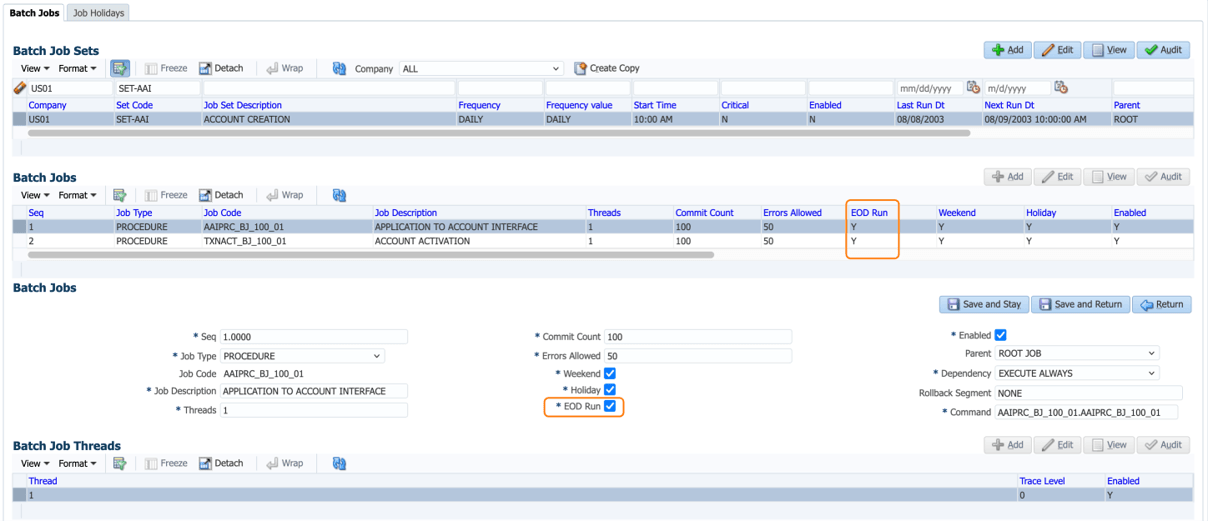
Flag to exclude batch jobs execution at EOD
- Added new flag 'EOD Run' to batch jobs to avoid the batch job run during EOD.
- Flag placed to each job level.
- During EOD, scheduler checks the flag status to run only if flag value = Y.
- If the flag value = N, scheduler skips executing the batch job.
- Default value = Y and hence customers has to review the applicability of batches or their business.
Figure 2-10 EOD Run Setting for Batch Jobs
Jobs set configured by the Scheduler
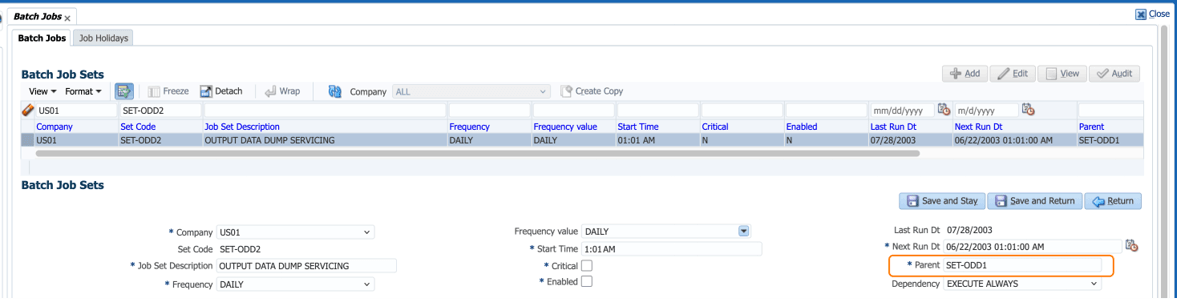
- Changed the existing placeholder to accept the multiple parents.
- Text box is provided in place of Lookup, so that user can input the values in text. Each job is separated by comma.
- User has to maintain the setup meticulously.
- Scheduler checks the status of the jobs, which are part of above exclude set (Parent).
- If the job set mentioned in criteria is running, system queues current job set, until all the job runs completed in the exclude criteria list.
- Default values in this placeholders will be as per pre-configuration and there is no impact on existing customers.
- Depending on business cases, customers can configure the job sets in the parent criteria.
Parent topic: Release Enhancements