2.4 Upfront / Stream definition at Tax Level
Business Process Workflow, Activity & Overall Task Flow Setup Changes
Overview
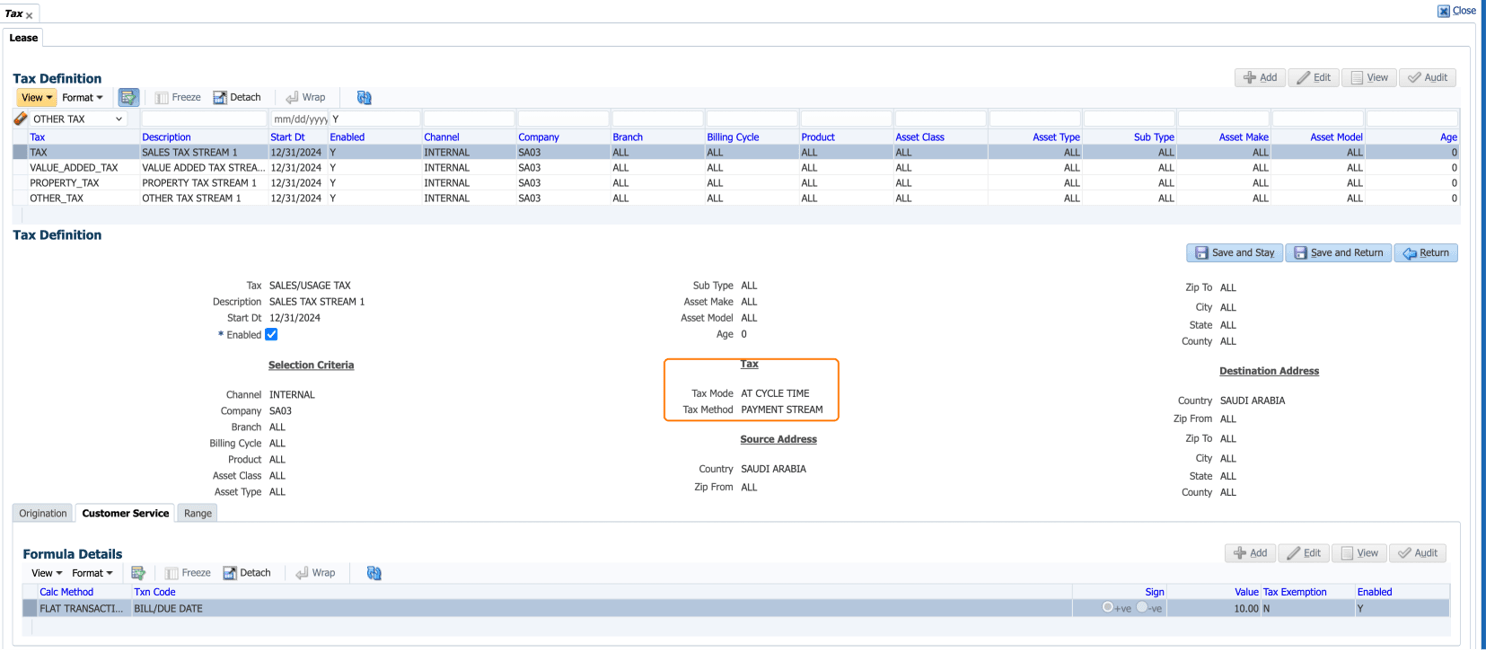
Currently, the Tax Method and Tax Mode fields are defined at the lease contract level to determine whether tax is captured upfront or through the payment stream. This prevents users from assigning different capture methods to individual taxes on the same lease. This enhancement moves both fields to the Tax Definition page, allowing each tax to be configured independently.
Solution Approach
- Removed field from lease – Contract setup and place at part of Tax Definition, so that user can define multiple taxes with the combination of Upfront or Stream.
- Migration script has to be provided to change setup for existing customer to move the definition to Tax setup.
Following changes done for Tax Definition Screen EDIT behavior
Start Date and End Date Validations:
- Start Date will be validated for 'Current System Date' and doesn’t allow user to input back date or future date.
- Removed 'End Date' from Tax Definition' Screen. Record validation is driven by Current Record Start Date and Next Record Start Date -1.
- Once user Saves the record, system allows user to either 'Enable/Disable' the record. All other fields are view only and not allowed for modification, once record is saved.
Figure 2-7 Tax Method and Tax Mode in Tax Definition
Parent topic: Release Enhancements