2.5 Files - Delete facility
Overview
- Users can delete files before they are mapped to an application or account.
- Users can delete files that have already been uploaded and mapped to an application or account.
Business Process Workflow, Activity & Overall Task Flow Setup Changes
Application/ Account Document Screen - Documents are yet to posted to application/account.
Application → Document → Document Tab
Servicing → Customer Service → Document Tracking
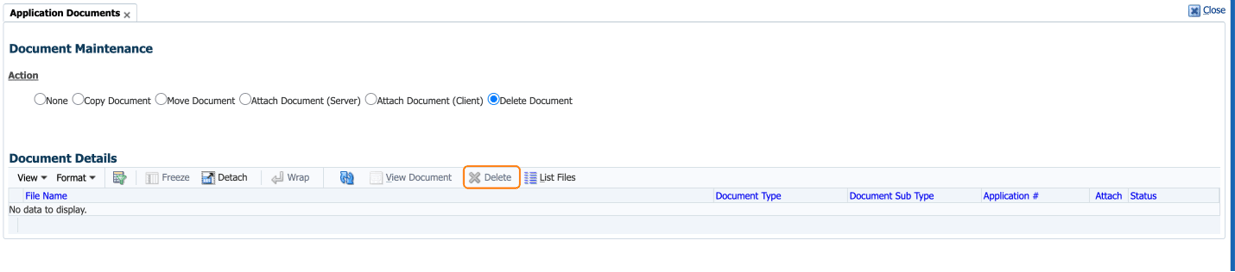
- These screen displays the the list of documents yet to be uploaded to server.
- New button DELETE document is provided.
- User can select the file and choose to delete.
- Once Delete button is pressed, system will show the prompt for confirmation.
- On selection of YES, system will delete the file from the server.
- On selection of No, system will return back to the screen with no action.
Figure 2-8 Delete Option in Application Document Maintenance
Application/ Account Document Screens with in Application & Account Screens): - Documents posted to application/account
- This screen displays the the list of documents uploaded to server.
- New button DELETE document is provided.
- User can select the file and choose to delete.
- Once Delete button is pressed, system will show the prompt for confirmation.
- On selection of YES, system will delete the file from the server.
- On selection of No, system will return back to the screen with no action.
- For Applications (Origination Stage) → Status with NEW and FUNDED are not allowed to DELETE the files (Button should not be available to trying out DELETE).
- For Accounts (Servicing Stage) → Status with TRADED, VOID, CLOSED are not allowed to DELETE the files (Button should not be available to trying out DELETE).
- In Servicing stage, there is a facility to VIEW origination documents. It does not allows user to DELETE origination (Applications) files using servicing screen.
Parent topic: Release Enhancements