7 Configuring a Package
Introduction
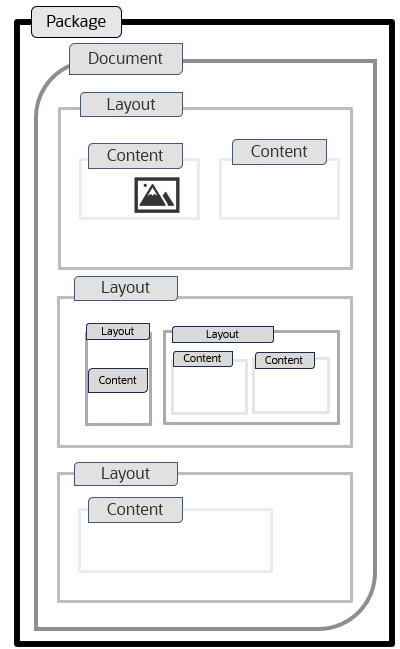
Package in Communication Cloud Service is a well-organized framework that encompasses all the necessary components for generating and providing customized communication. A Package serves as the top-level structure in the configuration hierarchy, containing Documents, Layouts, Contents, and Styles along with business logic, iterations, and data mapping, which personalize the communication for each customer. The Package helps in grouping these elements, which are then used to generate the communication to the intended recipient in different output formats.
A Package can have multiple versions created for different time periods. Each Package Version has an Assembly Template, which specifies the integration of data such as customer data, transactional data and so on, into the communication output. The JSON data is used to dynamically populate communication output with customer-specific information, mapped to placeholders in the Content through the fields defined as part of Assembly Template. The Package Version is then associated to the relevant Documents, with all the required elements such as, Layout, Content and Style. After the Package is assembled and processed, the communication output is used by the Communication Distribution configuration for distribution using preferred channel.
Functionalities
Following are the functionalities of a Package:
- Customized Customer Communication: You can create customized communications such as Emails, PDFs, and SMS messages, which can use along with distribution to deliver reminders, documents, offers, financial statements, and so on, based on customer data and preferences. This ensures that each customer receives contextually relevant information.
For example, you can send personalized monthly account statements to your customers. The content of each statement is dynamically customized based on customer data, including the customer's name, account balance, transaction history, and any special offers that may be relevant to their account type or activity. You can also send personalized Emails based on a customer's transaction history and preferences. Customers who have a salary deposit might receive a promotional Email about different deposit schemes, while those who have limited transactions might receive the customized communication.
- Versatile Configuration: You can use the same Style, Content, Layout, Document configurations to generate the communication output to different customer preferences, whether they opt to receive their bill through Email, or an intimation about the availability of the generated through an SMS message.
For example, if a customer wants to receive the billing statement embed into the Email or as an attachment to the Email, you can use the same configuration to generate the communication output.
- Document Management: In Package configuration, individual documents are structured, styled, and populated with dynamic content based on specific templates. These templates are used to generate various types of communications, and can be reused across different packages to maintain consistency in formatting and style. The Document configuration also manages versions to accommodate changing business needs over time. In communication, the system generates and sends tailored messages based on specific events or actions related to a customer’s transaction. Depending on the event, different documents are attached, ensuring the customer receives the necessary information in the appropriate format, such as PDF or Email. These documents are dynamically populated with personalized data, ensuring each communication is relevant and specific to the recipient.
In Package configuration, the documents are structured, styled, and populated with dynamic content based on reusable templates. These templates ensure consistency across communications while supporting version control to meet changing business needs. The system generates tailored communications for specific customer events. Depending on the event, different documents are attached in formats such as, PDF or Email, with customized data dynamically populated.
You can maintain and manage multiple versions of customer communications, to comply with evolving changes within the market. The Communication Cloud Service configuration enables you to handle different versions, and retrieve the appropriate version based on the requested Transaction Date.
Configuration Movement
Configuring Package follow the configuration movement process; that is, if you configure a Package in one environment (non-production), you can move the configuration to different environments (pre-production and production) sequentially.
For more information refer, Understanding Configuration Movement topic.
Video Tutorial
Dynamic Assembly Templates in Communication Cloud Service video:
This guide demonstrates how to define and reference data variables, apply conditional logic for dynamic content inclusion, and iterate through data collections. Discover how to control and personalize communication outputs based on external JSON data for efficient and customized document creation.