14.7.1.1 Expression Application Rule
You need to specify only the 'SQL query Where Clause' in the Expression field.
Figure 14-13 Expression Rule Details Window
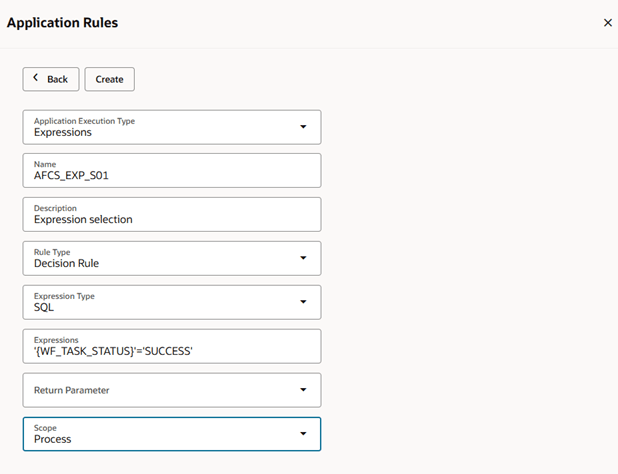
Table 14-21 Expression Rule Details Description
| Field Name | Description |
|---|---|
| Name | Enter a unique name for the Application Rule. |
| Description | Enter a description for the Application Rule. |
| Rule Type | Select the Rule Type from the drop-down list. The Expression Application Rule can be used as a Decision Rule, Execution Rule, or Selection Rule based on your requirement. |
| Expression Type | Select Expression Type as SQL to use SQL expressions |
| Expression | Enter the expression in SQL format. For example, '{WF_TASK_STATUS}'='SUCCESS'. The WF_TASK_STATUS is the Data Field name and the Data field value replaces the Data Field name in the expression present in the {}. |
| Return Parameter | This is field optional. Select the Data Field that receives the return parameter of the Expression, from the drop-down list. |
| Scope | Select the Scope as Process to use the Application Rule only in the current process or Package to use the Application Rule across all the processes in the package. |