24.1.7 Prepayment Model Analysis
This module describes the procedure for prepayment models analysis.
The Prepayment Model Analysis module will allow you to develop a model for prepayment rate calculations as per the chosen risk factors.
You can get the latest status of each step by hovering over progress train blocks, a call out will open with stage milestones which will help to confirm if the process is running or failed.
This section covers the following topics:
- Understanding Prepayment Model Analysis
- Searching for a Model Rule
- Defining a Model
- Editing Prepayment Model Analysis Rule
- Deleting Prepayment Model Analysis Rule
- Copying Prepayment Model Analysis Rule
- Dependency Checking
Note:
Populate the data in table FSI_M_PROD_INST_TABLE_MAP as the model searches the processing tables as per the selected products based on mapping in this table.
Note: Prepayment model analysis is supported only for OEL.
For User Roles and Functions related to Prepayment Model Analysis, see the Creating Application Users section in the OFS Analytical Applications Infrastructure Installation and Configuration Guide.
Understanding Prepayment Model Analysis
In the Oracle Financial Services Analytical Applications Infrastructure Home Screen, select Financial Services Funds Transfer Pricing.
- To access the Prepayment Model Analysis window, navigate to FTP Assumption Specification , select Prepayment Rules , and then select Prepayment Model Analysis .
- The definitions based on the search criteria are listed under the List of Prepayment Model Analysis. This is the search section that contains multiple parameters. You can specify one or multiple search criteria in this section. When you click Search, depending upon the search criteria, the corresponding Prepayment Model Analysis Summary would be shown. The Prepayment Model Analysis Summary window displays the following fields.
Table 24-2 Fields and Descriptions in the Prepayment Model Analysis Summary window
Fields and Icons Description Search This icon allows you to search the Prepayment Model Analysis definition based on the search criteria specified. Search criteria may include a combination of Name, Folder, Status, and Model Type. The Prepayment Model Analysis rule definitions displayed in the Prepayment Model Analysis Summary table are filtered based on the search criteria specified on clicking this icon. Reset This icon allows you to reset the Search section to its default state without any selections. Resetting the Search section displays all the existing Prepayment Model Analysis rule definitions in the Prepayment Model Analysis Summary table. Name This field allows you to search the pre-defined Prepayment Model Analysis Rule based on the rule name. Enter the Rule name. Folder This field allows you to search for the pre-defined Prepayment Model Analysis Rule definitions based on the selected folder. This field displays a list of folders that you have access to as a drop-down list. Selecting a folder from the drop-down list displays only those Prepayment Model Analysis rule definitions that are defined within the selected folder/segment in the Prepayment Model Analysis rule summary table. Model Type This field allows you to search the pre-defined Prepayment Model Analysis rule based on type. Model Type would only be defined for “Confirmed” models. All models, which are still in draft, would not have any Model type. This drop-down has the following options:
- Linear
- Polynomial
Status This field allows you to search the pre-defined Prepayment Model Analysis rule based on status. This drop-down list displays the statuses Draft or Completed. Selecting a status from the drop-down list displays only those Prepayment Model Analysis rule definitions that are defined within the selected status in the Prepayment Model Analysis Summary table. The Prepayment Model Analysis Summary page offers several icons that allow you to perform different functions when a Prepayment Model Analysis rule is selected.
Table 24-3 Prepayment Model Analysis rule – Icons and Descriptions
Fields Description Add Click Add icon to build a new Prepayment Model Analysis rule. The Add icon is disabled if any row is selected in the table. View Select a single row in the table to enable the View icon.
Click View to view the contents of a Prepayment Model Analysis rule in read-only format. The View icon is enabled only when a single Prepayment Model Analysis rule is selected in the table.
Edit Selecting a single row out of the pane enables the Edit icon.
Click the Edit icon to modify a previously saved Prepayment Model Analysis rule. The Edit icon is only enabled when a single Prepayment Model Analysis rule is selected.
You can control the number of rows to display on the window by selecting the Pagination Options icon from the action bar.
Copy Selecting a single row out of the pane enables the Copy icon.
Click the Copy icon to create a copy of an existing Prepayment Model Analysis rule. The Copy icon is only enabled when a single Prepayment Model Analysis rule has been selected.
Check Dependencies Select the Prepayment Model Analysis rule.
Click the Check Dependencies to generate a report on all rules that utilize your selected Prepayment Model Analysis rule.
The Check Dependencies icon is only enabled when a single Prepayment Model Analysis Rule has been selected.
Delete Select one or more rows in the table to enable the Delete icon.
Click Delete to delete the selected Prepayment Model Analysis Rule. Only prepayment models that are not being used, could be deleted.
Refresh Click Refresh to refresh the Prepayment Model Analysis summary page. To select a Prepayment Model Analysis, select a check box in the first column of the table. More than one Prepayment Model Analysis can be selected at a time, but this disables some of the icons.
Figure 24-4 Prepayment Model Analysis
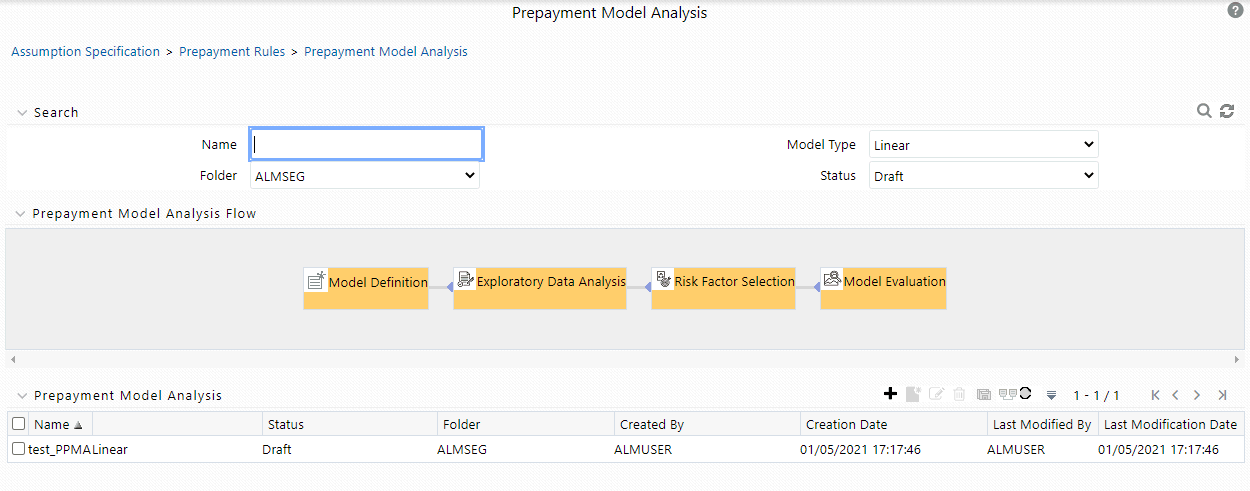
You can select or deselect all the Prepayment Model Analysis Rules on the Summary Page by selecting the check box in the upper left-hand corner of the Summary table directly to the left of the Name column header.
The following list provides the Prepayment Model Analysis details based on the search criteria.
- Name : Displays the Prepayment Model Analysis Rule's short name.
- Creation Date : Displays the Date and Time at which a Prepayment Model Analysis Rule was created.
- Created By : Displays the Name of the user who created the Prepayment Model Analysis Rule.
- Last Modification Date : Displays the Date and Time when a Prepayment Model Analysis Rule was last modified.
- Last Modified By : Displays the Name of the user who last modified the Prepayment Model Analysis Rule.
- Status : Displays the Status of the Prepayment Model.