4.4.2 Searching Records
In the DEFQ - Data Entry window, you can search for a record in the View, Edit, and Authorize modes. You can perform a quick Search to find a specific record or run an Advanced Search to further query the record for the required details.
To search for a record in the DEFQ - Data Entry window:
- Click
. The search fields are displayed.
Figure 4-27 Icon

- Select Field Name from the drop-down list.
- Enter the value/data in the Search Field.
- Click Go .
The search results are displayed in the list.
To perform an Advanced search in the DEFQ - Data Entry Window:
- Click
within the Search fields. The Advanced Search Window is displayed.
Figure 4-28 Icon

Figure 28: Advanced Search Window
Figure 4-29 Advanced Search Window
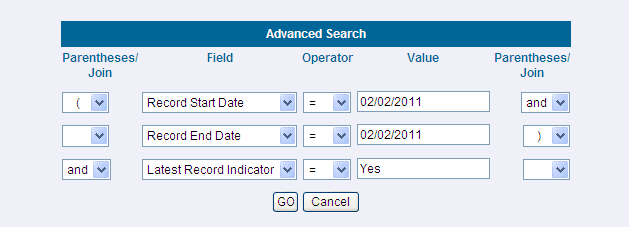
- Select the required Parentheses/Join, Field, Operator from the drop-down list and enter the Value as required to query the Form data.
- Click GO . The results are displayed with the field names containing the Searched Data.