4.7 Translation Tools
This section includes the keystroke reference details for the Translation Tools Module. It includes the following screens:
Config Schema Download
Figure 4-3 Config Schema Download Module
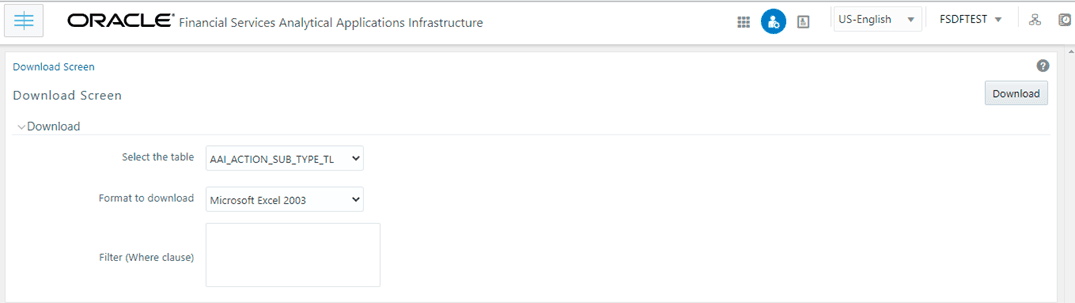
Table 4-27 Keystroke References for the Config Schema Download Section
| UI Control | How Does the UI Control Look | List of UI Controls on the Screen | Keystrokes to Access This UI Control |
|---|---|---|---|
|
html5-select-one |

|
|
HTML Select (html5-select-one) |
| html5-button |
|
Download | HTML Button (html5-button) |
|
html5-textrea |

|
Filter (Where clause) | HTML Textarea (html5-textarea) |
Config Schema Upload
Figure 4-4 Config Schema Upload Module
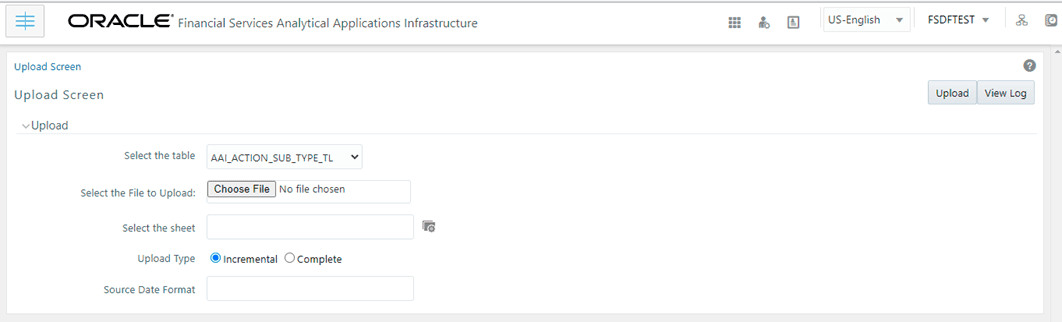
Table 4-28 Keystroke References for the Config Schema Upload Section
| UI Control | How Does the UI Control Look | List of UI Controls on the Screen | Keystrokes to Access This UI Control |
|---|---|---|---|
|
html5-select-one |
|
|
HTML Select (html5-select-one) |
| html5-button |
|
Upload | HTML Button (html5-button) |
| html5-button |

|
View Log | HTML Button (html5-button) |
|
html5-textarea |

|
Source Date Format | HTML Textarea (html5-textarea) |
| html5-filepicker |

|
Select the file to Upload | HTML File Picker (html5-filepicker) |
| html5-dialog-launcher |
|
Select the sheet | HTML Dialog Launcher (html5-dialog-launcher) |