Cases Home
Use this dashboard to view case information related to the due cases, and other information about cases and their statuses.
Figure 4-17 Cases Home Dashboard
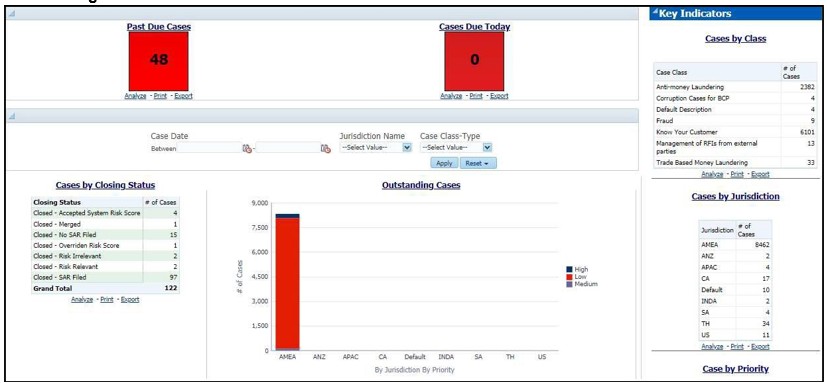
The following Case reports are displayed in the Cases Home page:
- Past Due Cases: Use this report to view the number of cases which are past their due date.
- Cases Due Today: Use this report to view the number of cases for which the due date is the current date.
- Cases by Closing Status: Use this report to view the number of cases by their closing status. Use this report to view the number of cases generated for a particular closing status.
- Outstanding Cases: Use this report to view total count by jurisdiction and priority of all reports which are not closed.
Figure 4-18 Scenario Efficiency Report in the Cases Home Dashboard
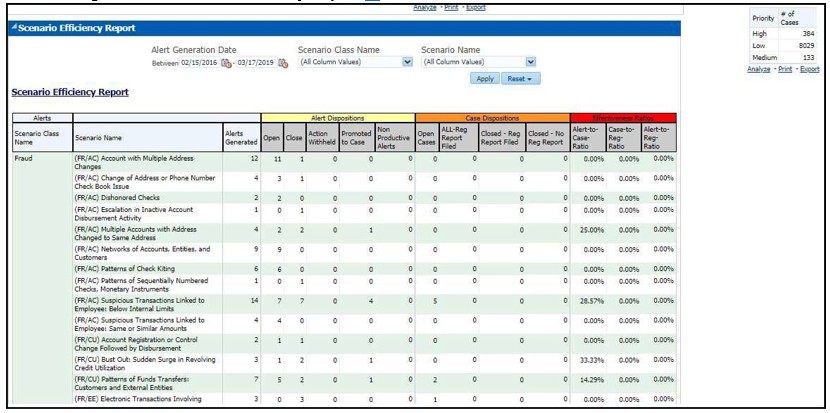
- Scenario Efficiency Report: Use this report to view the list of all scenarios and information about the number of alerts generated by those scenarios and of those alerts how many were promoted to a case. Other key indicators are also provided to best understand what actions have been take on the alerts and cases.
- Key Indicators: The following are the list of Key Indicators shown on the Right of the Cases Home Dashboard.
- Cases by Class: Use this report to view the count of the total number of cases by Case Class.
- Cases by Jurisdiction: Use this report to view the count of the total number of cases by business jurisdiction (geographic location).
- Cases by Priority: Use this report to view the count of the total number of cases by priority.