Exempt Entity Report
The Exempt Entity Report shows the Currency Transaction Report Exemptions filtered by search criteria namely, Exempt Year From, Exempt Year To, Business Type, Initiate Recertify Date, State, and Exempt Classification.
Figure 4-63 Exempt Entity Report
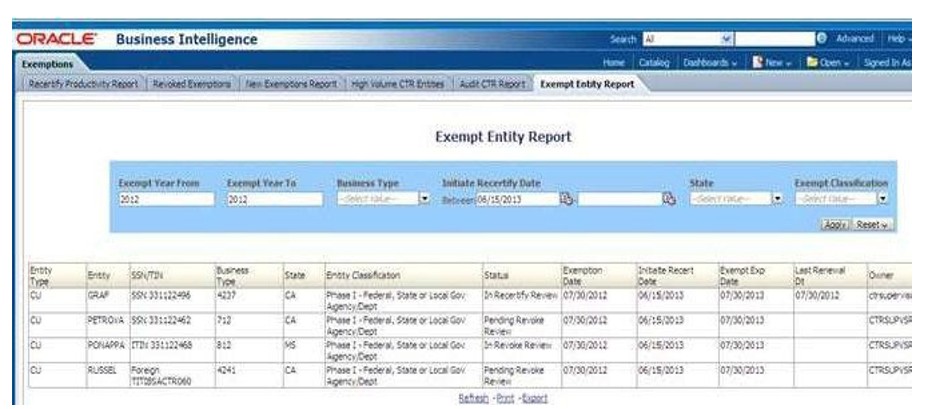
To generate Exempt Entity Report, follow these steps:
- Hover over the Reports menu in the CTR and click Reports.
The Reports Home page is displayed. The Home page varies depending upon the users roles.
- From Dashboards drop-down menu select Exemption dashboard under Currency Transaction Report submenu option.
Different report types related to Exemption dashboards are displayed in tabs depending upon the user role.
- From Dashboards drop-down menu select Exemption dashboard under Currency Transaction Report submenu option.
Different report types related to Exemption dashboards are displayed in tabs depending upon the user role.
- Select the Exempt Entity Report report tab.
The Exempt Entity Report page is displayed with default values entered in the filters.
- To view the Exempt Entity Report, enter the details described in the following table:
Table 4-25 Exempt Entity Report Filter Descriptions
Filter Name Description Exemption Year From
This field defaults to current year.
Exemption Year To
This field defaults to current year.
Business Type
Select a business type from the drop-down option. This field is a multi-selectlist with NAICS codes.
Initiate Recertify Date From
Enter a date range for the search using the Select Date icon. This fielddefaults
to blank.
Initiate Recertify Date To
Enter a date range for the search using the Select Date icon. This fielddefaults
to blank.
State
Select a state from the drop-down option. This field is a multi-select drop-down
with states.
Exemption Classification
Select an Exemption classification from the drop-down list. The following are the multi-selectable Exemption classification options displayed:
Phase I - Bank
Phase I - Federal, State or Local Gov Agency/Dept Phase I - Entity Exercising Govt'l Authority w/in US Phase I - Listed Entity
Phase I - Subsidiary of Listed Entity Phase II - Payroll Customer
Phase II - Eligible Non-Listed Business
- Click Apply.
A tabular report showing Exempt Entity Report is displayed. You can also click Reset to reset all the field values to default values.
- You can choose to Refresh, Print and Export the displayed report.