High Risk Customers at Assessment Level
Use this dashboard to view the customers based on their CER (Customer Effective Risk) score and grouped by Jurisdiction, Country, and Customer Type.
To generate High Risk Customers at Assessment Level Report, follow these steps:
- Navigate to the MIS Reports.
- Expand the KYC option displayed on the LHS.
- Click the High Risk Customers at Assessment Level option.
- Click the Global Filters icon.
The Global Filters are displayed on the left hand side.
Figure 4-41 Global Filters for High Risk Customers at Assessment Level Report
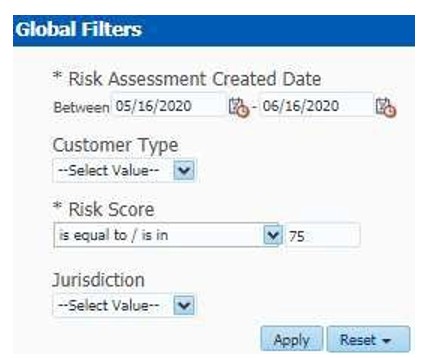
- Enter the following filter details:
Table 4-13 High Risk Customers at Assessment Level Report Filter Descriptions
Field Description Risk Assessment Created Date
Select the date range between which the risk assessment is created. Theformat is DD/MM/YYYY.
Customer Type
Select the customer type of the risk assessment. This can be Individual, Financial Institution, or Other Organization.
Risk Score
Enter the risk score of the assessments you want to view. You can also view
the risk score of the assessments which are lesser or greater than the entered risk score.
Jurisdiction
Select the business jurisdiction (geographic location) of the risk assessment.
The list of jurisdictions that appear in the drop-down list is based on your access permission.
- Click Apply.
The data is filtered to satisfy all the specified filter conditions, and the result displays the following category of reports:
Figure 4-42 High Risk Customers Report
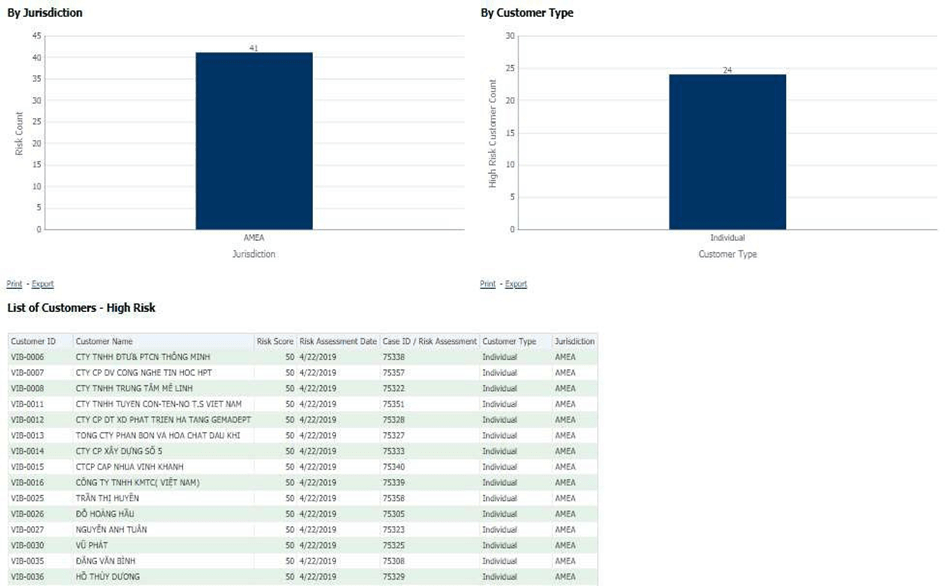
- By Jurisdiction
- For example, in the above figure, the bar chart report displays the information with jurisdiction using the X axis, and risk count using the Y axis.
- By Customer Type
- For example, in the above figure, the bar chart report displays the information with customertype using the X axis, and high-risk customer count using the Y axis.
- List of Customers - High Risk
- The data is filtered to satisfy all the specified filter conditions, and the result is displayed in tabular format reports.