MI Transaction Log
The MI Transaction Log dashboard shows the cash purchases of monetary instruments where the total purchase amounts aggregated to between $3000 and $10,000, inclusive, in a calendar day.
Figure 4-64 MI Transaction Log
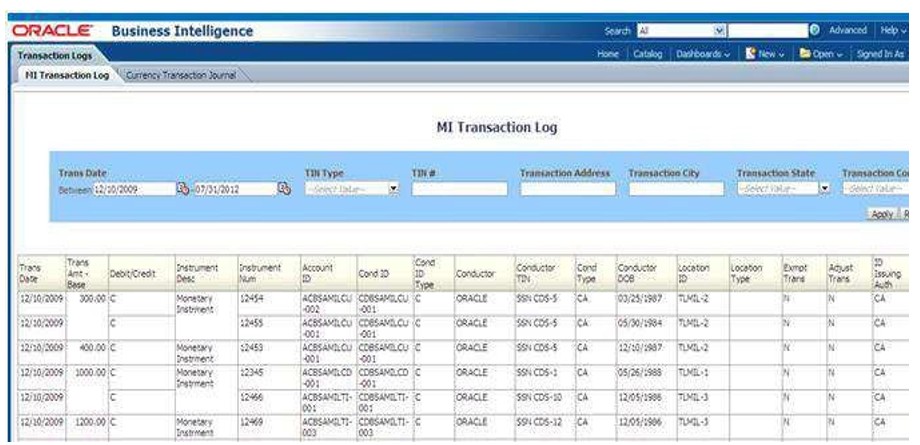
To generate MI Transaction Log report, follow these steps:
- Hover over the Reports menu in the CTR and click Reports.
The Reports Home page is displayed. The Home page varies depending upon the users roles.
- From Dashboards drop-down menu select Transaction Logs dashboard under Currency Transaction Report submenu option.
Different report types related to Transaction Logs dashboards are displayed in tabs depending upon the user role.
- From Dashboards drop-down menu select Exemption dashboard under Currency Transaction Report submenu option.
Different report types related to Exemption dashboards are displayed in tabs depending upon the user role.
- Select the MI Transaction Log report tab.
The MI Transaction Log page is displayed with default values entered in the filters.
- To view the MI Transaction Log report, enter the details as described in the following table:
Table 4-26 MI Transaction Log Filter Descriptions
Filter Name
Description
Transaction Date Between
Enter the transaction date using the Select Date icon. This field defaults to
one calendar day less than the current date.
Transaction Date To
Enter the transaction date using the Select Date icon. This field defaults to
current date.
TIN Type
Select a TIN Type from the drop-down options.
TIN
Enter the TIN # in this field.
Transaction Address
Enter the transaction address in this field. This field supports wildcard searching.
Transaction City
Enter the transaction city in this field. This field supports wildcardsearching.
Transaction State
Select a state from the Transaction State drop-down option.
Transaction Country
Select multiple countries from the Transaction Country drop-down option.
- Click Apply.
A tabular report showing MI Transaction Log is displayed. You can also click Reset to reset all the field values to default values.
- You can choose to Refresh, Print and Export the displayed report.