ADS Run History
The ADS Run History provides information related to Batches that have been processed to move data from DFCS to PBSM.
Note:
For the user to be able to see the ADS History, the user must be mapped to a group that has the required role (RLADSHISTVIEW). Role is not mapped in the OOTB set up.
To open the ADS Run History, from the LHS menu, , select Admin Tools, select Data Foundation Integration, and then select ADS Run History.
The ADS Run History page is displayed.
Figure 5-38 ADS Run History
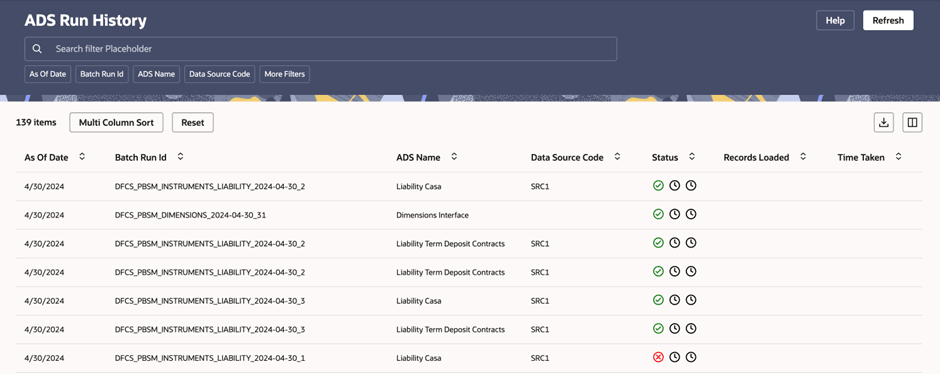
This UI allows you to apply various filters namely, As Of Date, Batch Run Id, ADS Name, and Data Source Code. The default view of ADS Run History displays the mentioned details. You can click More Filters which are Data Load Status, Batch Name, Task Name, and Task Id to change the view from default.
You can click the icons under Status to see the status of the batch. The status displays Passed, Failed, and Pending status icons.
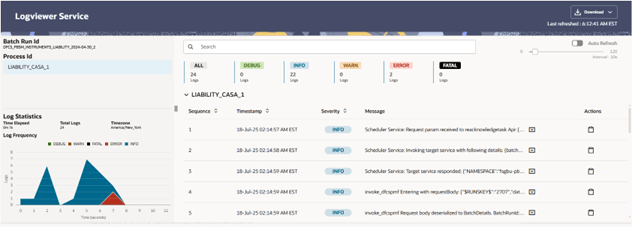
Figure 5-39 Log Viewer Service
The Multi Column Sort allows you to define different columns to be displayed in the UI.
Figure 5-40 Multi Column Sort
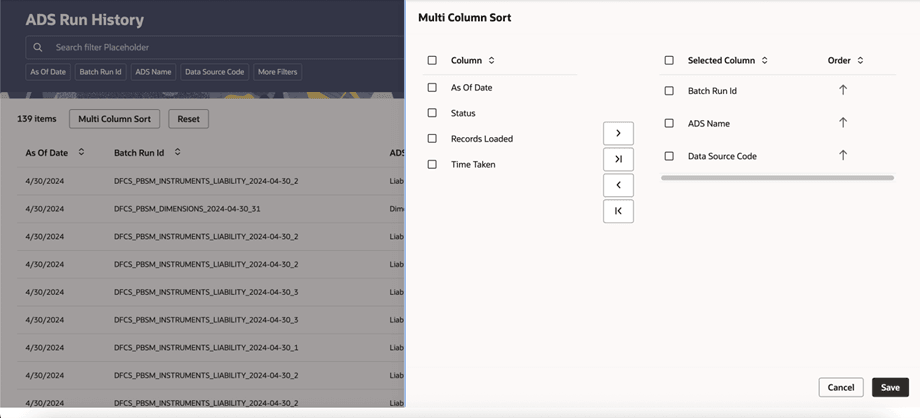
Select the required Columns and move them to the Selected Columns box and then click Save. You can also define the order of the column appearance by selecting ascending or descending setting the order. The ADS Run History UI displays the rows as per selection.
If you click Reset, all the filters, columns order will be reset and the ADS Run History UI displays the default view.
You can download the ADS Run History in Excel (.xlsx) format using the Download icon.
Click the Columns icon to select or deselect the columns you want to display in the ADS Run History data.
Note:
If an ADS batch fails with the generic error DIE0021 - Unknown exception occurred, this error can mask an underlying Oracle error. Use the Log Viewer Service to review the detailed execution logs. If the underlying error is ORA-01723: zero-length columns are not allowed, the custom ADS SQL or mapping likely contains a derived CASE expression that returns only NULL without an explicit datatype. See Datatype Requirements for Custom ADS Mappings for the required correction, then rerun the batch after the extension is refreshed.