AMLES Historic Event Load
- This is a pre-seeded batch and will be available in all workspaces ( production & sandboxes )
- This Batch is to be executed in the Sandbox workspace.
- This Batch pulls data from the ECM system used for ML Model training in the sandbox.
Batch and Task Parameters
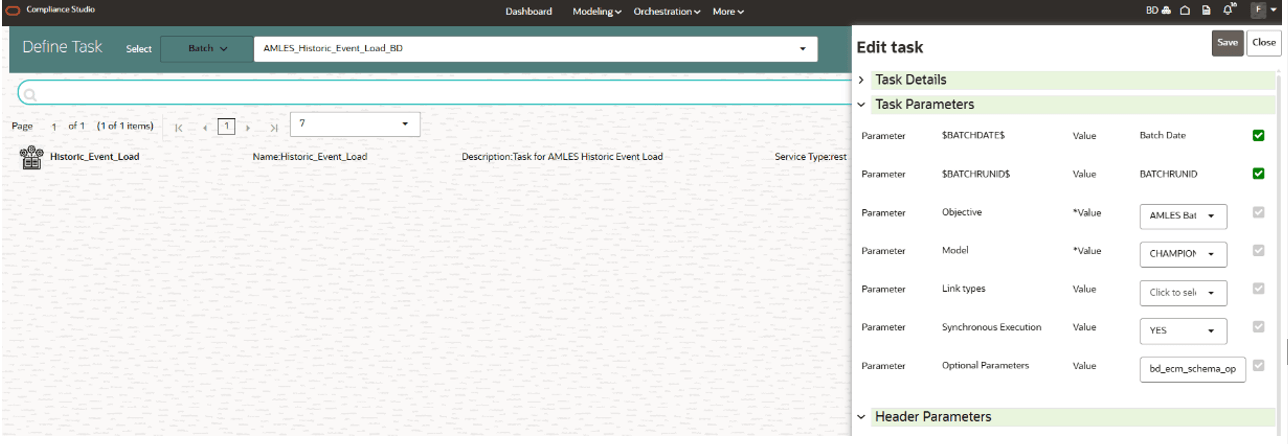
The batch contains a single task named
Historic_Event_Load.
Figure 5-78 Task Details for Historic Event Load

Historic_Event_Load, Task Parameters
- Objective folder for this task
:
Home / Modeling / Pipelines / AMLES Batch Framework / Load Events / AMLES Data Load - Do not change any parameter, except Optional Parameters.
- Optional Parameters:
- Event date range: from_date=YYYY-MM-DD,to_date=YYYY-MM-DD
- bd_ecm_schema_option : ECM schema topology option (case-insensitive)
- SameDBSameSchema: AMLES Workspace Schema(Production/Sandbox) and ECM objects are in the same Oracle database and the same schema (Pack-on-Pack).
- SameDBDiffSchema: AMLES Workspace Schema(Production/Sandbox) and ECM objects are in the same Oracle database but in different schemas.
- RemoteSchema: ECM data/objects are in a remote database (AMLES Workspace Schema(Production/Sandbox)) accessed through a DB link for ECM.
- ecm_datasource: ECM DataSource Name
- For SameDBSameSchema:
ecm_datasourceis not required ('None'). - For SameDBDiffSchema: Provide
ecm_datasourceas the ECM source schema name. - For RemoteSchema: Provide
ecm_datasourceas the DB link or remote qualifier for ECM Schema.
- For SameDBSameSchema:
- enable_debug_mode:Enable or do not enable the debug mode . The options are True or False.
Example:
bd_ecm_schema_option=SameDBDiffSchema,ecm_datasource=ECM_SCHEMA,from_date=2026-01-01,to_date=2026-12-31
- Edit Task Parameters & Save.
Figure 5-79 Define Task