AMLES Scoring
- This is a pre-seeded batch and will be available in all workspaces (production and sandboxes)
- This Batch is to be executed in the Production workspace.
Scenario frequency gives the flexibility to schedule event-scoring solution at appropriate frequency so that daily, weekly and monthly events can easily be handled by event-scoring notebook.
As a solution, raw data which is input for event-scoring is pulled on daily basis. It consists of daily, weekly and monthly alerts.
Since alerts are pulled from ECM on daily basis, it is possible weekly and monthly alerts are not pulled daily. In this case, weekly and monthly event-scoring notebook exits gracefully and makes one entry in amles_event_score table with status as No Data and with the status as successful.
- amles_event_score
- amles_event_score_details
- Scoring_Event_Data_Load
- ML_Scoring

- Objective folder for this task:
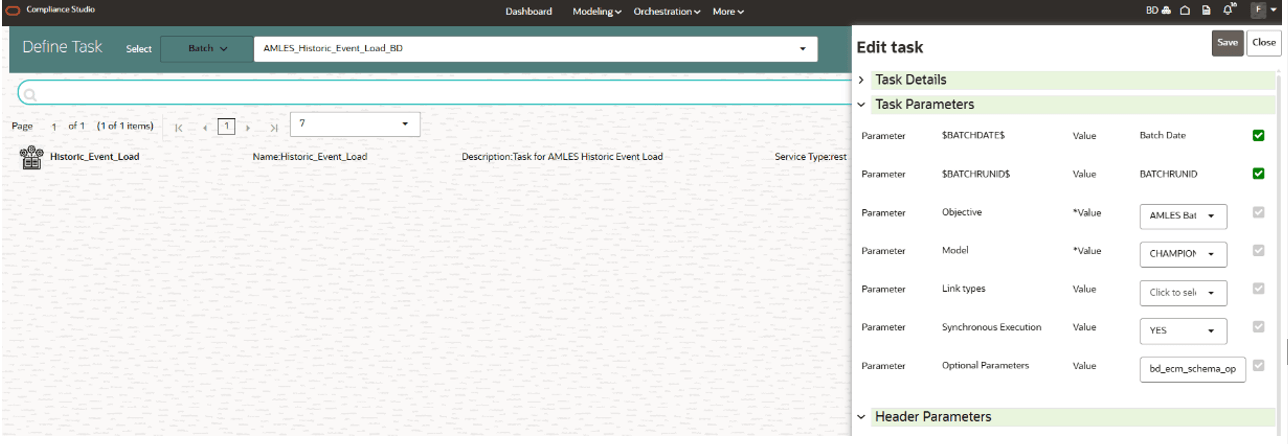
Home / Modeling / Pipelines / AMLES Batch Framework / Load Events / AMLES Data Load - Model: Retain the default settings.
Note:
- For a fresh installation, do not modify any parameters except Optional Parameters.
- For upgrade, see the How to Execute Model Scoring/Annual Model Validation with the Batch Framework section.
- Optional Parameters:
- bd_ecm_schema_option : ECM schema topology option (case-insensitive)
- SameDBSameSchema: AMLES Workspace Schema(Production/Sandbox) and ECM objects are in the same Oracle database and the same schema (Pack-on-Pack)
- SameDBDiffSchema: AMLES Workspace Schema(Production/Sandbox) and ECM objects are in the same Oracle database but in different schemas
- RemoteSchema: ECM data/objects are in a remote database ( AMLES Workspace Schema(Production/Sandbox)) accessed through a DB link for ECM
- ecm_datasource: ECM DataSource Name
- For SameDBSameSchema:
ecm_datasourceis not required ('None'). - For SameDBDiffSchema: Provide
ecm_datasourceas the ECM source schema name. - For RemoteSchema: Provide
ecm_datasourceas the DB link or remote qualifier for ECM Schema.
- For SameDBSameSchema:
- enable_debug_mode:To enable or not to enable the debug mode. Options are True or False.
Example:
bd_ecm_schema_option=SameDBSameSchema,ecm_datasource=None
- bd_ecm_schema_option : ECM schema topology option (case-insensitive)
- Objective folder for this task:
Home / Modeling / Pipelines / AMLES - Navigate to respective model group/scenario folders for actual model templates.
- Model: Retain the default settings.
Note:
- For a fresh installation, do not modify any parameters except Optional Parameters and Link Types.
- For upgrade, see the How to Execute Model Scoring/Annual Model Validation with the Batch Framework section.
- Optional Parameters:
- debug_flag: flag to set for debugging purpose. Few records will be selected.
Options: True or False
- Optional Parameters can be edited from the Schedule Batch option.
- Choose Link Types as Scoring.
Figure 5-81 Define Task
- debug_flag: flag to set for debugging purpose. Few records will be selected.
Note:
In the current release, the new AMLES batch parameters (bd_ecm_schema_option and ecm_datasource) need to be manually changed in the ECM RRF Batch.