5.5.5.2 Unsupervised Scoring
- Choose CSAD_Scoring_Batch.
- This is a pre-seeded batch and will be available in all workspaces (production & sandboxes).
- This Batch is to be executed in the Production workspace.
- This batch contains two tasks:
- Aggregate Base Features task to load scoring data into
ML4AML_SM_BASE_FEATUREStable. - ML Scoring task to run ML scoring on production data.
- Aggregate Base Features task to load scoring data into
Aggregate Base Features task
This use case uses the same features as the Behavioral Model use case. Follow the Aggregate_Base_Features task instructions in Behavioral Model Aggregate Base Features
Note:
Since the scoring batch is run in production, the parameterprod_flag should be set to Y
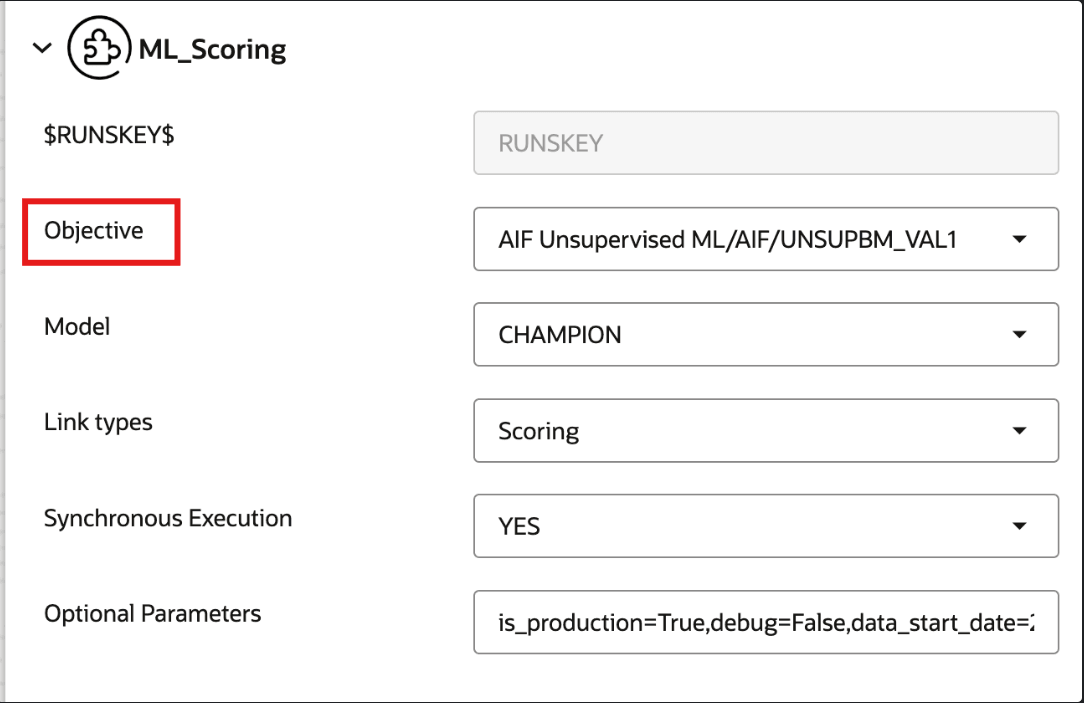
ML_Scoring
- Objective folder for this task:
Home/Model Pipelines/AIF Unsupervised ML/AIF - Model: Retain the default settings.
Note:
- For a fresh installation, do not modify any parameters except the Optional Parameters.
- For upgrade, see the How to Execute Model Scoring/Annual Model Validation with the Batch Framework section.
The values in Optional Parameters can be edited:
- is_production: Should be set to True.
- osot_end_month_anomaly_scoring: Specify the scoring data month in YYYYMM format. If it is not specified, then by default the latest month data available in the table will be picked up for anomaly scoring.
- osot_end_month_deviation_scoring: Specify the scoring data month in YYYYMM format. If it is not specified, then by default the latest month data available in the table will be picked up for deviation scoring.
- debug: Assign True if debug mode is to be switched on. Default is False.
- method_anomaly_scoring: String indicating which anomaly scoring method to use. Currently "NNLOF", "PCAREC" and "ISOFOR" are supported and the default is "NNLOF".
- method_deviation_scoring: String indicating which deviation scoring method to use. Currently "LDCOF" and "CBLOF" are supported and the default is "CBLOF".
- cutoff_pctl_anomaly_scoring: Cutoff percentile for anomaly flags. Ranges from 0 to 100. Defaults to 99.
- cutoff_pctl_deviation_scoring: Cutoff percentile for deviation scoring. Ranges from 0 to 100. Defaults to 99.
- return_flag: Controls whether the scoring API returns output dataframes to the notebook in addition to performing its normal execution and database-write behavior.
- write_to_DB_anomaly_scoring: Controls whether anomaly scoring results are written to the configured database output tables; set it to True for production runs and False when testing or inspecting results in the notebook without persisting them.
- write_to_DB_deviation_scoring: Controls whether deviation scoring results are written to the configured database output tables; set it to True for production runs and False for notebook validation or dry runs.
- compute_feature_contribution_anomaly_scoring: Controls whether feature contributions are generated for anomaly scoring results; set it to True when explainability is required and False to reduce runtime for faster scoring.
- compute_feature_contribution_deviation_scoring: Controls whether feature contributions are generated for deviation scoring results; set it to True when users need driver-level explanations and False when only deviation scores are needed.
is_production=True,osot_end_month_anomaly_scoring=None,osot_end_month_deviation_scoring=None,osot_end_month_predict_new_entities=None,debug=False,data_start_date=20160701,data_end_date=20160708,method_anomaly_scoring=NNLOF,cutoff_pctl_anomaly_scoring=80,method_deviation_scoring=CBLOF,cutoff_pctl_deviation_scoring=80,return_flag=False,write_to_DB_anomaly_scoring=True,write_to_DB_deviation_scoring=True,compute_feature_contribution_anomaly_scoring=True,compute_feature_contribution_deviation_scoring=True
Note:
You have to choose the deployed champion in the 'Objective' field to run the scoring taskFigure 5-77 Choose the deployed model in the Objective field
Note:
Users should run as many SM_Aggregate_Base_Features tasks as there are physical model groups available. Users can do this by cloning the SM_Aggregate_Base_Features batch and then cloning the SM_Aggregate_Base_Features task under the cloned batch. This ensures the user has their own batch, customized with as many tasks as the number of model groups they wish to analyze.When database writing is enabled, unsupervised scoring results are stored in the following tables:
- AIF_ANOMALY_SCORE
- AIF_ANOMALY_SCORE_DETAILS
- AIF_ANOMALY_SCORE_ECM_DETAILS
- AIF_ENTITY_CLUSTER_DEVIATION
The application can consume anomaly scores from these tables for downstream integrations. For more information on these tables, see the OFS Compliance Studio Data Model Reference Guide.