8.2.9.2 Custom Dataset Creation
In order to view the extended custom attributes in a staging table and view their logical names, user can create a Dataset and generate reports in the Data Visualization using OAS interface using Create Dataset Option available on top right.
Steps to Refresh the views for newly created catalog extensions via Reporting Object
Publish window:
- On the DFCS Home page, click the User menu and select Administration.
- Click Reporting Object Publish. A history of published reporting objects will be displayed.
- Click Refresh Catalog Extensions to update the reporting objects based on
recent catalog extension changes.
Note:
The button will be enabled only if a catalog extension has occurred since the last reporting object creation. The number of objects created, modified, and the total number of objects will also be shown.
Steps to create a dataset
To create a dataset and view the custom attributes in staging tables in the Data
Visualization canvas in DFCS, complete the following steps:
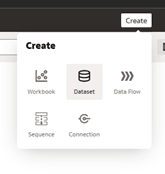
- On the Home page, click the Create icon and then click
Dataset.
Figure 8-119 Custom Attributes Visualization
- The Dataset page is displayed.
- Select Dataset from the available list. The
Create Dataset window is displayed with the list of available
connections.
Figure 8-120 Create Dataset
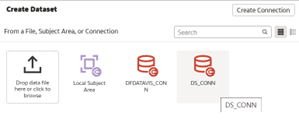
- Double click on the DS Connection and the New Dataset page is displayed.
- From the LHS menu, double click on the Manual
Query, the Manual Query button is displayed.
Figure 8-121 Manual Query
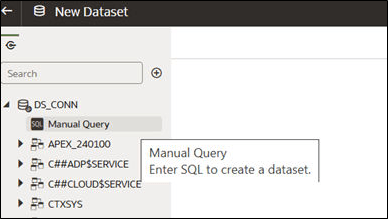
- Double click on the Manual Query button, and enter the SQL query under the Statement window.
- Click Get Preview Data to preview the data of the entered query.
- Click Save and the Save Dataset As window is displayed.
- Enter the Name and Description of the dataset and click OK.
- Select Dataset from the available list. The
Create Dataset window is displayed with the list of available
connections.
Note:
Refer to Data Visualization via Custom Datasets section for further details about New Dataset creation.