3.3 Data Maintenance Interface
Data Maintenance Interface (DMI) helps to design a Data Form in a user-specified format. Further, it allows to perform maintenance activities using the Designed Form.
Form Builder
Form Builder allows the user to build a form to maintain the underlying data.
Data Entry
This allows the user to maintain the data either through the form that has been defined or do a bulk upload using the excel upload mechanism. A strong data governance process is enabled through an approval workflow of the data maintained.
Guidelines for Data Entry and Excel Upload Forms for Staging Tables
When creating Data Entry or Excel Upload forms for staging tables (STG_*), ensure that all required columns related to data partitioning are included in the form definition. Missing mandatory columns may result in data load failures.
For staging tables, the following columns must be included in the form:
Table 3-16 Mandatory Columns for Staging Tables
| Column Name | Description | Example |
|---|---|---|
| INPUT_FILE_NAME | Specifies the name of the source file associated with the data load. | stg_asset.csv |
| DATA_FILE_SPEC_ID | Identifies the Data File Specification corresponding to the input file. | |
| LOAD_IDENTIFIER | A unique identifier for the data load. This can be any numeric value | 12345 |
Note:
- Staging tables (STG_*) are internally partitioned and sub-partitioned.
- Sub-partitioning is based on the INPUT_FILE_NAME column.
- If INPUT_FILE_NAME is not included in the form or is left NULL, the system cannot map the record to a valid partition.
If mandatory partition-related columns are not populated, the following error may occur during data entry or Excel upload:
ORA-14400: inserted partition key does not map to any partition- Records may initially appear as Created in the Audit Trail.
- They are subsequently marked as Rejected due to partition mapping failure.
Process of DMI Windows
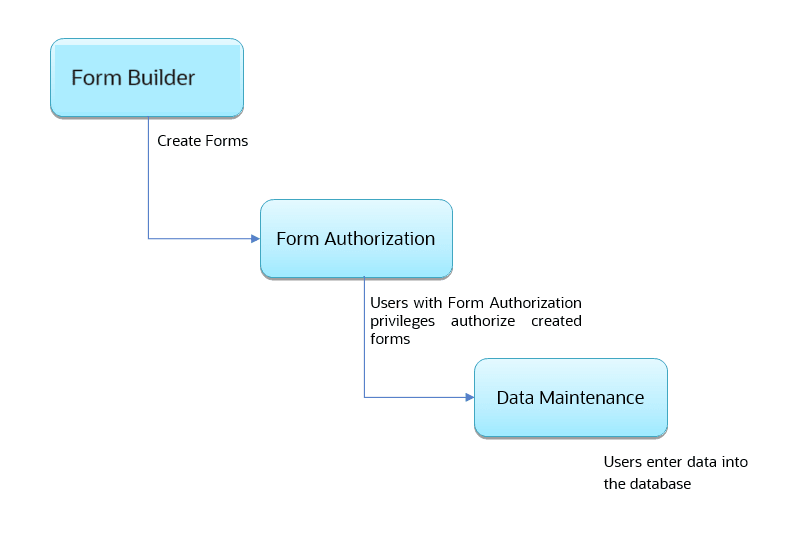
The DMI Process starts with a user creating forms in the Form Builder. After the creation of forms, a user with Authorization Privileges authorizes the forms. The Authorized Forms are then used by users to enter data into the database.
Figure 3-19 DMI Process Flowchart
User Role Mapping and Access Rights
User access to the DMI UI and the ability to perform functions in it is dependent on the mapping of the user profile to the roles and the access rights assigned.
To access the DMI features and edit forms, you must be mapped to the following roles:
Table 3-17 User Role Mapping for Data Maintainence Interface
| Role Code | Role Name | Functionality |
|---|---|---|
| DMIDSGNREAD | Data Designer Read |
Assign this role to the user to access the Configure View menu from Navigation Tree. NOTE: The mapping of this role does not allow view, edit, and add actions. |
| DMIDSGNAUTH | Data Designer Auth | Assign this role to the user to Authorize, Excel Upload, and Designer Summary. |
| DMIDSGNREJ | Data Designer Reject | Assign this role to the user to Reject, Excel Upload, and Designer Summary. |
| DMIDGNFORM | Data Designer Form | Assign this role to the user to Create Designer Form Definition. |
| DMIDGNTEMPLATE | Data Designer Template | Assign this role to the user to Create Excel upload Definition. |
| DMIDSGNDEL | Data Designer Delete | Assign this role to the user to Delete, Excel upload, and Designer Summary. |
| DMIDGNVIEW | Data Designer View | Assign this role to the user to Create View Definition. |
| DMIDSGNWRITE | Data Designer Write | Assign this role to the user to Add, Edit and Copy all kinds of definitions in Designer screen. |
| DMIDATAREAD | Data Entry Read |
Assign this role to the user to access the Data View menu from the Navigation Tree. NOTE: The mapping of this role does not allow view, edit, and add actions. |
| DMIDATAALL | Data All Summary | Assign this role to view the list of all Component Records in Data Entry Screen. |
| DMIDATAWRTE | Data Entry Write | Assign this role to the user to Add, Edit Records in Data Entry Screen. |
| DMIDATADEL | Data Entry Delete | Assign this role to the user to Delete a Record Summary Data Entry Screen |
| DMIDATAAUTH | Data Entry Auth | Assign this role to Authorize a Record Summary in Data Entry Screen. |
| DMIDATAREJ | Data Entry Reject | Assign this role to Reject a Record Summary in Data Entry Screen. |
| DMIDGNAUTO | Enable Auto Approve | The user mapped to this function will have access to create Auto Approved Forms |
| DMIDGNAMND | Enable editing of approved forms | User with this role can edit/amend approved forms. |
Note:
All the DMI roles are mapped to a single group, Data Maintenance admin group. If a user is mapped to this group all the DMI roles are automatically assigned to the user.