6.3.9.3.1 Process Details
In the Process Details screen, you can define the Code, Name, Folder, Description, and Access Type for the standard process.
Figure 6-134 Process Details
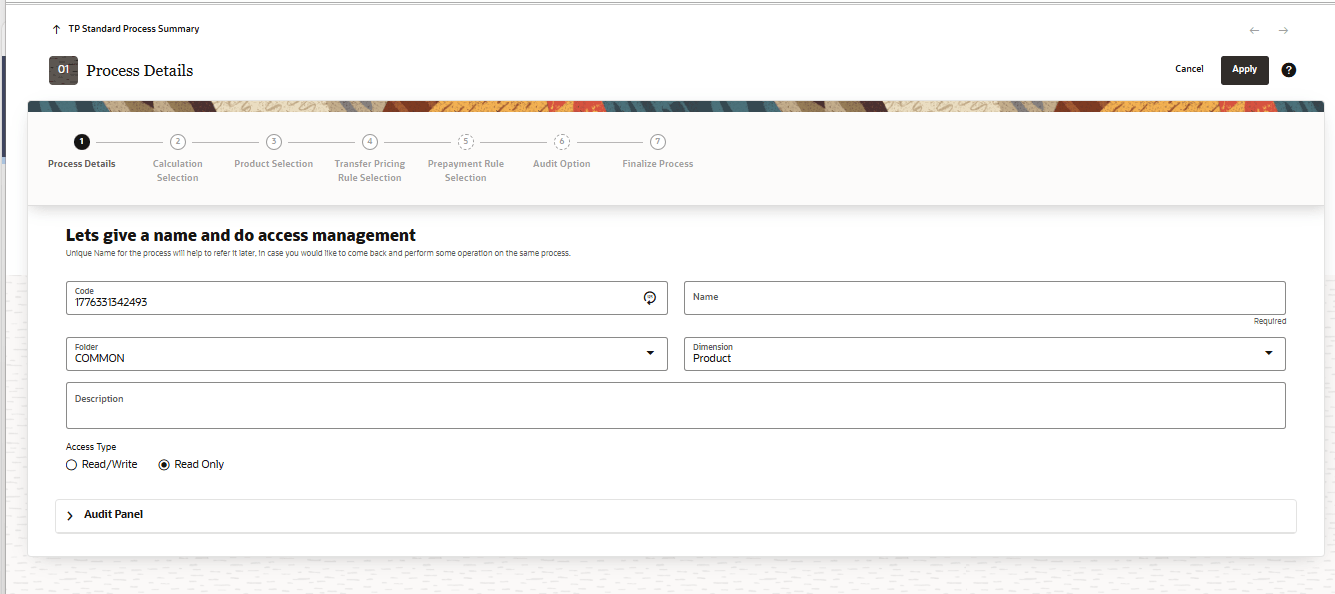
- Enter or select the following details:
- Code: Enter a unique numeric code for the Standard Process.
Note:
In the Code field, the code is auto-generated. You can also manually enter a numeric code. Only numerical values are allowed; special characters are not permitted. - Name: The name for the Standard Process.
- Folder: The folder where you want to save the Standard Process.
- Description: The short description for the Standard Process.
- Dimension: When you select the dimension, only the respective rules belonging the selected dimensions will be available for selection.
- Access Type: Read/Write or Read Only.
- Code: Enter a unique numeric code for the Standard Process.
- Click Apply to display the next screen.