3.8 Rules Framework
The Rules Framework provides a user-friendly interface for creating, managing, and executing business rules without requiring direct SQL knowledge. It enables you to define rule logic using datasets, conditions, hierarchies, and expressions, and preview the impact before execution.
The Rules Framework consists of the following components:
- Business Rule Summary — the central screen for viewing, searching, and managing all Business Rules.
- Basic Details — defines the name, description, folder, and dataset for the rule.
- Source Setup — defines the input sources and conditions (IF clauses) that drive the rule logic.
- Outcome Setup — defines the target columns and how they are updated when conditions are met.
- Combination Configuration — maps specific source conditions to outcomes through IF-THEN combinations.
- Impact Preview — previews the effect of the rule on sample data before submission.
- Review and Submit — provides a final consolidated summary and the generated merge query before the rule is saved.
The Business Rule Summary screen is the gateway to all Business Rules and related functionality. You can navigate to all rule management actions from this screen.
Figure 3-57 Business Rule Summary
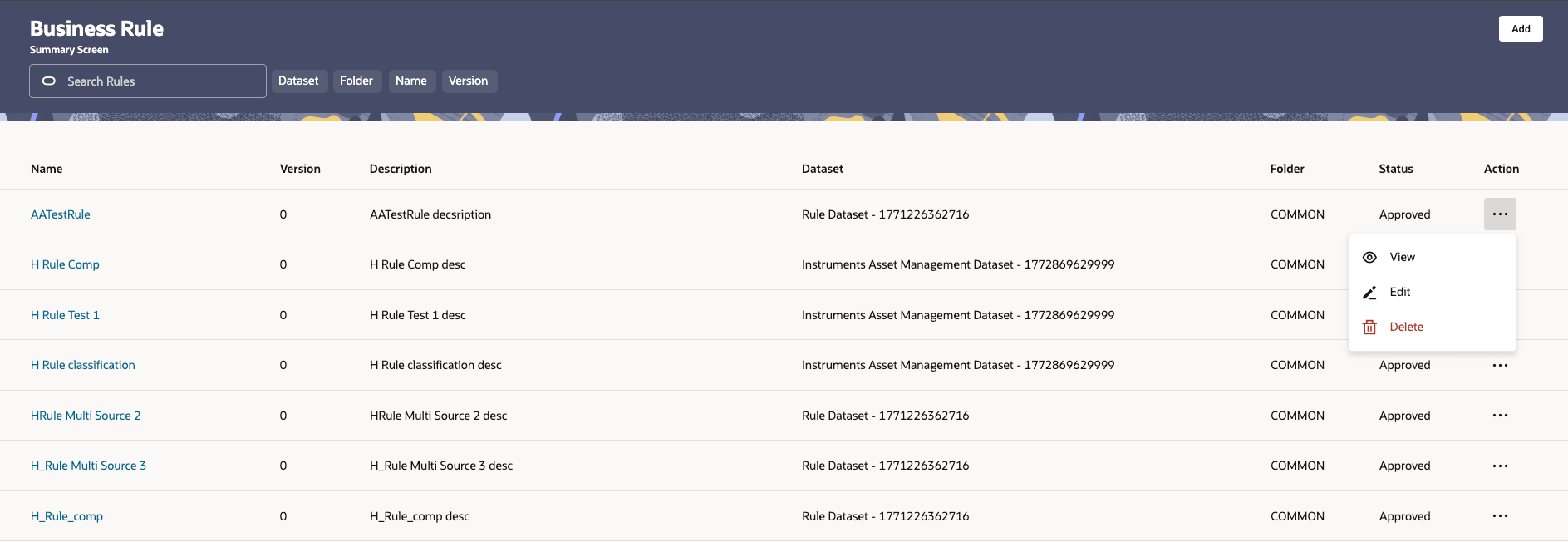
To access the Business Rule Summary screen, navigate to Data Management Tools > Rule from the left navigation menu.
- Name — the name of the Business Rule.
- Version — the version number of the rule.
- Description — a brief description of the rule.
- Dataset — the dataset associated with the rule.
- Folder — the folder in which the rule is saved.
- Status — the current status of the rule.
- Action — the available actions for the rule (View, Edit, Delete).
You can search for existing rules using the Search Rules bar. Filter the results by Dataset, Folder, Name, or Version using the filter tabs below the search bar.