3.6.2.4 Lookup Table Data Screen
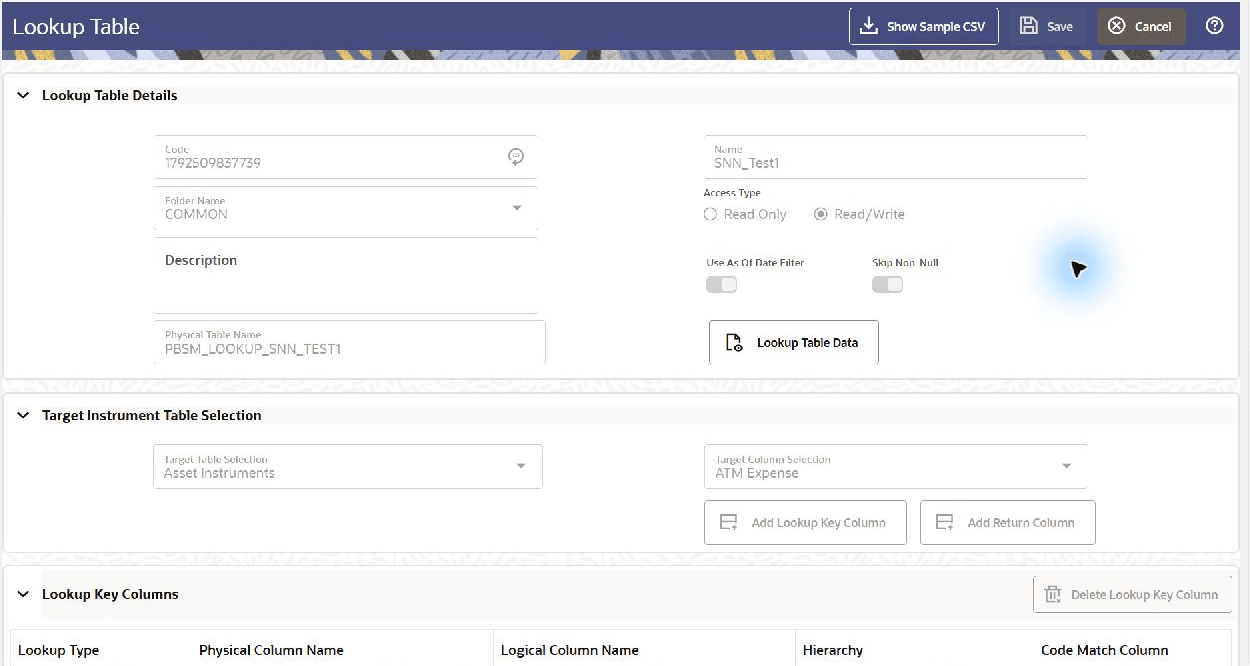
Open the Lookup Table definition in View mode to maintain its data. From the Lookup Table Summary screen, select View for the required definition and click Lookup Table Data. Add, modify, delete, import, export, and save data records on the Lookup Table Data screen.
Use Edit mode to change the definition and structure. Maintain data records in View mode because structural changes can affect existing lookup data.
The Lookup Table Data screen displays the lookup table columns and the data contained in the table. The following operations are available:
- Add Row: Enter the number of rows to add and click Add Row to insert new rows into the table.
- Delete Row: Removes one or more selected rows from the table.
- Remove Blank Rows: Removes all blank rows in the table at once.
- Export: Exports the lookup table data in .xls format. The file can be used to prepare / modify data and imported back into the Lookup Table from this UI.
- Import: Imports data from a .xls file into the lookup table.
- Save: Saves the row values to the database and closes the screen.
- Apply: Saves the row values to the database without closing the screen, allowing you to continue working.
Figure 3-33 Open Lookup Table Data from the definition in View mode
Parent topic: Navigation in the Detail Screen