PreviousNext
JavaScript must be enabled to correctly display this content
6.2.2 Defining an Intraday Bucket
In the Oracle Financial Services Analytical Applications Infrastructure home screen, select Financial Services Liquidity Risk Management .
To open the Time Buckets window, select Liquidity Risk Management , then select Time Buckets on the Left-Hand Side (LHS) menu.
In the Time Bucket summary window, click Add to add an intraday bucket.
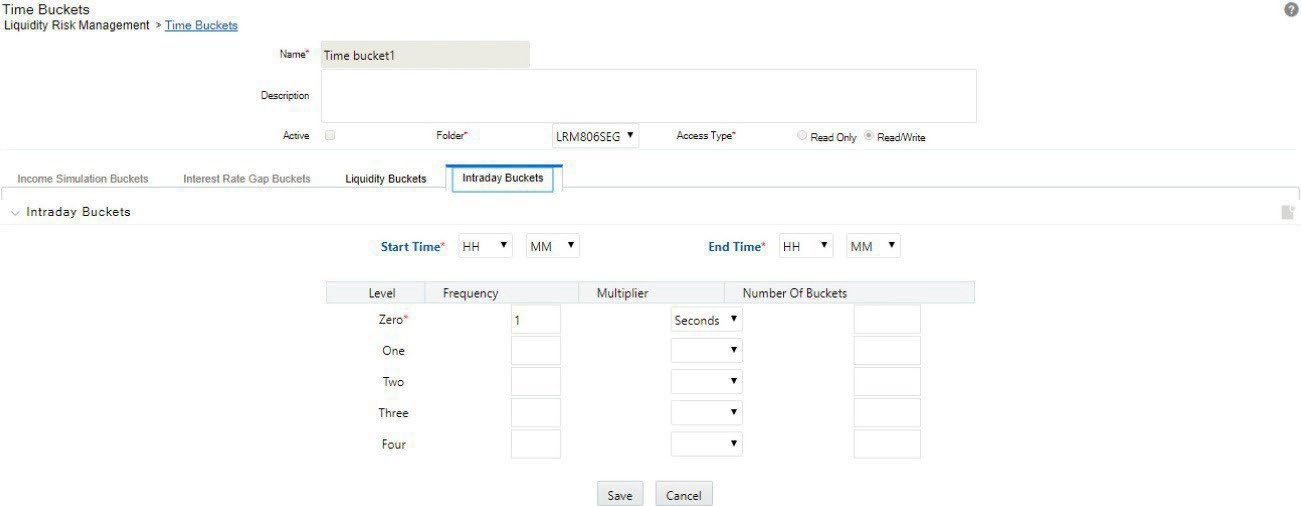
The Time Bucket Details window is displayed.
Figure 6-6 Time Bucket
Select the Intraday Buckets tab in the Time Buckets window.
Note:
By default, the Liquidity Buckets tab is selected.
Enter the time bucket definition Name.
Enter the time bucket Description.
Note:
Active option is checked by default for LRM users.
Select the Folder from the drop-down list.
Define the Start Time and End Time based on the Bucket Definition provided.
Define the Frequency (a whole number greater than zero) and Multiplier (Seconds/Minutes/Hours).
Once you define Level 0 time buckets, you are allowed to create multiple levels for this definition up to a maximum of 5 levels inclusive of level 0 buckets. Creating higher levels is optional.
Once you have defined the multi-level time buckets, click Apply and Save the definition. The hierarchy for the specified time bucket definition is now created and can be used for further computations.
The application saves the bucket definition and the defined intraday bucket appears in the Time Bucket Summary window.
Note:
The application supports up to five levels.
A multi-level time bucket definition is optional. You can save the time bucket with level less than or equal to five.
You cannot modify an intraday bucket to a liquidity bucket or vice-versa. You can only define one bucket at a time.