16.1.9.3 Manual Adjustments Rule
In the Run Definition window, Include Forward Date Calculations is selected as Yes and the Balance Sheet Adjustment Method is selected as Manual Adjustment then, the rule for Manual Balance Adjustment has to be selected.
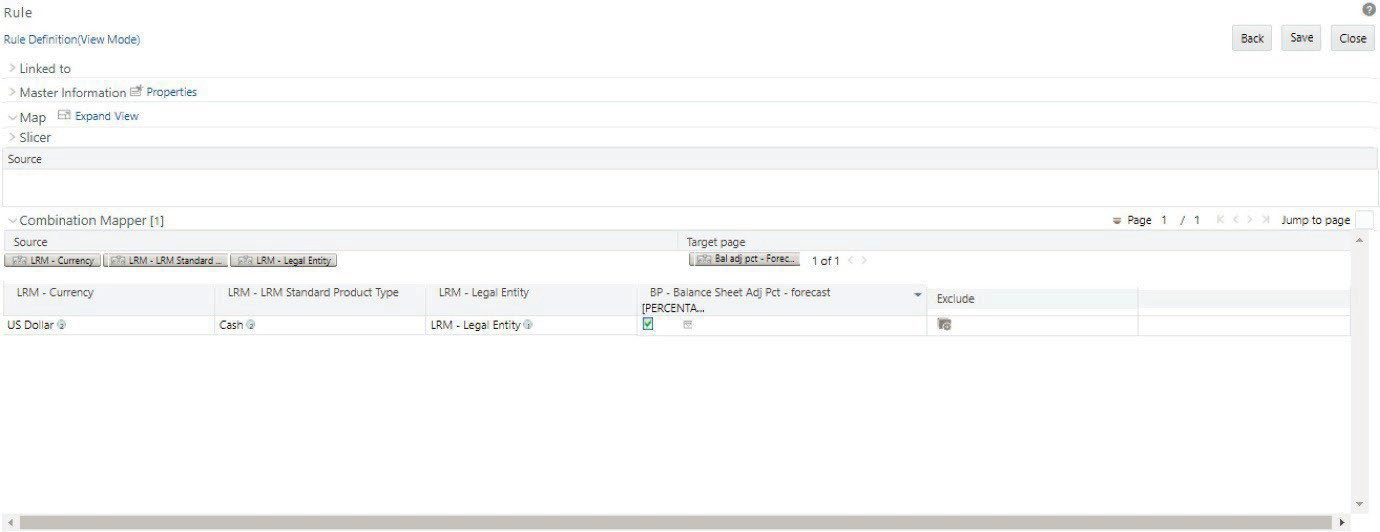
The Out of Box Rule name is “LRM - Manual Balance Adjustment – Forecast”. The list of mandatory source dimensions for this rule is as follows:
- Standard Product Type
- Legal Entity
- Currency
The Out of Box rule has sample mapping and values in the target. The Manual Adjustment percentage (the target BP, a parameterized BP) is input as per the requirement.
The total of the Manual Adjustment percentage has to be 100%.
Figure 16-14 Manual Adjustment Rule
You can also create new rules as per the procedure to replace the existing pre-configure forecasting rules. However, these rules must be mapped in the setup master table. The new rules are seeded in FSI_LRM_FWD_METHOD_RULES. Once it is available in the set up the master table then, it will be available in the Method selection dropdowns in Run Management window for selection.
Table 16-32 Pre configured Forecasting Rules
| Rule | V_RULE_TYPE | V_RRF_RULE_OBJECT_ID |
|---|---|---|
| Manual Balance Adjustment Rule | BAL_ADJ_RULE | LRMFRULE019 |
| Forward Balance Calculation Rule | FWD_BAL_RULE | LRMFRULE034 |
| Forward Cash Flow Calculation Rule | FWD_CF_RULE | LRMFRULE040 |