4.4.1 Accessing the Tenant Statistics Screen
To access the Tenant Statistics Screen, from the LHS menu, navigate to Admin Tools and Click Tenant Statistics.
Figure 4-41 Tenant Statistics Screen
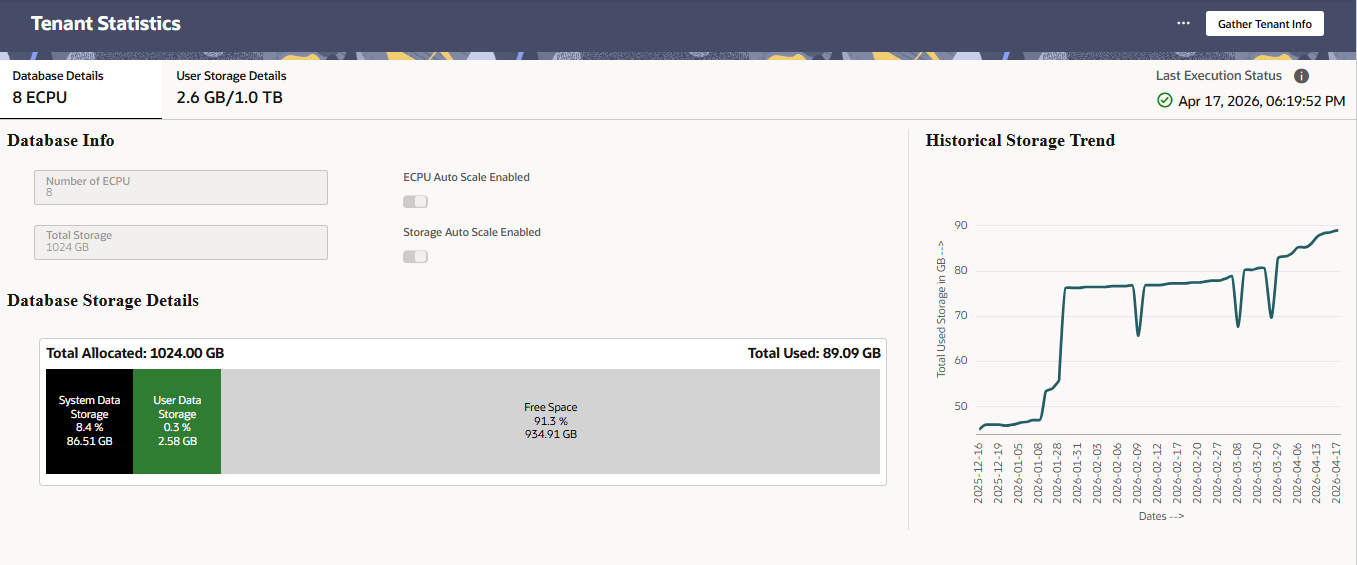
The screen is only visible to users assigned the ADMIN role. The required menu, role, and function mappings are listed below:
Table 4-10 Tenant Statics Screen Required Mappings
| Parameter | Value | Description |
|---|---|---|
| Menu ID | PBSM_TENANT_STATISTICS | Unique identifier for the Tenant Statistics menu |
| Menu Description | Tenant Statistics | Display label in the navigation menu |
| Role | RLTENANTSTATSVIEW | Role required to access this screen |
| Role Description | Tenant Statistics View | Describes the role purpose |
| Function | TENANTSTATISTICSVIEW | Function code controlling access |
| Function Description | Tenant Statistics - view | Describes the function scope |