5.2 Creating a Report Manually

When you identify a report of suspicious behavior that is not reported through the OFS ECM application but want to report it to the regulator, you can manually create a new report using the Create New Report option in the OFS CRR CA STR application.

Only Analyst and Supervisor users can create a new regulatory report.
To create a new report, follow these steps:
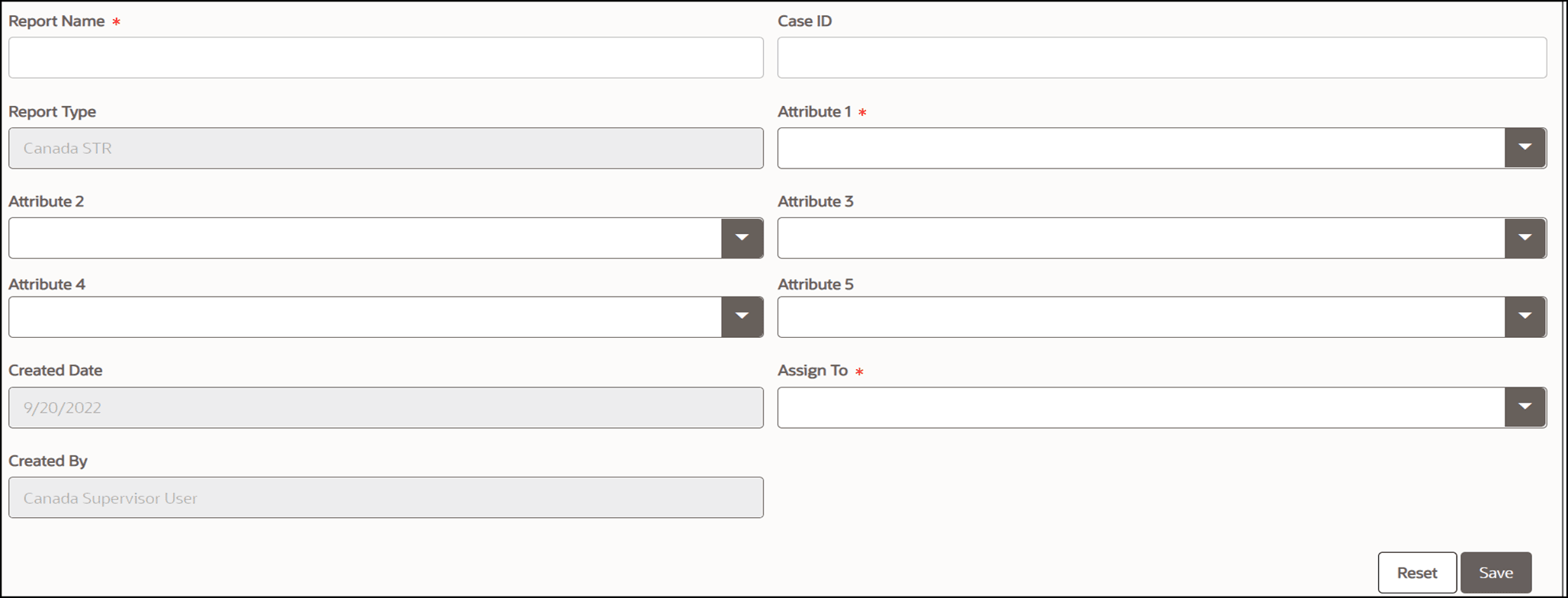
  1. On the Search and List page, click Create New Report. The Create New Report window is displayed.

    Figure 5-1 Create a New Report
    Create a New Report
  2. Enter the following information in the Create New pane as tabulated.
    Table 5-1 describes fields in the Creating New Report pane. Fields marked with an asterisk * is mandatory.

    Table 5-1 Creating New Report

    Fields Description
    Report Name Enter the name of the new report. Note : Enter up to fifty characters.
    Case ID Enter the unique case identification number.
    Report Type This field is auto-populated with the report type. For example, Canadian STR.
    Attribute 1 This attribute specifies the jurisdiction for the report. For example, AMEA, JAPAC, and so on.
    Attribute 2 This attribute specifies the business domain for the report. For example, bank, financial institute, and so on.
    Attribute 3 This attribute specifies the case type for the report. For example, AML, KYC, and so on.
    Attribute 4 This attribute specifies the organization for the report. For example, the name of the organization.
    Attribute 5 This attribute specifies the source of the report. For example, Money laundering, currency transactions, and so on.
    Created Date This is auto-populated with the current system date.
    Assigned To Select the user from the drop-down menu.
    Created By This is auto-populated with the logged-in user’s name.
  3. Click Save to create a new report. The newly created report is available in the Report List for further analysis and action.
    A new report is created and the due date is set as per the number of days configured by the administrator in the static data table. The status of a new report is Open.

    Note:

    The report details of a manually created report are not sent to the OFS ECM application.