
Alert Notification Generation
The Alert Notification for TFM, FRT, Bill/Bill Segment Errors (C1-ERRAL) batch enables you to create alert notifications for the transactions in the Ignored or Error status. To create alert notifications for the TFM feature, you need to do the following while executing the batch:
-
Set the To Do Created For parameter to TFM
-
Specify the transaction status (for example, EROR or IGNR) for which you want to create an alert notification
The batch then creates a To Do using the C1-TXNER To Do type. Note that it will not create a new To Do when the To Do for the same drill key combination already exists in the Open status. If the To Do is created for the error transactions, it indicates the number of transactions and transaction feeds that are in the Error status. The To Do is created in the following format:
Transaction Processing Summary: Business Date : {Batch Business Date}, File upload errors : {No. of Files/Transaction Feeds in Error}, TFM errors : {No. of Transactions in Error}Example: Transaction Processing Summary: Business Date : 14-MARCH-2026, File upload errors : 10, TFM errors : 150
However, if the To Do is created for the ignored transactions, it indicates the number of transactions that are in the Ignored status. The To Do is created in the following format:
Transaction Processing Summary: Business Date : {Batch Business Date}, Ignored Transaction Count : {No. of Ignored Transactions}Example: Transaction Processing Summary: Business Date : 14-MARCH-2026, Ignored Transaction Count : 36
The C1-ERRAL batch must be executed daily only after all the transaction feed management batches are executed successfully.
If the C1-ERRAL batch is executed for the first time, the system considers all the transactions whose CURR_SYS_PRS_DT is earlier than or equal to the batch business date. However, in the subsequent execution, the system considers only those transactions whose CURR_SYS_PRS_DT is later than the last To Do generation date and earlier than or equal to the batch business date.
To create an email notification along with the To Do, you need to attach an algorithm created using the C1-TFMERREML algorithm type to the To Do Post-Processing system event of the C1-TXNER To Do type. On creating a To Do, the batch then creates an outbound email message which contains the transaction error summary statistics. For more information about the batch, see Oracle Revenue Management and Billing Batch Guide.
You can then view the To Dos created using the C1-TXNER To Do type from the user interface. On clicking the related entity link of the To Do created for the EROR transactions, you can view the transaction error summary statistics in the Feed Management Dashboard screen, as shown in the following figure:
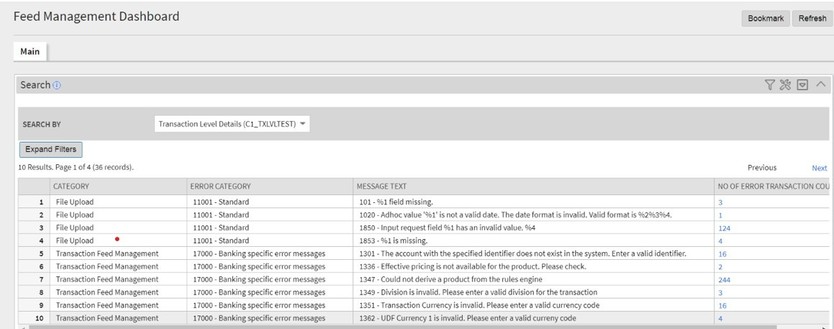
Note that, in the above figure, you can view records of two different categories – File Upload and Transaction Feed Management. The File Upload category records indicate the number of transactions with a particular error in a transaction feed or file uploaded in the system. On clicking the error transaction count, the system will list all the error transaction records of the respective file in the File Record Details screen. However, the Transaction Feed Management category records indicate the number of transactions with a particular error in the system. On clicking the error transaction count, the system will list all the error transactions in the Transaction Level Information zone.
Similarly, on clicking the related entity link of the To Do created for the IGNR transactions, you can view the ignored transaction summary in the Feed Management Dashboard screen, as shown in the following figure:
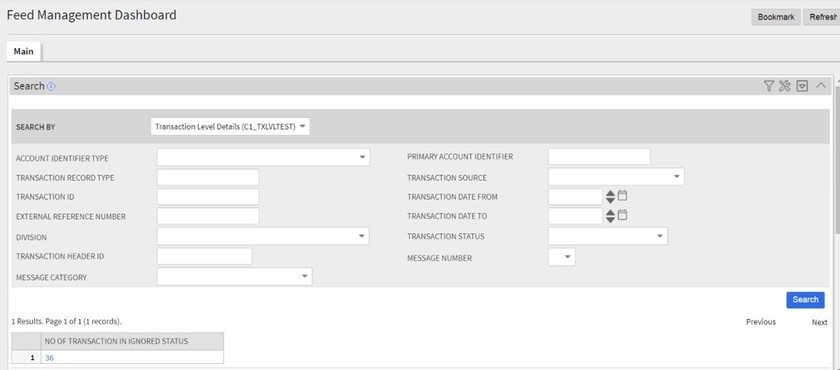
Note that, in the above figure, you can view the count of ignored transactions. On clicking the ignored transaction count, the system will list all the ignored transactions in the Transaction Level Information zone.