1 Feature Summary
This chapter describes the feature enhancements in this release.
Noteworthy Enhancements
This guide outlines the information you need to know about new or improved functionality in the Oracle CrowdTwist Loyalty and Engagement update and describes any tasks you might need to perform for the update. Each section includes a brief description of the feature, the steps you need to take to enable or begin using the feature, tips or considerations that you should keep in mind, and the resources available to help you.
Column Definitions
-
Feature: Provides a description of the feature being delivered.
-
Module Impacted: Identifies the module associated with the feature, if any.
-
Scale: Identifies the size of the feature. Options are:
-
Small: These UI or process-based features are typically comprised of minor field, validation, or program changes. Therefore, the potential impact to users is minimal.
-
Large: These UI or process-based features have more complex designs. Therefore, the potential impact to users is higher.
-
-
Delivered: Is the new feature available for use immediately after upgrade or must the feature be enabled or configured? If no, the feature is non-disruptive to end users and action is required (detailed steps below) to make the feature ready to use.
- Customer Action Required: You must take action before these features can be used. These features are delivered disabled and you choose if and when to enable them.
Table 1-1 Table 1-1 Noteworthy Enhancements
| Feature | Scale | Delivered | Customer Action Required? |
|---|---|---|---|
| Campaigns | Small | Enabled | No |
| Integrations | Small | Enabled | No |
| Rewards | Small | Enabled | No |
| Data | Small | Enabled | No |
Campaigns
Opt-In Support for Activity Campaigns
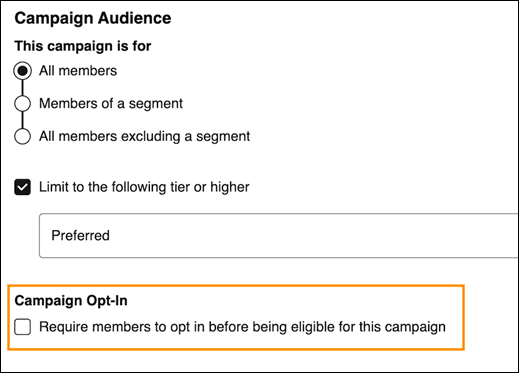
Activity Campaigns now support member opt-in functionality, extending capabilities previously available only for Commerce Campaigns. Members can actively enroll in eligible Activity Campaigns before participating, giving brands more insight into member intent as well as control over campaign enrollment and engagement strategies.
Frequency Capping for Activity Campaigns
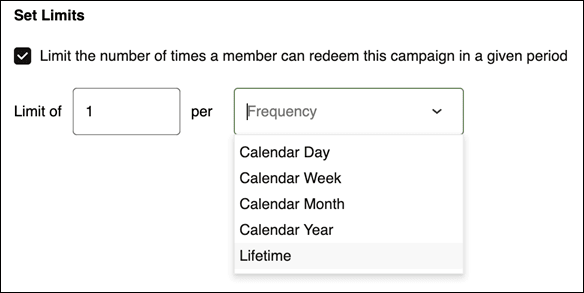
Frequency capping is now available for Activity Campaigns. Similar to existing Commerce Campaign functionality, administrators can limit how often members can earn an outcome from a campaign within a defined period. This helps prevent over-participation, better manage promotional budgets, and create a more balanced member experience.
Integrations
Xstore Plug-in v2 Enhancements
- Points Redemption at Point of Sale – Members can now redeem loyalty points directly during checkout.
- Customer-Facing Marketing Messages – Display personalized loyalty and promotional messaging during the purchase experience.
- Custom Receipt Trailers – Configure receipt messaging to include loyalty program information, promotional content, or other branded communications.
These enhancements help create a more connected and engaging loyalty experience across physical retail locations.
Rewards
Improved Reward Management in Widgets
Rewards that are actively being used within a widget can now be disabled without first removing them from the widget configuration. This streamlines reward administration and gives program managers greater flexibility when retiring or temporarily suspending rewards.
Data
Segment Filter in Reporting
Control Center reports now include a Segment dashboard filter, which lets control center users narrow report results to members who are currently in a selected segment. Segment filters reflect the current as-is population and do not show members who were previously in a segment but have since left it.

- When Exclude is not selected, the report includes data only for members who are currently in the selected segment or segments.
- When Exclude is selected, the report includes data only for members who are not currently in the selected segment or segments.
- When multiple segments are selected, the filter returns unique members who are in any of the selected segments. It does not return only members who are in all selected segments.
Example: User applies both Segment A and Segment B, with data shown below, as dashboard filters.
| Members | Points Redeemed | |
|---|---|---|
| Segment A | 20 | 100 |
| Segment B | 15 | 200 |
| Members in both Segment A and Segment B | 10 | 25 |
| Members not in Segment A or Segment B | 1,000 | 500 |
Default filter results:
The report returns 275 points redeemed from 25 unique members who are currently in Segment A, Segment B, or both.
With Exclude selected:
The report returns 500 points redeemed from 1,000 members who are not currently in either Segment A or Segment B.