Integrated Device Network (IDN)
The Integrated Device Network (IDN) is an Oracle MICROS proprietary network module that enables the creation of a localized network. It is commonly used to connect one or more receipt or order printers to an Oracle MICROS workstation.
A local IDN network consists of a workstation controlling one or more devices that are connected in a daisy chain configuration using IDN cable runs.
A remote IDN network consists of a workstation controlling one or more devices connected in a daisy chain over twisted pair cable, with distances of up to 4,000 feet from the workstation. This setup requires in-wall cable runs, faceplates, and patch cables at both the workstation and each connected device.
The following figure illustrates how a workstation with an IDN port can operate a small network of IDN printers using shielded Category 6 or better cable and connection hardware. If already installed, Category 3, 4, or 5 cable may also be used. In the figure, the workstation controlling the IDN printers appears on the left. An 8-pin to 6-pin IDN patch cable connects the workstation’s 8-pin IDN port to one of the 6-pin connectors on the local module.
Figure 7-2 IDN Illustration
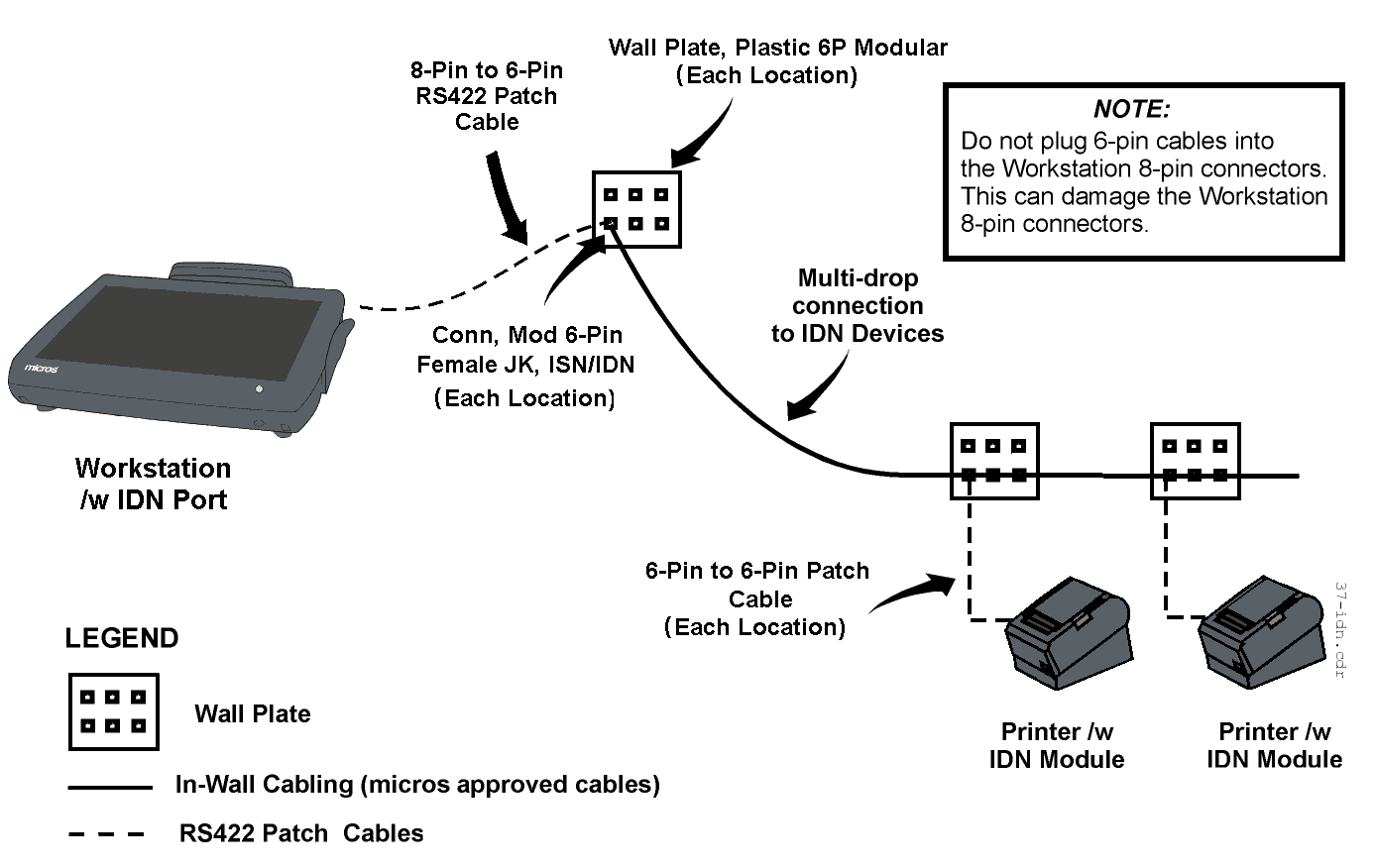
A patch cable is installed between the remaining 6-pin connector on the local IDN printer and the faceplate connector to convert the IDN transmit/receive pairs to ANSI/TIA/EIA-568-A compatible transmit/receive pairs.
Install a pair of shielded Category 6 or better cables between the patch panel and the two wall plate connectors at each printer location. The dual run to the faceplate is required for cable certification, as daisy chain configurations are not part of Ethernet topology. Terminate the drain wire of each cable run at the patch panel.
To maintain the IDN daisy chain, use Category 6 or better patch cables at the patch panel. At each remote printer location, install a pair of patch cables to continue the daisy chain between printers. The last printer in the chain requires only one patch cable.
IDN cable runs are terminated with an RJ45 connector at the workstation and an RJ12 connector at the network module or wall plate.
All MICROS workstations have at least one 8-pin modular port for connecting IDN devices.
Parent topic: Cable Types