Oracle Cloud
- Connection to Oracle Simphony Application
- Image Locations for Kiosks
- Peer-to-Peer Network Connectivity
Parent topic: Cloud Connectivity
Connection to Oracle Simphony Application
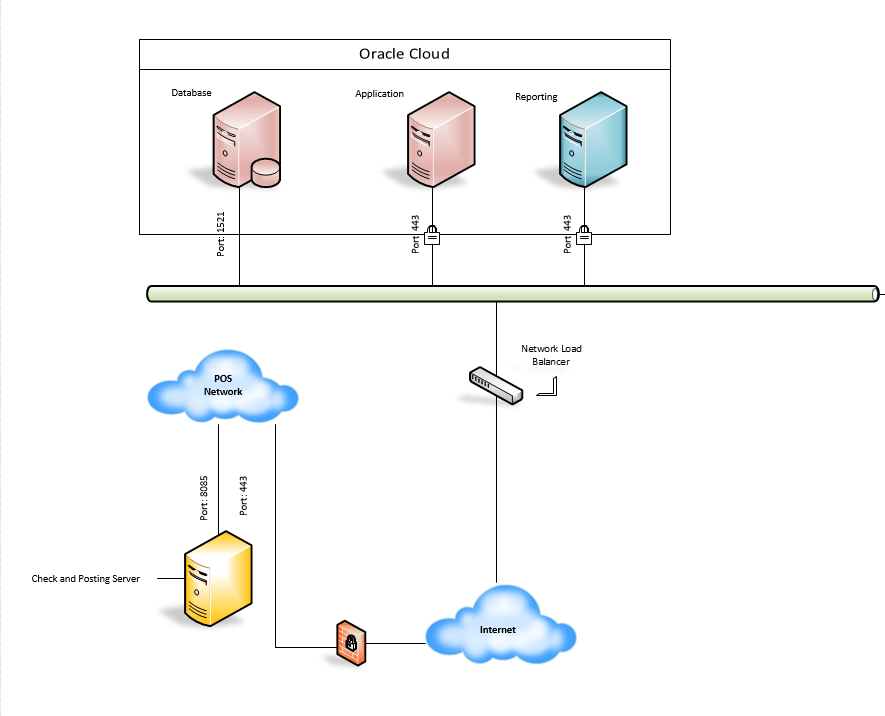
Full communication with the designated URL over port 443 is required for CAL authentication and daily database synchronization. If access is not allowed, installation issues may occur and sales totals will not be transmitted from the Check and Posting Service to the cloud.
All workstations must have access to the Certificate Authority’s Certificate Revocation List (CRL) to ensure proper CAL authentication. For more information, see the Oracle Simphony Security Guide for your Simphony version.
Simphony Cloud Services are accessible through Oracle Cloud Infrastructure (OCI) Load Balancer as a Service (LBaaS), which operates based on TCP specifications. In some cases—particularly at larger properties or enterprises where many devices connect to Simphony Cloud Services via a single NAT address—default firewall configurations may conflict with these standards. This can lead to issues with certain workstation functions, such as database downloads. Oracle recommends applying the following configurations to the customer firewall device, where available:
-
TCP Time Wait Recycle: Enabled
-
TCP Time Wait: 60 seconds or greater
-
TCP Sequence Randomization: Disabled
Parent topic: Oracle Cloud
Image Locations for Kiosks
To ensure kiosks can display images configured through the EMC and hosted in the Oracle Cloud, connectivity must be established to the regional image repository associated with your Simphony installation. For more information on enabling access to Oracle Cloud-hosted services, see IP Address Ranges.
Connectivity to Oracle Reporting and Analytics
Full HTTP and HTTPS communication to the Reporting and Analytics server is required for reporting functionality. For Oracle Cloud customers, the necessary URL is provided after server provisioning. For self-installed Simphony systems, use the fully qualified domain name (FQDN) or server name.
Figure 5-1 Oracle Cloud Connectivity Illustration
Parent topic: Oracle Cloud
Peer-to-Peer Network Connectivity
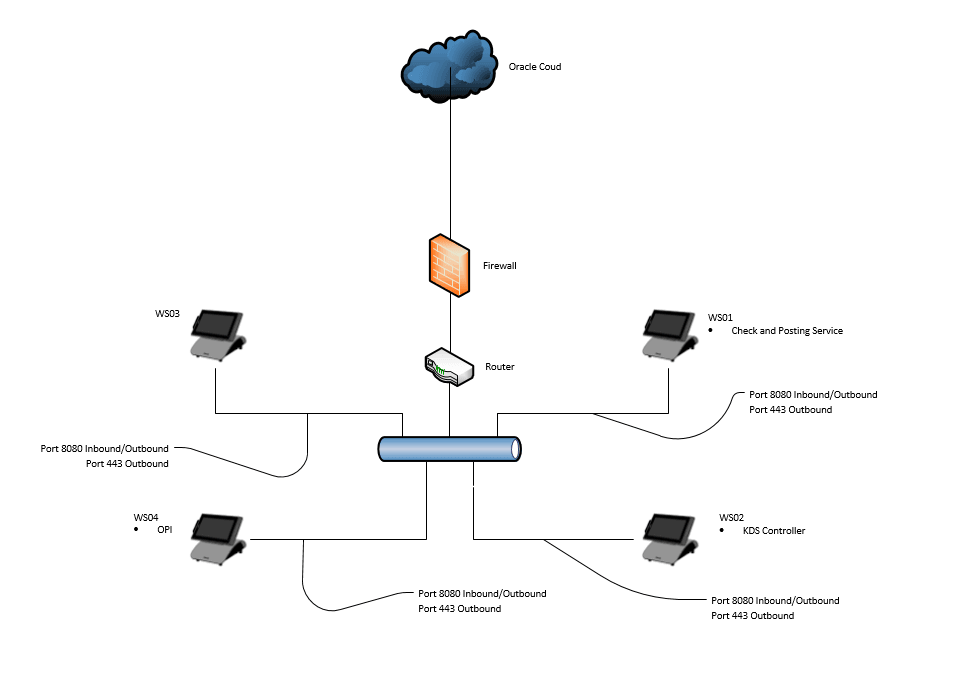
The Check and Posting Service (CAPS) uses port 8080 by default. It is recommended to change this port when running Service Host as a service or when running CAPS on IIS.
See Configuring the Service Host for CAPS in EMC in the Oracle Simphony Configuration Guide to determine which port is being used for CAPS (typically 8071, 8080, or 8085 depending on how CAPS is configured). This information is also provided by Oracle Consulting at the time of CAPS server installation.
Workstations (Service Host) use port 8080 for peer-to-peer communication through the Simphony EGateway service.
As a best practice, configure your workstations to use their IP address (with static IPs) as the host name in the EMC. This is especially helpful in networks where DNS is incorrectly configured or not set up at all.
Figure 5-2 Workstation Peer-to-Peer Network Setup
Parent topic: Oracle Cloud