Roles
Roles determine what functionality users and API accounts have within the Simphony Point-of-Sale portion of the system - Enterprise Management Console (EMC), Configuration & Content API (C&CAPI), FrontLine Manager (FLM), Point-of-Sale (POS) clients. Assign roles to users using People Management and API accounts using the API Accounts modules, located in Simphony Home.
Each role consists of the following sections:
Table 5-1 Role Sections
| Section | Description |
|---|---|
|
General |
Basic role details |
|
EMC Modules |
Controls which EMC modules users can access and what they can do within them |
|
FLM Modules |
Controls which FLM modules users can access and what they can do within them |
|
Actions |
Controls which EMC functions users can perform |
|
Operations |
Controls which POS functions users can perform |
|
Visibility |
Determines which hierarchy levels this role can be assigned at |
|
View |
Controls the Revenue Center Security access settings |
|
Fields |
Controls field level access settings for EMC modules which support this capability |
Visibility Tab
On the properties tab, the role is assigned to specific locations or assigned to the Enterprise. In many situations, a role is assigned to the Enterprise—it is likely that a server or bartender role is the same for all properties. This tab consists of a grid that allows the administrator to add and delete locations, and to set the check box, [Propagate to Children], for each location.
The check box allows a role to be visible in the selected zones/locations and all its children; if it is unchecked, the role is visible in the selected zone/location only, but not its children.
View Tab
The View tab contains one option that controls the revenue centers that users can view: Enable Revenue Center-Level Security. This option relates to workstation behavior only. Employees associated with a role that has this option enabled are only able to view revenue centers in which they are an operator.
Employees can be set as an operator in a revenue center in the Employee Edit Form. When an employee is associated with a role with this option enabled, the employee is unable to add new revenue centers, even if the user is associated with a role with the Add Revenue Centers option enabled.
Fields Tab
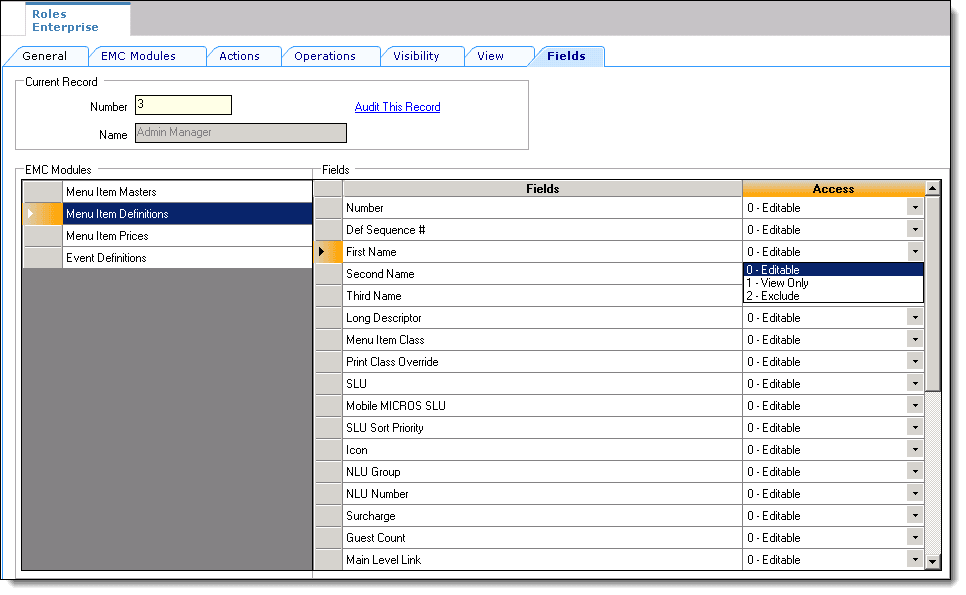
The Field tab allows you to control specific field access for users in several EMC modules. Access control includes three privileges:
-
Editable: You are able to view and edit the field
-
View Only: You are only able to see the field (no editing allowed)
-
Exclude: You cannot view or access the field
Figure 5-1 Roles Fields Tab