EMC Modules
EMC Modules Tab
In the EMC Modules tab, roles are configured to allow access to various modules of the EMC. From this tab, a user may be given permissions to:
Table 5-4 EMC Module Permissions
| Module Permission | Grants Permission To |
|---|---|
|
View |
Open and view a module. If you allow a user to Edit, Add, or Delete, you must also grant View access (otherwise the user cannot open the module). |
|
Edit |
Update fields or records within a module. |
|
Add |
Add records to a module. |
|
Delete |
Delete records from a module. |
|
Add Override |
Override records within a module. |
|
Allow Duplicate Obj# |
Add menu item records where existing records with the same number exist elsewhere in the Enterprise. |
|
Allow Duplicate Name |
Add records where existing records with the same name exist elsewhere in the Enterprise. |
To easily configure a role to View, Edit, Add, Delete, or Add Override for every module without individually selecting each option, right-click a column heading and select Set All.
Add Override also controls the ability to delete an override in single-record modules. In these modules, there are multiple fields to change, but all the changes are for a single record. Users cannot insert additional records into single-record modules.
Note:
Users must be assigned View access to a module to open it. If a user is assigned the privilege to edit, add, and delete a module, but not to view it, they are unable to open the module. When an employee does not have access to view a module, the module appears as grayed out on the EMC Enterprise home page.In some modules, such as Enterprise Parameters, RVC Parameters, and Order Devices, there is no Add or Delete option because individual records cannot be added or deleted.
Figure 5-2 Roles EMC Modules Tab
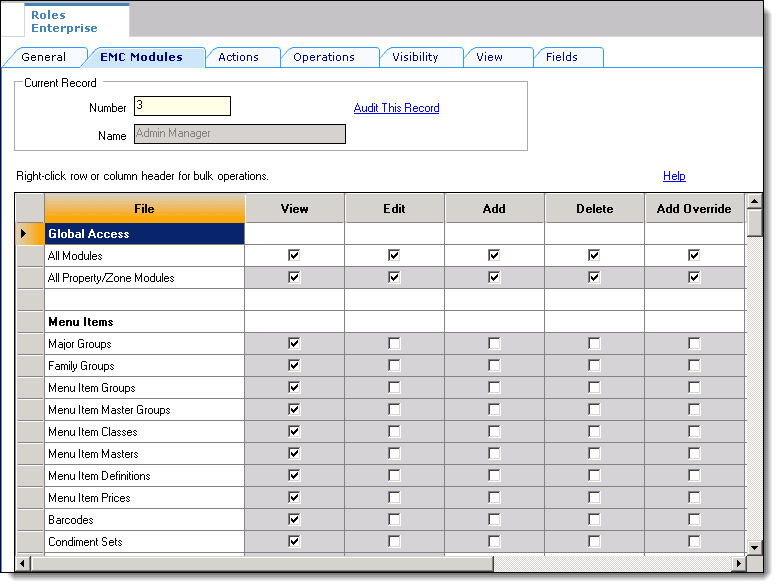
Global Access
The All Modules and All Property/Zone Modules checkboxes allow a role to be configured to view, edit, add, or delete every module without having to individually select each box. Furthermore, this checkbox allows access to new modules that are created in the future. For example, if a new module “voice ordering” is created and released in a new version, an employee with “Global Access” for View will be able to access this module without having a specific checkbox for the “voice ordering” module. Oracle recommends that administrator-type roles have the All Modules option checked so that administrators can always access every module in the system.