Operations
Configure the Point-of-Sale and transaction processing actions which users and API accounts assigned to this role can perform.
There are over 200 operational options, so it could be difficult to find an option by searching on the various tabs. To quickly find options, use the Search tab to perform a Context Sensitive Help text comparison. The following figure shows a search for discount options.
Figure 5-4 Roles Operations Tab with Search Example
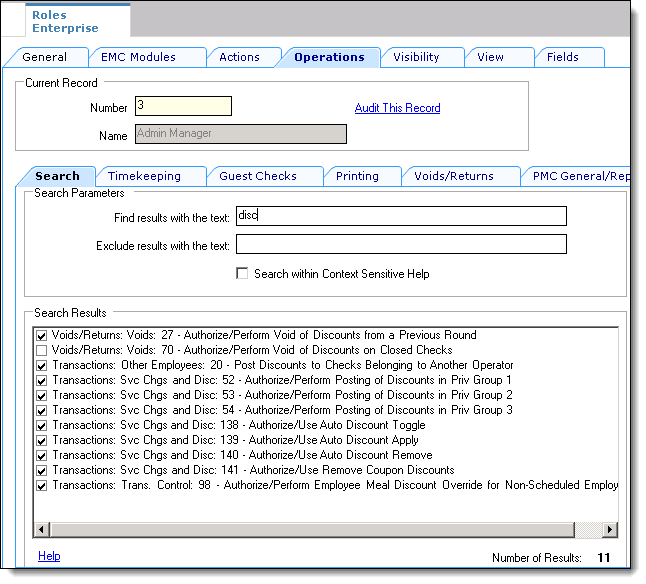
The Operations tab contains all of the options related to workstation functionality. The Operations tab is divided into sub-tabs based on similar functionality: Timekeeping, Voids, and the Property Management Console (PMC).
Table 5-6 Privilege Areas
| Area | Description |
|---|---|
|
Guest Checks |
Controls guest check opening, pickup, edit, ownership, transfer, event, autofire, team service, and close authorizations. |
|
Printing |
Controls memo check, guest check, receipt, voucher, and header or trailer printing authorizations. |
|
Voids/Returns |
Controls void, return, cancel, correction, refund, reauthorization, and partial-payment authorizations. |
|
PMC General/Reports |
Controls PMC launch, shift incrementing, Start of Day, replay, and general workstation reporting authorizations. |
|
Ad Hoc Reports |
Controls which workstation ad hoc reports employees can run. |
|
PMC Procedures |
Controls access to PMC procedures such as order devices, menu items, employees, diagnostics, routing groups, themes, barcodes, and printer management. |
|
Transactions |
Controls posting, tender, service charge, discount, price level, tip, and other transaction processing authorizations. |
|
Miscellaneous |
Controls additional operational authorizations such as cash drawer, workstation status, offline mode, till assignment, guest information, and other specialized functions. |
|
Stored Value Cards |
Controls stored value and loyalty functions such as issue, activate, reload, redeem, inquiry, transfer, coupon, and loyalty card operations. |
|
Guest Management |
Controls wait list, reservation, section layout, dining table, seating, legend, and server availability functions. |
|
Cash Management |
Controls Enterprise Cash Management receptacle, till, server bank, safe, petty cash, bank deposit, change order, threshold, and dashboard operations. |
Table 5-7 Guest Checks
| Privilege | Description |
|---|---|
|
1 - Allow Sign-in to a Workstation |
Select to allow employees with this Role to sign into a workstation or a Mobile client. |
|
2 - Authorize Sign-in to a Workstation |
Select to allow employees with this role to authorize a non-privileged employee to sign into a workstation or Mobile client. |
|
3 - Create New Checks using [Begin Check] Key |
Select to allow employees with this role to begin a guest check. |
|
4 - Authorize/Perform Pickup of a Check that is "Open on System" |
Select to allow employees with this role to pickup checks that have an open status and to authorize others to do so. |
|
7 - Authorize/Use the [Order Type] Keys |
Select to allow employees with this role to select an Order Type, and to authorize others to do so. |
|
8 - Authorize/Use the [Split Check] Key |
Select to allow employees with this role to split guest checks, and to authorize others to do so. |
|
18 - Authorize/Perform Pickup of a Check Belonging to Another Operator |
Select to allow employees with this role to pick up another workstation operator's checks and to authorize others to do so. |
|
19 - Post Menu Items to Checks Belonging to Another Operator |
Select to allow employees with this role to add menu items to checks belonging to another workstation operator. |
|
20 - Post Discounts to Checks Belonging to Another Operator |
Select to allow employees with this role to add discounts to checks belonging to another workstation operator. |
|
21 - Post Service Charges to Checks Belonging to Another Operator |
Select to allow employees with this role to add service charges to checks belonging to another workstation operator. |
|
22 - Post Payments to Checks Belonging to Another Operator |
Select to allow employees with this role to post tender/media entries to checks belonging to another workstation operator. |
|
30 - Authorize/Perform Open of Checks for Multiple Groups at a Table |
Select to allow employees with this role to open multiple checks at the same table. Each subsequent check is assigned a successive check number. |
|
33 - Authorize/Perform Change Number of Guests |
Select to allow employees with this role to change the number of guests in a transaction using the Number of Guests key, and to authorize other to do so. |
|
38 - Authorize/Perform Closing of Checks with a Zero Balance |
Select to allow employees with this role to tender and close transactions that have a balance due of 0.00, and to authorize others to do so. |
|
39 - Authorize/Perform Closing of Checks with a Negative Balance |
Select to allow employees with this Role to tender and close transactions that have a negative balance due, and to authorize others to do so. |
|
45 - Authorize Transfer of Checks in the Same Revenue Center |
Select to allow employees with this role to transfer checks from another operator within the same revenue center, and to authorize others to do so. |
|
46 - Authorize Transfer of Checks Between Revenue Centers |
Select to allow employees with this role to transfer checks from another revenue center, and to authorize others to do so. |
|
47 - Authorize Adding of Checks in the Same Revenue Center |
Select to allow employees with this role to add checks (to be in a check, and add another check to it) within a revenue center, and to authorize others to do so. |
|
48 - Authorize Adding of Checks Between Revenue Centers |
Select to allow employees with this role to add checks (to be in a check, and add another check to it) from another revenue center, and to authorize others to do so. |
|
61 - Authorize/Use the [Table Number] Key |
Select to allow employees with this role to use the Table Number key, and to authorize others to do so. |
|
67 - Authorize/Perform Adjust Closed Check |
Select to allow employees with this role to use the Adjust Closed Check key, and to authorize others to do so. |
|
68 - Authorize/Perform Reopen Closed Check |
Select to allow employees with this role to use the Reopen Closed Check key, and to authorize others to do so. |
|
81 - Authorize/Perform Edit of a Guest Check ID In an Open Check |
Select to allow employees with this role to edit a guest check ID of an open check using the Guest Check ID key, and to authorize others to do so. |
|
86 - Authorize/Allow Sharing of Check Items |
Select to allow employees with this role to share menu items, and to authorize others to do so. Sharing menu items is performed when using the Touch Split and Touch Edit functions to divide a menu item between multiple checks. |
|
90 - Authorize Workstation to Enter Offline Mode |
Select to allow employees with this Role to enter offline mode on a workstation. When an operation is attempted that normally causes the workstation to contact the Simphony database, if contact cannot be established, a prompt appears to retry the operation or to work offline. |
|
91 - Authorize Workstation to Exit Offline Mode |
Select to allow employees with this role to enter online mode (if in offline mode) on a workstation. While offline, if communication with the Simphony database is detected, a prompt appears to resume online mode. |
|
92 - Authorize Running of Offline Reports |
Select to allow employees with this role to generate Offline Reports on an offline workstation. |
|
93 - Authorize/Perform Pickup of a Check that is "Owned by Offline UWS" |
Select to allow employees with this role to pickup checks owned by an Offline workstation, and to authorize others to do so. |
|
102 - Enable Limited Split Check |
Select to prevent an employee from performing the Split Check function more than once on a check. If enabled, the Authorize/Use Split Check option must be disabled. This option was created to safeguard against the "floating soda" theft technique. |
|
129 - Authorize/Perform Creation and Pickup of Unassigned Checks |
Select to allow employees with this role to begin and pickup Unassigned Checks, and to authorize others to do so. When an Open Check SLU is used, privileged workstation operators see their own checks, as well as any Unassigned Checks in the revenue center, but not the open checks of other workstation operator. |
|
133 - Auth/Perform Adjust Closed Check from Previous Business Days |
Select to allow employees with this role to adjust closed checks from previous business days. |
|
134 - Auth/Perform Reopen Closed Check from Previous Business Days |
Select to allow employees with this role to reopen closed checks from previous business days. |
|
152 - Authorize/Perform Barcode Check Edit Over Limit |
Enables employees to edit checks by barcode when exceeding the limit per check or revenue center. |
|
153 - Authorize/Perform Other RVC Barcode Check Pickup |
Enables employees to pick up a check by barcode from another revenue center. |
|
154 - Authorize/Perform Manual Entry of Guest Check Barcode Number |
Enables employees to manually enter a guest check barcode number. |
|
155 - Authorize/Perform Automatic Combo Meal Recognition on Previous Round Menu Items |
Enables employees to include previous round menu items when creating a combo meal from existing items. |
|
156 - Authorize/Perform Return of Barcode Check from another Property |
Enables employees to return a barcode check from another property. |
|
164 - Authorize/Perform Service Total/Payment with Placeholder item |
Enables workstation operators to perform or authorize tendering a transaction with a placeholder item. Tender/Media option 85 - Not Allowed With Incomplete Meals must be set. |
|
181 - Authorize/Perform Find Check |
Select to allow employees to find a check when Check and Posting is unavailable. |
|
183 - Begin Autofire Check using [Begin Autofire Check] Key |
Select to allow employees to begin an Autofire Check. |
|
184 - Authorize/Perform Pickup of Autofire Check Belonging to Another Operator |
Select to allow employees to pick up another operator's Autofire checks. |
|
185 - Authorize/Perform Edit of Autofire Date/Time |
Select to allow employees to modify the Autofire date and time of an existing Autofire check. |
|
190 - Authorize/Create Team |
Select to allow employees to use keys to create a team and add initial team members, and to authorize others to do so. |
|
191 - Authorize/Add or Delete Team Member to a Team |
Select to allow employees to add or delete members for a team, and to authorize others to do so. |
|
192 - Authorize/Delete a Team |
Select to allow employees to delete a team, and to authorize others to do so. |
|
193 - Print a list of Teams |
Select to allow employees to print a Team List with team name and assigned members. |
|
194 - Authorize/Assign a Stay Down Team to a Table |
Select to allow employees to assign a stay-down Team to a table, and to authorize others to do so. |
|
196 - Available as Team Service Team Member |
Select to show employees in selection lists when assigning team members. |
|
197 - Authorize/Perform Pickup From Peer Workstation |
Select to allow employees to pick up a check from a workstation when Check and Posting is unavailable, and to authorize others to do so. |
|
198 - Authorize/Perform Pickup From Inaccessible Workstation |
Select to allow employees to pick up or authorize an inaccessible open check. |
|
199 - Begin Check by Prompt |
Select to allow employees to begin a check by prompt. This is used with the Banquet Check Printing Process. |
|
200 - Edit Check by Prompt |
Select to allow employees to edit a check by prompt. This is used with the Banquet Check Printing Process. |
|
270 - Authorize/Perform association of a new Check to an ended Event |
Select to allow employees with this role to associate a new check to an event that has already ended, and to authorize non-privileged employees to do the same. |
|
271 - Authorize/Perform override of the "Event association to a Check is mandatory" option (Control Parameters) |
Select to allow employees with this role to begin a check without associating it to an event when event association is mandatory, and to authorize non-privileged employees to do the same. |
|
272 - Authorize/Perform Start an Event |
Select to allow employees with this role to start an event, and to authorize non-privileged employees to do the same. |
|
273 - Authorize/Perform End an Event |
Select to allow employees with this role to end an event, and to authorize non-privileged employees to do the same. |
|
274 - Authorize/Perform Add an Event |
Select to allow employees associated with this role to add an event, and to authorize non-privileged employees to do the same. |
|
275 - Authorize/Perform Update an Event |
Select to allow employees associated with this role to update an event, and to authorize non-privileged employees to do the same. |
|
276 - Authorize/Perform Select an Event |
Select to allow employees with this role to select an active event as the workstation operator's default event, and to authorize non-privileged employees to do the same. |
|
277 - Allow selection of 'No Default Area Selected' when assigning default event |
Select to allow workstation operators to select a default event without selecting a default area. |
|
282 - Authorize/Perform Minimum Amount Threshold Override |
Select this option to allow employees associated with this role to override Minimum Amount Threshold validation on Manual Discount and to authorize non-privileged employees to do so as well. |
|
312 - Authorize/Use the [Order Channel] Keys |
Select to allow employees with this role to select an Order Channel, and to authorize others to do so. |
|
313 - Authorize/Perform Set Order Status to Complete |
Select to allow employees with this role to set the Order Status of a Check to Complete, and to authorize others to do so. |
|
315 - Authorize/Perform Force Close of Check |
Select to allow employees with this role to force the closure of checks that cannot be picked up normally, and to authorize others to do so. |
Table 5-8 Printing
| Privilege | Description |
|---|---|
|
9 - Authorize/Perform Printing of Memo Checks |
Select to allow employees with this role to print memo checks and to authorize others to do so. |
|
10 - Authorize/Perform Reprinting of Memo Checks |
Select to allow employees with this role to reprint memo checks and to authorize others to do so. |
|
23 - Authorize/Perform Unlimited Reprinting/Printing of a Check |
Select to allow employees with this role to perform two functions. 1. Allow On-Demand operators to print more guest checks than the maximum number allowed. 2. Allow By-Round operators to use the Reprint Closed Check key. This also allows employees to grant authorization to others for these functions. |
|
24 - Authorize/Perform Reprinting of Closed Checks |
Select to allow employees with this role to reprint a guest check after it has been closed and to authorize others to do so. |
|
64 - Authorize/Perform Reprint of a Credit Voucher |
Select to allow employees with this role to reprint a credit card voucher slip, and to authorize others to do so. |
|
308 - Authorize/Perform Edit Receipt Header Trailer |
Select this option to allow employees to edit the header and trailer of the receipt. |
Table 5-9 Voids/Returns
| Privilege | Description |
|---|---|
|
25 - Authorize/Perform Void of Menu Items from a Previous Round |
Select to allow employees with this role to void menu items posted in previous rounds, and to authorize others to do so. |
|
26 - Authorize/Perform Void and Return of Menu Items Not on Check |
Select to allow employees with this role to void or return items that were never posted to a check, and to authorize others to do so. |
|
27 - Authorize/Perform Void of Discounts from a Previous Round |
Select to allow employees with this role to void discounts that were posted in a previous round, and to authorize others to do so. |
|
28 - Authorize/Perform Void of Service Charges from a Previous Round |
Select to allow employees with this role to void service charges that were posted in a previous round, and to authorize others to do so. |
|
29 - Authorize/Perform Void of Tender/Media from a Previous Round |
Select to allow employees with this role to void tender/media entries that were posted in a previous round, and to authorize others to do so. |
|
32 - Authorize/Perform Return of Menu Items Entered on Current Check |
Select to allow employees with this role to return menu items posted in the current check (using a Return key) and to authorize others to do so. |
|
36 - Authorize/Use the [Void Check] Key |
Select to allow employees with this role to use the Void Check key, which voids all items on the check, and to authorize others to do so. |
|
40 - Authorize/Use the [Transaction Cancel] Key |
Select to allow employees with this role to use the Transaction Cancel key, and to authorize others to do so. |
|
41 - Authorize/Perform Error Corrects |
Select to allow employees with this role to authorize and perform all void types in the current round. |
|
62 - Authorize/Use the [Transaction Void] Key |
Select to allow employees with this role to use the Transaction Void key, and to authorize others to do so. |
|
69 - Authorize/Perform Void of Menu Items on Closed Checks |
Select to allow employees with this role to void menu items from closed checks after they have been reopened, and to authorize others to do so. |
|
70 - Authorize/Perform Void of Discounts on Closed Checks |
Select to allow employees with this role to void discounts from closed checks after they have been reopened, and to authorize others to do so. |
|
71 - Authorize/Perform Void of Service Charges on Closed Checks |
Select to allow employees with this role to void service charges from closed checks after they have been reopened, and to authorize others to do so. |
|
72 - Authorize/Perform Direct Voids |
Select to allow employees with this role to void transaction items by pressing the Void key and then the key for the item (e.g., a Menu Item key), and to authorize others to do so. |
|
74 - Authorize/Perform Voids, Cancels, and Device Test of NALDS Items |
Select to allow employees with this role to perform voids or cancels of menu items ordered through a North American Liquor Dispensing System (NALDS), and to authorize others to do so. This option also determines if a user is able to perform a device test of NALDS in PMC Diagnostics. |
|
77 - Authorize/Use the [Transaction Return] Key |
Select to allow employees with this role to use the Transaction Return key, and to authorize others to do so. |
|
87 - Authorize/Allow Voiding of Shared Check Items |
Select to allow employees with this role to void items which are shared between seats or checks, and to authorize others to do so. |
|
135 - Perform Error Corrects |
Select to allow employees with this role to perform voids in the current round (error corrects). |
|
159 - Authorize/Perform Cancel Order |
Enables employees to cancel an order and controls workstation operator access to the Cancel Order key, which deletes check details and cancels the order. |
|
278 - Authorize/Perform Credit Card Refund Transaction |
Select to allow employees associated with this role to refund a credit card, and to authorize non-privileged employees to do so. |
|
279 - Authorize/Perform Credit Card Release Authorization Transaction |
Select to allow employees associated with this role to release an authorization held against a credit card, and to authorize non-privileged employees to do so. |
|
280 - Authorize/Perform Credit Card End of Day (EOD) Transaction |
Select to allow employees associated with this role to communicate to the processor that the credit card activity for the business day is final and to authorize non-privileged employees to do so. |
|
293 - Authorize/Perform ReFire Menu Items |
Select this option to allow employees associated with this role to re-fire menu items from previous round. |
|
303 - Authorize/Perform a zero Direct Tip |
Select to allow employees with this role to perform or authorize a zero Direct Tip. |
|
304 - Authorize/Perform modifications (void, price or quantity change) to previous round condiments |
Select to allow condiment Price Overrides, Void Condiments and Add new Condiments for current and previous round items. Disable to apply these operations to only current round items. |
|
307 - Authorize/Perform Cashback |
Select this option to allow employees associated with this role to perform Cashback within a transaction. |
|
309 - Authorize/Perform Reauthorization of released CC Authorization |
Select to allow employees associated with this role to reauthorize a released CC authorization, and to authorize non-privileged employees to do so. |
|
314 - Authorize/Perform Void after Partial Payment |
Select to allow employees with this role to void menu items after Partial Payment, and to authorize others to do so. |
Table 5-10 PMC General/Reports
| Privilege | Description |
|---|---|
|
30001 - Run PMC |
Select to allow employees to start the PMC using the Launch PMC key. |
|
30007 - Increment Cashier Shift for Another Employee |
Select to allow employees to increment cashier shifts for other cashiers. You must enable the Shift Tracking option in the Control Parameters for this option to take effect. |
|
30008 - Increment Employee Shift |
Select to allow employees to increment their employee shift. |
|
30009 - Increment Cashier Shift |
Select to allow employees to increment their cashier shift. |
|
30010 - Change Serving Period |
Select to allow employees to change the Serving Period using the PMC. Enable Run PMC to select this option. |
|
30011 - Increment Employee Shift when Clocking Out |
Select to increment the employee shift when they clock out, unless they are clocking out for a break. You must enable the Shift Tracking option in the Control Parameters for this option to take effect. |
|
30012 - Increment Employee Shift when Clocking In |
Select to increment the employee shift when they clock in, unless they are returning from a break. You must enable the Shift Tracking option in the Control Parameters for this option to take effect. |
|
30013 - Increment Employee Shift when Changing Job |
Select to increment the employee shift when they clock in for a different job, possibly for a different revenue center. You must enable the Shift Tracking option in the Control Parameters for this option to take effect. |
|
30014 - Increment Employee Shift when Changing Revenue Center |
Select to increment the employee shift when they sign into a different revenue center. You must enable the Shift Tracking option in the Control Parameters for this option to take effect. |
|
30015 - Prompt before incrementing Employee Shift |
Select to prompt employees to declare if their shift should increment. You must enable the Shift Tracking option in the Control Parameters for this option to take effect. |
|
30016 - Prompt to Increment Employee Shift after Shift Report |
Select to prompt employees to declare if their shift should increment when an employee generates the Employee Shift report. You must enable the Shift Tracking option in the Control Parameters for this option to take effect. |
|
30058 - Run Start of Day from OPS |
Select to allow employees to perform Start of Day operations from a POS client. Enable Run Start of Day from OPS to select this option. |
|
30059 - Prevent Running SOD from OPS with Open Checks |
Select to prevent employees from running Start of Day operations from a POS client if the property contains open checks. |
|
30063 - Increment Cashier Shift when Clocking Out. |
Select to increment the cashier shift when they clock out, unless they are clocking out for a break. You must enable the Shift Tracking option in the Control Parameters for this option to take effect. |
|
30064 - Increment Cashier Shift when Clocking In. |
Select to increment the cashier shift when they clock in, unless they are returning from a break. You must enable the Shift Tracking option in the Control Parameters for this option to take effect. |
|
30065 - Increment Cashier Shift when Changing Job. |
Select to increment the cashier shift when they clock in for a different job, possibly for a different revenue center. You must enable the Shift Tracking option in the Control Parameters for this option to take effect. |
|
30066 - Increment Cashier Shift when Changing Revenue Center. |
Select to increment the cashier shift when they sign into a different revenue center. You must enable the Shift Tracking option in the Control Parameters for this option to take effect. |
|
30067 - Prompt to Increment Cashier Shift after Shift Report |
Select to prompt employees to declare if their cashier shift should increment when an employee generates the Cashier Shift report. You must enable the Shift Tracking option in the Control Parameters for this option to take effect. |
|
30068 - Prompt before incrementing Cashier Shift |
Select to prompt employees if their cashier shift should increment. You must enable the Shift Tracking option in the Control Parameters for this option to take effect. |
|
30069 - Replay Checks |
Select this option to allow Employees associated with this Role to replay checks on demand from within the PMC. |
Table 5-11 Ad Hoc Reports
| Privilege | Description |
|---|---|
|
31001 - Run Property Financial Report |
Select to allow employees to run the Property Financial report. |
|
31002 - Run Revenue Center Financial Report |
Select to allow employees to run the Revenue Center Financial report. |
|
31007 - Run Employee Financial Report |
Select to allow employees to run the Employee Financial report. |
|
31008 - Run Open Check Report |
Select to allow employees to run the Open Check report. |
|
31009 - Run Closed Check Report |
Select to allow employees to run the Closed Check report. |
|
31010 - Run Employee Tip Report |
Select to allow employees to run the Employee Tip report. |
|
31011 - Run Employee Labor Detail Report |
Select to allow employees to run the Employee Labor Detail report. |
|
31012 - Run Employee Labor Summary Report |
Select to allow employees to run the Employee Labor Summary report. |
|
31014 - Run Cashier Financial Report |
Select to allow employees to run the Cashier Financial report. |
|
31015 - Run Major Group Sales Report |
Select to allow employees to run the Major Group Sales report. |
|
31016 - Run Family Group Sales Report |
Select to allow employees to run the Family Group Sales report. |
|
31017 - Run Menu Item Summary Report |
Select to allow employees to run the Menu Item Summary report. |
|
31018 - Run Menu Item Sales Report |
Select to allow employees to run the Menu Item Sales report. |
|
31023 - Run Time Period Detail Report |
Select to allow employees to run the Time Period Detail report. |
|
31024 - Run Time Period Summary Report |
Select to allow employees to run the Time Period Summary report. |
|
31025 - Run Serving Period Financial Report |
Select to allow employees to run the Serving Period Financial report. |
|
31026 - Run Table Sales Report |
Select to allow employees to run the Table Sales report. |
|
31027 - Run Clock In Status Report |
Select to allow employees to run the Clock In Status report. |
|
31028 - Run Labor Availability Report |
Select to allow employees to run the Labor Availability report. |
|
31029 - Run Job Code Labor Report |
Select to allow employees to run the Job Code Labor report. |
|
31030 - Run Autofire Open Check Report |
Select to allow employees to run the Autofire Open Check report. |
|
31031 - Run Offline Revenue Center Financial Report |
Select to allow employees to run the Offline Revenue Center Financial report. |
|
31032 - Run Offline Employee Financial Report |
Select to allow employees to run the Offline Employee Financial report. |
|
31033 - Run Offline Cashier Financial Report |
Select to allow employees to run the Offline Cashier Financial report. |
|
Run Offline Employee Time Card Report |
Select to allow employees to run the Employee Time Card report. |
|
31035 - Run Offline Open Check Report |
Select to allow employees to run the Offline Open Check report. |
|
31036 - Run Employee Journal |
Select to allow employees to run the Employee Journal report. |
|
31037 - Run Check Journal Report |
Select to allow employees to run the Check Journal Report. |
|
31038 - Run Employee Financial Report V2 |
Select to allow employees to run the Employee Financial report. |
|
31039 - Run Property Financial - VAT Report |
Select to allow employees to run the Property Financial - VAT Report. |
|
31040 - Run Revenue Center Financial - VAT Report. |
Select to allow employees to run the Revenue Center Financial - VAT Report. |
|
31041 - Run Employee Financial - VAT Report |
Select to allow employees to run the Employee Financial - VAT Report. |
|
31042 - Run Employee Timecard Report |
Select to allow employees to run the Employee Timecard Report. |
|
31043 - Run Tax Summary Report |
Select to allow employees to run the Tax Summary Report. |
|
31044 - Run Employee Section Assignment Report |
Select to allow employees to run the Employee Section Assignment Report. |
|
31045 - Run Employee Tip Track Report |
Select to allow employees to run the Employee Tip Report. |
|
31046 - Run Till Report |
Select to allow employees to run the Till Report. |
|
Run Start Amount Adjustment Report |
Select to allow employees to run the Start Amount Adjustment Report. |
|
31048 - Run Cash Pull Report |
Select to allow employees to run the Cash Pull Report. |
|
31049 - Run Till Banking Report |
Select to allow employees to run the Till Banking Report. |
|
31050 - Run Safes Report |
Select to allow employees to run the Safes Report. |
|
31051 - Run Paid-In/Paid-Out Report |
Select to allow employees to run the Paid-In/Paid-Out Report. |
|
Run Count Sheet Report |
Select to allow employees to run the Count Sheet Report. |
|
31053 - Run Over/Short Detail Report |
Select to allow employees to run the Over/Short Detail Report. |
|
31055 - Run Bank Deposits Report |
Select to allow employees to run the Bank Deposits Report. |
|
Run Deposit Adjustment Report |
Select to allow employees to run the Deposit Adjustment Report. |
|
31057 - Run Server Bank Report |
Select to allow employees to run the Server Bank Report. |
|
31058 - Run Petty Cash Report |
Select to allow employees to run the Petty Cash Report. |
|
31059 - Run Server Banking Report |
Select to allow employees to run the Server Banking Report. |
|
Run Cash Management Placeholder Report 2 |
Select to allow employees to run the Cash Management Report. |
|
31061 - Run Held Item Summary Report |
Select to allow employees to run the Held Item Summary Report. |
|
31062 - Run Employee Waste Report |
Select to allow employees to run the Employee Waste Report. |
|
31063 - Run Menu Item Waste Report |
Select to allow employees to run the Menu Item Waste Report. |
|
31064 - Run Waste Summary Report |
Select to allow employees to run the Waste Summary Report. |
|
31065 - Run Waste Detail Report |
Select to allow employees to run the Waste Detail Report. |
|
31066 - Run Workstation Lock Report |
Select to allow employees to run the Workstation Lock Report. |
|
31067 - Run Revenue Center Lock Report |
Select to allow employees to run the Revenue Center Lock Report. |
|
31068 - Run Property Financial Event Report |
Select to allow employees to run the Property Financial Event Report. |
|
31069 - Run Employee Financial Event Report |
Select to allow employees to run the Employee Financial Event Report. |
|
31070 - Run Menu Item Sales Event Report |
Select to allow employees to run the Menu Item Sales Event Report. |
|
31071 - Run Event Financial Report |
Select to allow employees to run the Event Financial Report. |
|
31072 - Run Change Order Report |
Select to allow employees to run the Change Order Report. |
|
31073 - Run Cash On Hand Report |
Select to allow employees to run the Cash On Hand Report. |
|
31074 - Run Receptacle Detail Report |
Select to allow employees to run the Receptacle Detail Report. |
|
31075 - Run Property Financial Event - VAT Report |
Select to allow employees to run the Property Financial Event - VAT Report. |
|
31076 - Run Employee Financial Event - VAT Report |
Select to allow employees to run the Employee Financial Event - VAT Report. |
|
31077 - Run Event Financial - VAT Report |
Select to allow employees to run the Event Financial - VAT Report. |
|
31079 - Run Non Revenue Menu Item Sales Report |
Select to allow employees to run the Non Revenue Menu Item Sales Report. |
|
31080 - Run Non Revenue Menu Item Summary Report |
Select to allow employees to run the Non Revenue Menu Item Summary Report. |
|
31101 - Allow Selection of All Business Dates |
Select to allow employees to select business dates for reports. |
|
31102 - Allow View of All Revenue Centers |
Select to allow employees to select revenue centers for reports. |
|
31103 - Allow View of All Employees |
Select to allow employees to select employees for reports. |
|
31104 - Allow View of All Cashiers |
Select to allow employees to select cashiers for reports. |
|
31105 - Allow View of All Family Groups |
Select to allow employees to select family groups for reports. |
|
31111 - Do Not allow to run with Open Checks for Any Report |
Select to prevent employees from running reports when the property contains open checks. Run the Employee Open Check report to view open checks for the property. |
|
31112 - Do Not Show Blind Drop Tender Groups |
Select to prevent employees from viewing detailed tender media. This option works in conjunction with the Do Not Display for Blind Drop Reports option in the Report group. |
Table 5-12 PMC Procedures
| Privilege | Description |
|---|---|
|
30002 - View Order Devices |
Select to allow employees to access the Order Devices procedure using the PMC or a POS client command. |
|
30003 - Redirect Order Devices |
Select to allow employees to redirect the Order Devices procedure using the PMC or a POS client command. Enable View Order Devices to select this option. |
|
30004 - View Currency Rates |
Select to allow employees to access the Currency procedure using the PMC. Enable Run PMC to select this option. |
|
30005 - Change Currency Rates |
Select to allow employees to change Currency Rates using the PMC. Enable View Currency Rates and Run PMC to select this option. |
|
30020 - View Menu Items |
Select to allow employees to access the Menu Item using the PMC. Enable Run PMC to select this option. |
|
30021 - Edit Menu Item Definitions |
Select to allow employees to edit Menu Item Definitions using the PMC. Enable View Menu Items and Run PMC to select this option. |
|
30022 - Edit Menu Item Prices |
Select to allow employees to edit Menu Item Prices using the PMC. Enable View Menu Items and Run PMC to select this option. |
|
30023 - Change Menu Item Availability |
Select to allow employees to change menu item availability using the PMC. Enable View Menu Items and Run PMC to select this option. |
|
30024 - Edit Menu Item Prep Costs |
Select to allow employees to edit Menu Item Prep Costs using the PMC. Enable View Menu Items and Run PMC to select this option. |
|
30025 - Edit Original Menu Item Definition |
Select to allow privileged employees to change the original menu items definitions or prices. If the employee is not privileged to make upper level changes, an override record is created at the revenue center level. Enable View Menu Items and Run PMC to select this option. |
|
30026 - Copy Edit Menu Item |
Select to allow employees to copy and edit a Menu Item in Simphony Essentials. |
|
30027 - Copy Employee |
Select to allow employees to copy an Employee in Simphony Essentials |
|
30030 - View Employee Definitions |
Select to allow employees to access the Employee Procedure using the PMC or a POS client command. |
|
30031 - Edit Employee Definitions |
Select to allow employees to edit Employee Records using the PMC. Enable View Employee Definition and Run PMC to select this option. |
|
30032 - View Employee Time Cards |
Select to allow employees to access the Time Card Procedure using the PMC. Enable Run PMC to select this option. |
|
30033 - Edit Employee Time Cards |
Select to allow employees to edit Employee Time Cards from within the PMC. Enable View Employee Time Cards and Run PMC to select this option. |
|
30034 - View Employee Pay Rates |
Select to allow employees to access the Pay Rates procedure using the PMC. Enable Run PMC to select this option. |
|
30035 - Edit Employee Pay Rates |
Select to allow employees to edit Employee Pay Rates using the PMC. Enable View Employee Pay Rates and Run PMC to select this option. |
|
30036 - Assign Employee ID/Mag Card |
Select to allow employees to assign IDs and magnetic stripe cards to employees using the PMC or a POS client command. Enable View Employee Definitions to select this option. |
|
30037 - Increment Employee Shift for Another Employee |
Select to allow employees to increment shifts for another employee. You must enable the Shift Tracking option in the Control Parameters for this option to take effect. |
|
30038 - Change Employee Training Status |
Select to allow employees to edit the Employee Training Status from within the PMC or a POS client command. Enable Run PMC to select this option. |
|
30039 - View and Edit Time Card Detail Pay Rates |
Select to allow employees to edit Time Card Entry Pay Rates. Enable Edit Employee Time Cards and Run PMC to select this option. |
|
30040 - Edit Definition Names and Classes |
Select to allow employees to edit the Name 1, Name 2, and class properties of a menu item definition. Enable Edit Menu Item Definitions, View Menu Items, and Run PMC to select this option. |
|
30050 - Run Diagnostics |
Select to allow employees to run diagnostics using the PMC, such as testing peripheral hardware. Enable Run PMC to select this option. |
|
30052 - Assign Employee Pin |
Select to allow employees to assign employee PINs using the PMC or a POS client command. |
|
30053 - Edit Routing Groups |
Select to allow employees to edit Routing Groups using the PMC or a POS client command. |
|
30054 - Set Active Kitchen Themes |
Select to allow employees to activate kitchen themes. |
|
30055 - Assign Employee Fingerprint Scan |
Select to allow employees to assign Fingerprint scans using the PMC or a POS client command. Enable View Employee Definitions to select this option. |
|
30056 - Change Default Revenue Center |
Select to allow employees to change the default revenue center for a workstation. |
|
30057 - Backup/Restore KDS Controller |
Select to allow employees to activate backup KDS controllers or restore primary KDS controllers. |
|
30060 - View Barcodes |
Select to allow employees to access the Barcode procedure using the PMC. Enable Run PMC to select this option. |
|
30061 - Edit Barcodes |
Select to allow employees to edit barcodes from within the PMC. Enable View Barcodes and Run PMC to select this option. |
|
30062 - Edit Original Barcodes |
Select to allow privileged employees to change the original barcode definitions. If the employee is not privileged to make upper level changes, an override record is created at the revenue center level. Enable View Barcodes, Edit Barcodes, and Run PMC to select this option. |
|
30070 - Launch/Close Support Session |
Select this option to allow Employees associated with this Role to launch or close a support session from OPS or PMC. |
|
30071 - Register Fingerprint |
Select to allow employees to Register Fingerprints using the PMC or a POS client command. |
|
30072 - Manage Receipt Printer |
Select to allow employees to edit Receipt Printers. |
|
30073 - Manage Kitchen Printer |
Select to allow employees to edit Kitchen Printers. |
Table 5-13 Transactions
| Privilege | Description |
|---|---|
|
11 - Authorize/Perform Tax Exemptions Using [Exempt Tax] Keys |
Select to allow employees with this role to forgive tax using a Exempt Tax key, and to authorize others to do so. |
|
12 - Authorize/Perform Automatic Service Charge Exemptions |
Select to allow employees with this role to forgive automatic service charges using the Exempt Auto Service Charge key, and to authorize others to do so. |
|
14 - Authorize/Perform Change of Transaction Main Level |
Select to allow employees with this role to change Main Levels using a Main Level key, and to authorize others to do so. |
|
15 - Authorize/Perform Change of Transaction Sub Level |
Select to allow employees with this role to change Sub Menu Levels using a Sub Level key, and to authorize others to do so. |
|
35 - Authorize Over HALO Amounts on [Tender/Media] Keys |
Select to allow employees with this role to exceed the HALO amount set for a Tender/Media key, and to authorize others to do so. |
|
37 - Authorize/Perform Posting of Payments |
Select to allow employees with this role to post payments to a transaction and to authorize others to do so. |
|
43 - Authorize/Perform Manual CA/EDC Credit Card Transaction |
Select to allow employees with this role to manually authorize a Credit Authorization transaction using the Manual Authorize key, and to authorize others to do so. |
|
44 - Authorize/Use the [Menu Item Price Override] Key |
Select to allow employees with this role to use the Menu Item Price Override key, and to authorize others to do so. Menu Item Price Overrides are usually used to override a preset price of a barcode item. |
|
49 - Authorize/Perform Posting of Menu Items in Priv Group 1 |
Select to allow employees with this role to post menu items belonging to Privilege Group 1, and to authorize others to do so. |
|
50 - Authorize/Perform Posting of Menu Items in Priv Group 2 |
Select to allow employees with this role to post menu items belonging to Privilege Group 2, and to authorize others to do so. |
|
51 - Authorize/Perform Posting of Menu Items in Priv Group 3 |
Select to allow employees with this role to post menu items belonging to Privilege Group 3, and to authorize others to do so. |
|
52 - Authorize/Perform Posting of Discounts in Priv Group 1 |
Select to allow employees with this role to post discounts belonging to Privilege Group 1, and to authorize others to do so. |
|
53 - Authorize/Perform Posting of Discounts in Priv Group 2 |
Select to allow employees with this role to post discounts belonging to Privilege Group 2, and to authorize others to do so. |
|
54 - Authorize/Perform Posting of Discounts in Priv Group 3 |
Select to allow employees with this role to post discounts belonging to Privilege Group 3, and to authorize others to do so. |
|
55 - Authorize/Perform Posting of Service Charges in Priv Group 1 |
Select to allow employees with this role to post service charges belonging to Privilege Group 1, and to authorize others to do so. |
|
56 - Authorize/Perform Posting of Service Charges in Priv Group 2 |
Select to allow employees with this role to post service charges belonging to Privilege Group 2, and to authorize others to do so. |
|
57 - Authorize/Perform Posting of Service Charges in Priv Group 3 |
Select to allow employees with this role to post service charges belonging to Privilege Group 3, and to authorize others to do so. |
|
58 - Authorize/Perform Posting of Tender/Media in Priv Group 1 |
Select to allow employees with this role to post tender/media entries belonging to Privilege Group 1, and to authorize others to do so. |
|
59 - Authorize/Perform Posting of Tender/Media in Priv Group 2 |
Select to allow employees with this role to post tender/media entries belonging to Privilege Group 2, and to authorize others to do so. |
|
60 - Authorize/Perform Posting of Tender/Media in Priv Group 3 |
Select to allow employees with this role to post tender/media entries belonging to Privilege Group 3, and to authorize others to do so. |
|
65 - Authorize/Use the [Direct Tips] and [Indirect Tips] Keys |
Select to allow employees with this role to use the Direct Tips and Indirect Tips keys to declare cash tips received (by themselves), and to authorize others to do so. |
|
66 - Authorize/Use the [Direct Tips] and [Indirect Tips] Keys for Another Employee |
Select to allow employees with this role to use the Direct Tips and Indirect Tips keys to declare cash tips received by another employee, and to authorize others to do so. |
|
98 - Authorize/Perform Employee Meal Discount Override for Non-Scheduled Employees |
Select to allow employees with this role to permit non-scheduled employees to receive the employee meal discount, and to authorize others to do so. This works in conjunction with the Employee Meal and Employee Meal Discount Applies to Scheduled Employees Only options in the Discounts module. |
|
99 - Authorize/Perform Memo Tenders |
Select to allow privileged employees with this Role to perform memo tenders, and to authorize others to do so. |
|
136 - Authorize/Perform Payment and Service Total of Insufficient Beverage Checks |
Select to allow employees with this role to pay and service total checks that have an insufficient beverage count, and to authorize others to do so when the RVC Parameter General Option Disallow Payment or Service Total of Insufficient Beverage Checks is enabled. |
|
138 - Authorize/Use Auto Discount Toggle |
Select to allow employees with this Role to use the Auto Discount Toggle function, and to authorize others to do so. |
|
139 - Authorize/Use Auto Discount Apply |
Select to allow employees with this role to use the Auto Discount Apply function, and to authorize others to do so. |
|
140 - Authorize/Use Auto Discount Remove |
Select to allow employees with this role to use the Auto Discount Remove function, and to authorize others to do so. |
|
158 - Authorize/Perform Over HALO Amounts on [Service Charge] Keys |
Enables employees to exceed the HALO amount set for service charges. |
|
160 - Authorize/Perform Start/End Event |
Enables employees to start or end an event. |
|
161 - Allow Incomplete Item |
Enables operators to add a parent item without a required condiment. The parent menu item must have 59 - Allow Item Incomplete Based on Role set from Menu Item Classes. |
|
162 - Authorize/Use Quebec SRM Control Function |
No description is provided in EMCText.xml. |
|
163 - Turn On Single Sign-In |
Indicates Employee ID is already in use, preventing employees from signing on to multiple workstations. |
|
165 - Authorize/Perform SVC Tender Of SVC Transactions |
No description is provided in EMCText.xml. |
|
186 - Perform Menu Item Refills |
Select to allow employees to refill menu items on a check. |
|
187 - Authorize/Perform the Pay Tip Out To Others Keys |
Select to allow employees to use keys to declare cash tips given to others, and to authorize others to do so. |
|
188 - Claim Tips From Other Employee |
Select to include employees in tip tracking so they can receive tips from another employee. |
|
189 - Authorize/Perform Edit Of Any Tip Outs |
Select to allow employees to use keys to edit cash tips given to others, and to authorize others to do so. |
|
195 - Allow Edit of My Tip Out |
Select to allow employees to tip out. |
|
305 - Authorize / Perform Change Price Main Level for Current Round |
Select to allow employees with this role to change main level price for the current round, and to authorize others to do so. |
|
306 - Authorize / Perform Change Price Sub Level for Current Round |
Select to allow employees with this role to change sub level price for the current round, and to authorize others to do so. |
|
310 - Authorize/Perform changes to non-placeholder side items ordered in previous rounds |
Select to allow employees with this role to change non-placeholder side items ordered in previous rounds and to authorize others to do so. |
Table 5-14 Miscellaneous
| Privilege | Description |
|---|---|
|
85 - Authorize/Allow Manual Entry of Credit Card Numbers |
Select to allow employees with this role to manually enter credit card numbers, and to authorize others to do so. |
|
88 - Authorize Cash Drawer Reconnection |
Select to allow employees with this role to authorize a cash drawer cable reconnection on a workstation. If a workstation operator has the Require Authorization for Cash Drawer Reconnection option enabled, an authorization code is required before performing another transaction. |
|
89 - Authorize Power Cycle of Workstation during Operations |
Select to allow employees with this role to authorize a Power Cycle of a workstation. If a workstation operator has the Require Authorization for Power Cycle of UWS during Operations option enabled, an authorization code is required before performing another transaction. |
|
142 - Require Till for Tender Media |
Prevents employee from performing tender operations unless assigned to a till at the workstation. |
|
143 - Require Till for Discounts |
Prevents employee from performing discount operations unless assigned to a till at the workstation. |
|
144 - Require Till for Service Charges |
Prevents employee from performing service charge operations unless assigned to a till at the workstation. |
|
145 - Quick Assign Till |
Assigns a till to the currently signed-in employee, and then assigns the till to a cash drawer. |
|
146 - Override Start Bank Amount |
Changes the starting bank amount of the currently assigned till. |
|
147 - Remove Till Assignment |
Removes a till from a cash drawer without removing the employee from the till. |
|
148 - Assign Open Till |
Moves a till from one cash drawer to another. |
|
149 - Assign Employee |
Assign an employee to a till that is already assigned to a workstation. |
|
150 - Remove Employee From Till |
Removes all but the last employee assigned to a till. |
|
151 - Close Till |
Remove the assignment of a till from a workstation and its employee. |
|
182 - Clock In Required to Perform Authorizations |
Select to allow employees to authorize actions at the POS client only when clocked in. Enable Clock In Requirement for Authorization must be set in the Property Parameters module. This option only applies when Labor Management is used or when the employee is required to clock in. |
Table 5-15 Stored Value Cards
| Privilege | Description |
|---|---|
|
103 - Authorize/Perform Manual Entry of Stored Value Card Number |
Select to allow employees with this role to manually enter a stored value card account number, and to authorize others to do so. |
|
104 - Authorize/Perform Issue Stored Value Function |
Select to allow employees with this role to issue a stored value card, and to authorize others to do so. |
|
105 - Authorize/Perform Void Issue Stored Value Entry |
Select to allow employees with this role to void an issued card, and to authorize others to do so. Touch Voids, Direct Voids, Last Item Voids, and Returns are not supported with this operation. |
|
106 - Authorize/Perform Issue Stored Value Batch Function |
Select to allow employees with this role to issue a batch of stored value cards, and to authorize others to do so. |
|
107 - Authorize/Perform Void Issue Stored Value Batch Entry |
Select to allow employees with this role to void a batch of stored value cards, and to authorize others to do so. Touch Voids and Direct Voids are allowed; Last Item Voids and Returns are not. |
|
108 - Authorize/Perform Activate Stored Value Function |
Select to allow employees with this role to activate a stored value card, and to authorize others to do so. |
|
109 - Authorize/Perform Void Activate Stored Value Entry |
Select to allow employees with this role to void the activation of a stored value card, and to authorize others to do so. Touch Voids and Direct Voids are allowed; Last Item Voids and Returns are not. |
|
110 - Authorize/Perform Activate Stored Value Batch Function |
Select to allow employees with this role to activate a batch of stored value cards, and to authorize others to do so. |
|
111 - Authorize/Perform Void Activate Stored Value Batch Entry |
Select to allow employees with this role to void the activation of a batch of stored value cards, and to authorize others to do so. |
|
112 - Authorize/Perform Reload Stored Value Function |
Select to allow employees with this role to reload (add funds to) an existing stored value card, and to authorize others to do so. |
|
113 - Authorize/Perform Void Reload Stored Value Entry |
Select to allow employees with this role to void a reload transaction, and to authorize others to do so. Touch Voids, Direct Voids, Last Item Voids and Returns are not supported with this operation. |
|
114 - Authorize/Perform Redeem Authorization Stored Value Function |
Select to allow employees with this role to perform a redemption authorization, and to authorize others to do so. |
|
115 - Authorize/Perform Void Redeem Authorization Stored Value Entry |
Select to allow employees with this role to void a redemption authorization, and to authorize others to do so. |
|
116 - Authorize/Perform Redeem Stored Value Function |
Select to allow employees with this role to perform a redemption transaction (a dollar amount is deducted from the account), and to authorize others to do so. |
|
117 - Authorize/Perform Void Redeem Stored Value Entry |
Select to allow employees with this role to void a redemption transaction, and to authorize others to do so. Touch Voids, Direct Voids, Last Item Voids and Returns are not supported with this operation. |
|
118 - Authorize/Perform Manual Redemption Stored Value Function |
Select to allow employees with this role to perform a manual redemption, and to authorize others to do so. |
|
119 - Authorize/Perform Void Manual Redemption Stored Value Entry |
Select to allow employees with this role to void a manual redemption transaction, and to authorize others to do so. |
|
120 - Authorize/Perform Issue Stored Value Points Function |
Select to allow employees with this role to issue points to a stored value card, and to authorize others to do so. |
|
121 - Authorize/Perform Void Issue Stored Value Points Entry |
Select to allow employees with this role to void issued points on a stored value card, and to authorize others to do so. Touch Voids and Direct Voids are allowed; Last Item Voids and Returns are not. |
|
122 - Authorize/Perform Redeem Stored Value Points Function |
Select to allow employees with this role to perform a points redemption transaction, and to authorize others to do so. |
|
123 - Authorize/Perform Void Redeem Stored Value Points Entry |
Select to allow employees with this role to void a points redemption transaction, and to authorize others to do so. |
|
124 - Authorize/Perform Stored Value Cash Out Function |
Select to allow employees with this role to debit some or all of the remaining balance on a stored value card, and to authorize others to do so. |
|
125 - Authorize/Perform Stored Value Balance Inquiry Function |
Select to allow employees with this role to review a stored value card's balance, and to authorize others to do so. |
|
126 - Authorize/Perform Stored Value Balance Transfer Function |
Select to allow employees with this role to transfer the balance from one stored value card to another, and to authorize others to do so. |
|
127 - Authorize/Perform Stored Value Point Inquiry Function |
Select to allow employees with this role to check a stored value card's point balance, and to authorize others to do so. |
|
128 - Authorize/Perform Stored Value Report Generation Function |
Select to allow employees with this role to generate stored value card reports, and to authorize others to do so. |
|
166 - Authorize/Perform Loyalty Coupon Inquiry |
Select to allow employees associated with this role to perform loyalty coupon inquiries, and to authorize non-privileged employees to do so for a single transaction. |
|
167 - Authorize/Perform Accept Loyalty Coupon Function |
Select to allow employees associated with this role to accept loyalty coupons, and to authorize non-privileged employees to do so for a single transaction. |
|
168 - Authorize/Perform Void Accept Loyalty Coupon Entry |
Select to allow employees associated with this role to void accept loyalty coupon entries, and to authorize non-privileged employees to do so for a single transaction. |
|
169 - Authorize/Perform Issue Loyalty Coupon Function |
Select to allow employees associated with this role to issue loyalty coupons, and to authorize non-privileged employees to do so for a single transaction. |
|
170 - Authorize/Perform Issue Loyalty Points Function |
Select to allow employees associated with this role to issue loyalty points, and to authorize non-privileged employees to do so for a single transaction. |
|
171 - Authorize/Perform Void Issue Loyalty Points Entry |
Select to allow employees associated with this role to void loyalty point entries, and to authorize non-privileged employees to do so for a single transaction. |
|
172 - Authorize/Perform Redeem Loyalty Points Function |
Select to allow employees associated with this role to redeem loyalty points, and to authorize non-privileged employees to do so for a single transaction. |
|
173 - Authorize/Perform Void Redeem Loyalty Points Entry |
Select to allow employees associated with this role to void redeem loyalty point entries, and to authorize non-privileged employees to do so for a single transaction. |
|
174 - Authorize/Perform Redeem And Issue Loyalty Points Function |
Select to allow employees associated with this role to redeem and issue loyalty points, and to authorize non-privileged employees to do so for a single transaction. |
|
175 - Authorize/Perform Void Redeem And Issue Loyalty Points Entry |
Select to allow employees associated with this role to void redeem and issue loyalty coupon and to authorize non-privileged employees to do so for a single transaction. |
|
176 - Authorize/Perform Loyalty Balance Inquiry Function |
Select to allow employees associated with this role to perform the loyalty balance inquiry function, and to authorize non-privileged employees to do so for a single transaction. |
|
177 - Authorize/Perform Loyalty Unique Item Inquiry Function |
Select to allow employees associated with this role to perform the loyalty unique item inquiry function, and to authorize non-privileged employees to do so for a single transaction. |
|
178 - Authorize/Perform Loyalty Balance Transfer Function |
Select to allow employees associated with this role to perform a loyalty balance transfer, and to authorize non-privileged employees to do so for a single transaction. |
|
179 - Authorize/Perform Void Stored Value Cash Out Function |
Select to allow employees associated with this role to perform a void stored value cash out, and to authorize non-privileged employees to do so for a single transaction. |
|
180 - Authorize/Perform Apply Loyalty Card to Check |
Select to allow employees associated with this role to apply a loyalty card to a check, and to authorize non-privileged employees to do so for a single transaction. |
Table 5-16 Guest Management
| Privilege | Description |
|---|---|
|
32001 - Add Wait List Entry |
Select to allow employees with this role to create Wait List requests. |
|
32002 - Edit Wait List Entry |
Select to allow employees with this role to edit Wait List requests. |
|
32003 - Abandon Wait List Entry |
Select to allow employees with this role to abandon Wait List requests. |
|
32004 - Seat Wait List Entry |
Select to allow employees with this role to seat Wait List requests. |
|
32005 - Unseat Wait List Entry |
Select to allow employees with this role to unseat Wait List requests. |
|
32006 - Greet Wait List Entry |
Select to allow employees with this role to greet Wait List requests. |
|
32007 - Mark as No Show |
Select to allow employees with this role to mark reservations as No Show. |
|
32010 - Add Reservation Entry |
Select to allow employees with this role to create reservations. |
|
32011 - Edit Reservation Entry |
Select to allow employees with this role to edit reservations. |
|
32012 - Cancel Reservation Entry |
Select to allow employees with this role to cancel reservations. |
|
32013 - Approve Reservation Entry |
Select to allow employees with this role to approve reservations. |
|
32020 - Edit Section Layout |
Select to allow employees with this role to add or edit section layouts. |
|
32021 - Activate Section Layout |
Select to allow employees with this role to activate section layouts. |
|
32022 - Delete Section Layout |
Select to allow employees with this role to delete section layouts. |
|
32030 - Assign Table To Section |
Select to allow employees with this role to assign dining tables to sections. |
|
32031 - Assign Employee To Table |
Select to allow employees with this role to assign servers to dining tables. |
|
32032 - Mark Table Clean or Dirty |
Select to allow employees with this role to mark tables as Clean or Dirty. |
|
32033 - Change Table State |
Select to allow employees with this role to mark tables as Available, Closed, Reserved, or Merged. |
|
32034 - Seat Unsuggested Table |
Select to allow employees with this role to seat guests at tables different than those reserved for them or suggested by TMS. |
|
32036 - Seat Unavailable Table |
Select to allow employees with this role to seat guests in sections that are unavailable. |
|
32037 - View Legend |
Select to allow employees with this role to view TMS legends. |
|
32038 - Allow seating guest above or below table capacity |
Select to allow employees with this role to seat guests at tables that support a different seating capacity. |
|
32039 - Allow seating guest at a table that does not meet all required table preferences |
Select to allow employees with this role to seat guests at tables that do not meet all seating preferences on the Wait List. |
|
32040 - Edit Server Availability |
Select to allow employees with this role to edit server availability. |
Table 5-17 Cash Management
| Privilege | Description |
|---|---|
|
201 - Assign Till to Cash Drawer |
Select to allow employees to perform or authorize till assignment to a cash drawer. |
|
202 - Unassign Till from Cash Drawer |
Select to allow employees to perform or authorize till unassignment from a cash drawer. |
|
203 - Assign User to Till |
Select to allow employees to perform or authorize employee assignment to an active till. |
|
204 - Unassign User from Till |
Select to allow employees to perform or authorize employee unassignment from an active till. |
|
205 - Count Till |
Select to allow employees to perform or authorize counting of a till. |
|
206 - Adjust Till Count |
Select to allow employees to perform or authorize adjustment of a till count. |
|
207 - Paid-In/Paid-Out |
Select to allow employees to perform or authorize a Paid-In or Paid-Out on a till. |
|
208 - Transfer Till |
Select to allow employees to perform or authorize transferring a till from one workstation to another cash receptacle. |
|
209 - Transfer Funds |
Select to allow employees to perform or authorize transferring funds from a till to another cash receptacle. |
|
210 - Deposit Funds |
Select to allow employees to perform or authorize depositing cash from a till to a bank deposit. |
|
211 - Return Deposit |
Select to allow employees to perform or authorize pulling back deposited cash from a bank deposit. |
|
212 - Close Till |
Select to allow employees to perform or authorize closing a till. |
|
213 - Reopen Till |
Select to allow employees to perform or authorize reopening a closed till. |
|
214 - Open Safe |
Select to allow employees to perform or authorize opening a safe. |
|
215 - Count Safe |
Select to allow employees to perform or authorize counting a safe. |
|
216 - Adjust Safe Count |
Select to allow employees to perform or authorize adjusting a safe count. |
|
217 - Paid-In/Paid-Out |
Select to allow employees to perform or authorize a Paid-In or Paid-Out on a safe. |
|
218 - Transfer Funds |
Select to allow employees to perform or authorize transferring funds from a safe to another cash receptacle. |
|
219 - Deposit Funds |
Select to allow employees to perform or authorize depositing cash from a safe to a bank deposit. |
|
220 - Close Safe |
Select to allow employees to perform or authorize closing a safe. |
|
221 - Reopen Safe |
Select to allow employees to perform or authorize reopening a closed safe. |
|
222 - Open Petty Cash |
Select to allow employees to perform or authorize opening a petty cash receptacle. |
|
223 - Count Petty Cash |
Select to allow employees to perform or authorize counting of petty cash. |
|
224 - Adjust Petty Cash Count |
Select to allow employees to perform or authorize adjusting a petty cash count. |
|
225 - Paid-In/Paid-Out |
Select to allow employees to perform or authorize a Paid-In or Paid-Out on petty cash. |
|
226 - Transfer Funds |
Select to allow employees to perform or authorize transferring funds from petty cash to another receptacle. |
|
227 - Deposit Funds |
Select to allow employees to perform or authorize depositing cash from petty cash to a bank deposit. |
|
228 - Close Petty Cash |
Select to allow employees to perform or authorize closing petty cash. |
|
229 - Reopen Petty Cash |
Select to allow employees to perform or authorize reopening of a closed petty cash. |
|
230 - Create Change Order |
Select to allow employees to perform or authorize creation of a change order request. |
|
231 - Reopen Change Order |
Select to allow employees to perform or authorize reopening of a reconciled change order. |
|
232 - Reconcile Change Order |
Select to allow employees to perform or authorize reconciliation of a change order. |
|
233 - Create a Bank Deposit |
Select to allow employees to perform or authorize creating a bank deposit. |
|
234 - Transfer Funds |
Select to allow employees to perform or authorize transferring funds from a bank deposit to another receptacle. |
|
235 - Submit Bank Deposit |
Select to allow employees to perform or authorize submission of a bank deposit. |
|
236 - Return Deposit |
Select to allow employees to perform or authorize returning a cash deposit from a bank deposit to the receptacle from which it originated. |
|
237 - Adjust Cash Deposit |
Select to allow employees to perform or authorize adjusting a cash amount deposited into the bank deposit. |
|
238 - Adjust Bank Deposit |
Select to allow employees to perform or authorize adjusting a bank deposit. |
|
239 - Reconcile Bank Deposit |
Select to allow employees to perform or authorize reconciliation of a bank deposit. |
|
240 - Unsubmit Bank Deposit |
Select to allow employees to perform or authorize returning a submitted bank deposit prior to reconciliation. |
|
241 - Start Server Bank |
Select to allow employees to perform or authorize opening a server bank. |
|
242 - Count Server Bank |
Select to allow employees to perform or authorize counting a server bank. |
|
243 - Adjust Server Bank Count |
Select to allow employees to perform or authorize adjustment of a server bank count. |
|
244 - Paid-In/Paid-Out |
Select to allow employees to perform or authorize a Paid-In or Paid-Out on a server bank. |
|
245 - Transfer Funds |
Select to allow employees to perform or authorize transferring funds from a server bank to another receptacle. |
|
246 - Deposit Funds |
Select to allow employees to perform or authorize depositing cash from a server bank to a bank deposit. |
|
247 - Close Server Bank |
Select to allow employees to perform or authorize closing a server bank. |
|
248 - Reopen Server Bank |
Select to allow employees to perform or authorize reopening a closed server bank. |
|
249 - Change Count Sheet |
Select to allow employees to perform or authorize changing the count sheet to be used for all counts. |
|
250 - Pull Cash |
Select to allow employees to perform or authorize a cash pull from a till or server bank. |
|
251 - Quick Start Till |
Select to allow employees to perform or authorize Quick Start of a till. |
|
252 - Submit Change Order |
Select to allow employees to perform or authorize submission of a Change Order. |
|
253 - Unsubmit Change Order |
Select to allow employees to perform or authorize return of a submitted Change Order before reconciliation. |
|
254 - Return Deposit |
Select to allow employees to perform or authorize pulling back a cash deposit from a server bank that was previously transferred to a bank deposit. |
|
255 - Open an Offline Till |
Select to allow employees to perform or authorize opening a till in offline mode. |
|
256 - Open an Offline Server Bank |
Select to allow employees to perform or authorize opening a server bank in offline mode. |
|
257 - Open an Offline Bank Deposit |
Select to allow employees to perform or authorize opening a bank deposit in offline mode. |
|
258 - Threshold Level Exception |
Select to allow employees to authorize a Cash Pull Threshold Exception. |
|
259 - Adjust Till Starting Amount |
Select to allow employees with this role to authorize adjusting the till starting amount. |
|
260 - View Receptacle Session Status |
Select to allow employees with this role to perform or authorize viewing the Receptacle Session Status dialog. |
|
261 - Add Funds to Safe |
Select to allow employees with this role to perform or authorize adding funds to a safe. |
|
262 - Remove Funds from Safe |
Select to allow employees with this role to perform or authorize removing funds from a safe. |
|
263 - Authorize/Begin Menu Item Waste Check |
Select to allow employees with this role to create or authorize creating Menu Item Waste checks. Deselect to require authorization to begin a Waste check. |
|
264 - Adjust Bank Deposit Reference |
Select to allow employees with this role to perform or authorize adjusting a bank deposit reference. |
|
265 - Adjust Server Bank Starting Amount |
Select to allow employees with this role to authorize adjusting the server bank starting amount. |
|
266 - Authorize/Perform Void of Fees |
Select to allow employees with this role to perform or authorize voiding fees (service charges). |
|
267 - Update Balance on Count |
Select to allow employees with this role to update balance on count when amount exceeds the count threshold values. |
|
268 - Save / Recall Change Order |
Select to allow employees with this role to perform or authorize saving and recalling a Change Order. |
|
269 - Consolidate Server Banks |
Select to allow employees with this role to perform or authorize consolidating two server bank sessions. |
|
301 - View Cash Management Dashboard |
Select to allow employees with this role to perform or authorize viewing the Cash Management Dashboard page. |
|
302 - View Cash Management Dashboard Detail |
Select to allow employees with this role to perform or authorize viewing the Till / Server Bank detail from the Cash Management Dashboard page. |