Adding the SPI Payment Module
Role Access: Payments Role
Privileges: View, Edit, Add, Delete, Override
Views: Table, form
Figure 11-2 Payment Module Configuration: Table View Settings

Table 11-3 Table View Settings
| Field Name | Description | Data Type/Value |
|---|---|---|
| Object Number | (This cell intentionally empty.) | Integer (1–999999999 ) |
| Name | (This cell intentionally empty.) | Translatable String (128 characters) |
| Zone/Location | The hierarchy node where the record is defined. | Enterprise, Zone, Property, Revenue Center |
| Inheritance Type | Explains how this record arrived in this hierarchy node. | Inherited; Defined Here, Overriding; Defined Here, No Override |
| Target | Not applicable for SPI payment. | FFFFFFFF |
Figure 11-3 Payment Module Configuration: Form View Settings
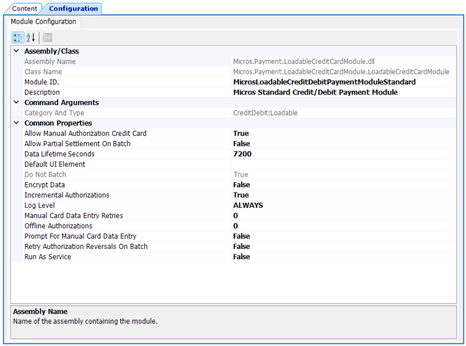
Table 11-4 Form View Settings
| Field Name | Description | Values |
|---|---|---|
| Assembly Class | ||
| Assembly Name | Read only | |
| Class Name | Read only | |
| Module ID | Pre-populated | |
| Description | Pre-populated | |
| Command Arguments | ||
| Category and Type | Read only | |
| Common Properties | ||
| Allow Manual Authorization Credit Card | Select True to allow calling in a manual authorization for a credit card. | Boolean (True, False) |
| Allow Partial Settlement on Batch | Not applicable to SPI. | |
| Data Lifetime Seconds | Lifetime of payment transactions maintained by the system (in seconds). If a transaction is not accessed within this timeframe, it is discarded. A value of 0 disables this functionality. | Numeric |
| Default UI Element | Not applicable to SPI. | |
| Do not batch | Pre-populated | True |
| Encrypt Data | Select True if the payment service provider supports this feature. | Boolean (True, False) |
| Incremental Authorizations | Select True if the payment service provider supports this feature. | Boolean (True, False) |
| Log Level | Select the log detail level. | |
| Manual Card Data Entry Retries | Not applicable to SPI. | Numeric |
| Offline Authorizations | Not applicable to SPI. | Numeric |
| Prompt For Manual Card Data Entry | Not applicable to SPI. | Boolean (True, False) |
| Retry Authorization Reversals on Batch | Not applicable to SPI. | Boolean (True, False) |
| Run As Service | Not applicable to SPI. | Boolean (True, False) |
- Select the Enterprise, property, revenue center, or zone, click Setup, and then click Payments.
- Insert a new record for SPI, and then double-click the record to open it.
- Click Import from a file, browse to
[Drive letter]\MICROS\Simphony2\EgatewayService\handlers\Micros.Payment.LoadableCreditCardModule.dll, and then click Open. - Select the SPI Driver from the drop-down list.
- Select Internal from the Device drop-down list.
- Select 3 - DLL from the Content Type drop-down list.
- On the Configuration subtab, modify the settings as required. Obtain the values from your PSP.
- Click Save.
Parent topic: The Simphony Payment Interface (SPI)