Configuring the SPI Device for Workstations
Where it can be accessed: Workstation
Role Access: Workstations
Role Privileges: View, Edit, Add, Delete
Views: Table, form
Figure 11-4 Devices Configuration: Table View Settings
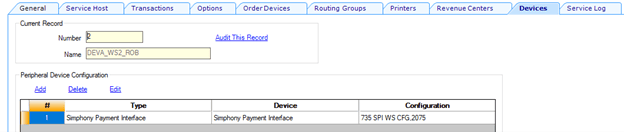
Table 11-5 Table View Settings
| Field Name | Description | Data Type/Value |
|---|---|---|
| Object Number | (This cell intentionally empty.) | Integer (1–999999999 ) |
| Type | Simphony Payment Interface | String |
| Device | Simphony Payment Interface | String |
| Configuration | (This cell intentionally empty.) | String |
Table 11-6 Form View Settings
| Field Name | Description | Values |
|---|---|---|
| Common Driver Properties | ||
| Enable Line Item Display |
Set to True to enable the Line Item Display feature. The PSP must support the feature. Not available for Oracle Payment All In One devices. (PSP support required). |
Boolean (True, False) |
| Enable Receipt Email Prompt |
Set to True to enable the Email receipt prompt on the payment device. Not available for Oracle Payment All In One devices. (PSP support required). |
Boolean (True, False) |
| Transport Service Properties | ||
| Host Timeout |
Enter the timeout value in seconds. This is the amount of time that the host waits for a response from the PSP. The default timeout value is 180 seconds. Overrides SPI Payment Driver Settings. |
Integer |
| Primary Host |
Enter the URL for the PSP endpoint. Terminal mode: Middleware mode: If the IP address for each PED is different (network/wireless PEDs in Terminal mode), create workstation devices to enter each POS workstation's PED’s IP address individually. If the Security Settings use HTTPS, ensure that the Primary Host field shows |
String (url) |
| Validate XML Message Against Schema |
To validate the format of existing messages that are sent to the PSP against the schema, set the value to True. Overrides SPI Payment Driver Settings. |
Boolean (True, False) |
| Security |
You can load certificates in either the payment driver configuration or the workstation device configuration, depending on your communication method and how devices connect to the payment device (PED). Certificates are installed on POS workstations as part of the DBSync process. |
|
| Security Settings |
Select the appropriate option:
For one-way authentication, the PSP provides the private key for the server certificates, which must be distributed to all POS workstations. For two-way authentication, the client certificates with passwords are also issued by the PSP for each Simphony POS workstation. The Oracle Simphony Security Guide contains more information about the certificates. |
List Choice |
| Load Server Certificate | Click the ellipsis button, select the server certificate, and then click Open. | String |
| Load Client Certificate | Click the ellipsis button, select the client certificate, enter the password when prompted, and then click Open. | String |
| Delete Certificates | To delete a certificate, select Do Not Delete, Delete All Certificates, Delete Server Certificate, or Delete Client Certificate. Confirm with Yes or No. | Button |
Parent topic: The Simphony Payment Interface (SPI)