Profile Message Delivery
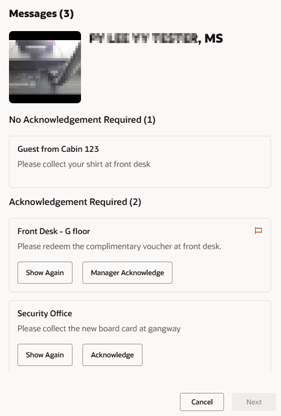
Authorized Security Officers can create and deliver messages to specific profiles (guests, residents, visitors, or crew) during gangway movement.
To deliver a message, follow these steps:
- Search for a profile on the Gangway/Tender tab by scanning a barcode or tapping an RFID card, or use the Search tab to find and select the profile manually. If searching manually, select the profile’s onboard status column, then confirm the movement change.
- If the profile has message, it will be showed along with a sound (configurable in Administration > Enterprise > Gateway Security Audio > Gangway/Tender > Message).
- All the messages are displayed according to priority, followed by standard messages.
- For a message to be showed, it must meet the following criteria:
- Delivery Type is set to Delivery at Gangway.
- The message is within its effective and expiry dates (or has no expiry date).
- The message status is undelivered.
- There are three types of messages:
- No Acknowledgement: Message is delivered directly after movement.
- User Acknowledgement with log: Message requires officer acknowledgement or Show Again.
- Manager Acknowledgement with log: Message requires managerial confirmation or Show Again.
- For messages requiring manager acknowledgement:
- If the current user has the Gateway Security - Message Handling - Authorize permission (i.e., is a manager), no further verification is needed.
-
Otherwise, the you are prompted to obtain manager authentication by either tapping your card or manually entering your credentials at the Manager action needed prompt.
- Once a manager has provided approval, the authorization is retained—even if the message status is temporarily set to "Show again." Reverting to "Manager acknowledgment" will not require additional manager authentication.
- If Show Again is selected, the message will be showed again in the next gangway movement.
Once all required acknowledgments are completed, the Next button becomes enabled. Clicking Next will continue with the profile's movement. Clicking Cancel will cancel the profile movement process and retain the previous message status.
The system uses the parameters in the OHC Administration, under System Setup, Database Parameters, to control the message delivery process. Refer to the table below for more details.
| Parameter Gangway, Check Message | Parameter Gangway, Allow Mark as Delivered | System Behavior |
|---|---|---|
| 0 | N/A | The acknowledgement status of messages is based on the Acknowledge Type field, which is set on the Messages page. |
| 1 | 0 | All types of messages will be categorized under No Acknowledgement Required and their delivery status will remain unchanged after profile movement. |
| 1 | 1 | All types of messages will be categorized under Acknowledgement Required and will allow the user to either Show Again or Acknowledge the message. |
| 1 | 2 | All types of messages will be categorized under No Acknowledgement Required and will be automatically marked as delivered after the profile movement. |