DVMs for Light & Wonder Engage
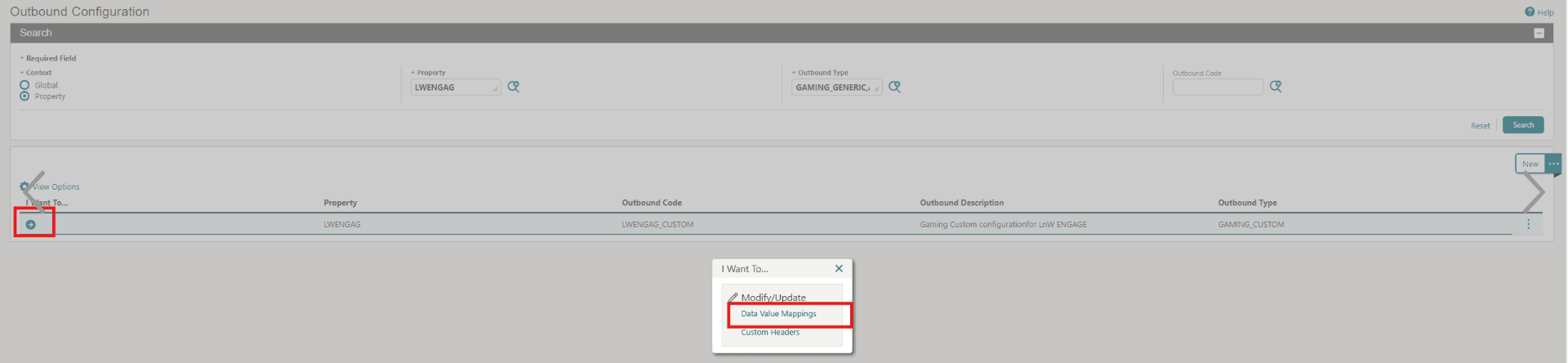
The below DVM values are for reference only and can vary by property.
Address Type
This DVM will convert the Address Type used in OPERA Cloud with the Address Type used in within Light & Wonder (and vice-versa).
-
OPERA Cloud Code: This is the Address Type that exists in OPERA Cloud.
-
External Value: This is the Address Type in Light & Wonder that corresponds to the OPERA Cloud Address Type code.
-
External > OPERA Cloud: Select this option to translate these values for messages received by OPERA Cloud.
-
OPERA Cloud > External: Select this option to translate these values for messages being sent out by OPERA Cloud.
Table 7-41 Address Type
| OPERA Cloud Code | External Value (aka Light & Wonder ENGAGE) | External > OPERA Cloud | OPERA Cloud > External |
|---|---|---|---|
|
HOME |
homeAddress |
 |
|
|
OTHER |
alternateAddress |
|
|
Phone Type
This DVM converts the Phone Type used in OPERA Cloud with the Phone Type used in Light & Wonder (and vice-versa).
-
OPERA Cloud Code: This is the Phone Type that exists in OPERA Cloud.
-
External Value: This is the Phone Type in Light & Wonder that corresponds to the OPERA Cloud Phone Type code.
-
External > OPERA Cloud: Select this option to translate these values for messages received in OPERA Cloud.
-
OPERA Cloud > External: Select this option to translate these values for messages being sent by OPERA Cloud.
Table 7-42 Phone Type
| OPERA Cloud | External Value (aka Light & Wonder ENGAGE) | External > OPERA Cloud | OPERA Cloud > External Cloud |
|---|---|---|---|
|
|
primaryEmail |
|
|
|
HOME |
homePhone |
|
|
|
MOBILE |
mobilePhone |
|
|
Parent topic: Light & Wonder ENGAGE