Workflow: Updating Out Of Order Status

Out Of Order status indicates the room is not available for the front desk for assignments and is removed from inventory availability.

Out of Order rooms affect RevPAR, average rate and occupancy calculations (available when the Out of Order OPERA Control is active).

Note:

A room cannot be set to Out Of Order when

  • the room is assigned for an arriving guest.
  • the room is checked in.

Sequence Diagram
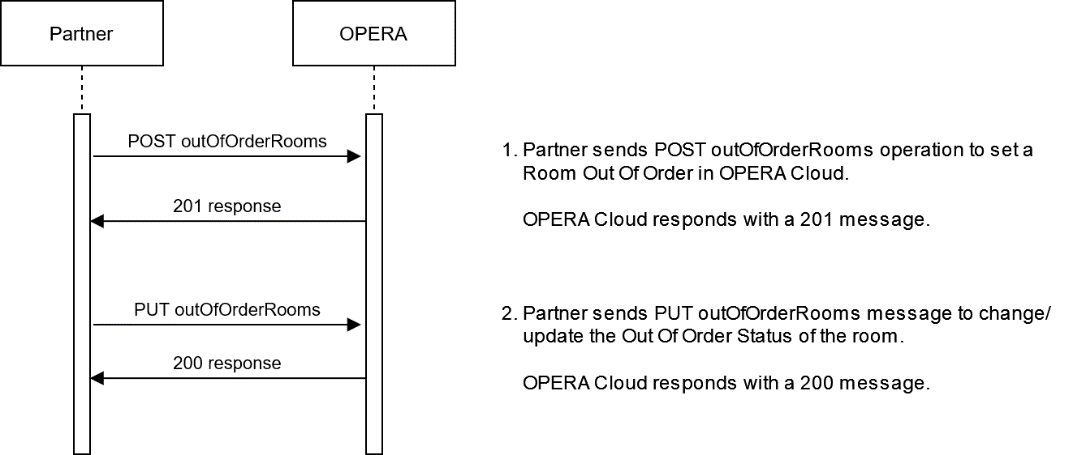

This image shows the workflow for Updating Out Of Order Status.

Description of Steps

Description Operation

Set a room to Out Of Order

Use the POST outOfOrderRooms operation to set a room to Out Of Order.

The user should set the related Out Of Order reason code ("reasonCode":), as defined in OPERA Cloud, as well as set a start date ("start":) and scheduled end date ("end":) of the status.

An optional text as "repairRemarks": can be sent for further details of the marked repair item.

It is not necessary to send the "reasonDescription": value; this is linked with the "reasonCode":

The user should also set a Room Status return status ("returnStatus":) that the room should be set to once the Out Of Order status has ended.

Update Out Of Order room status

Use thecompleteOutOfOrderRooms operation when one or more rooms are no longer Out Of Order and can now be available for a guest to stay in.

Specify in the request what status the room(s) should be returned to, such as Clean, Inspected, Dirty or Pickup.

Set a Room to Out Of Order

POST {{HostName}}/hsk/v1/hotels/{{HotelId}}/rooms/outOfOrderRooms


{
    "criteria": {
        "roomRangeList": {
            "roomIds": [
                "100"
            ],
            "roomOutOfOrder": {
                "repairRemarks": "remarks go here",
                "returnStatus": "Dirty",
                "reasonCode": "GEN",
                "reasonDescription": "General Maintenance",
                "newDateRange": {
                    "start": "2020-08-31",
                    "end": "2020-09-01"
                },
                "start": "2020-08-31",
                "end": "2020-09-01"
            }
        }
    }
}

Response HTTP 201 created

Update an Out Of Order status

PUT {{HostName}}/hsk/v1/hotels/{{HotelId}}/rooms/outOfOrderRooms

{
    "criteria": {
        "roomRepairByRoomNumber": [
            {
                "roomId": "100",
                "roomOutOfOrder": {
                    "repairRemarks": "remarks can go here",
                    "returnStatus": "Dirty",
                    "reasonCode": "GEN",
                    "reasonDescription": "General Maintenance",
                    "newDateRange": {
                        "start": "2020-08-31",
                        "end": "2020-08-31"
                    },
                    "start": "2020-08-31",
                    "end": "2020-09-01"
                }
            }
        ]
    }
}

Retrieve a list of rooms currently set to Out Of Order.

Using the OPERA Cloud / OHIP API operation GET outOfOrderRooms, the partner system can also retrieve a list of rooms currently in Out Of Order Status or request a list of Rooms in Out Of Order for a specific Date range.

Sequence Diagram
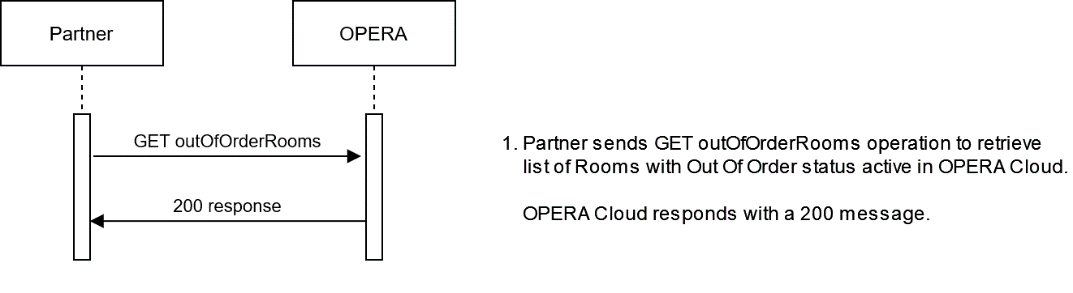

This image shows the workflow for GET outOfOrderRooms operation.

Description Operation

Partner system sends the GET outOfOrderRooms operation to request list of all rooms in active Out Of Order status.

The response message contains the rooms with detailed Out Of Order information.

GET all Rooms with Out Of Order status

GET {{HostName}}/hsk/v1/hotels/{{HotelId}}/rooms/outOfOrderRooms?startDate=2020-08-31&endDate=2020-09-01

{
    "housekeepingRooms": {
        "room": [
            {
                "roomType": {
                    "pseudoRoom": false,
                    "roomClass": "ALL",
                    "houseKeeping": false,
                    "roomType": "CLASSIC"
                },
                "roomId": "100",
                "housekeeping": {
                    "housekeepingRoomStatus": {
                        "housekeepingRoomStatus": "OutOfOrder",
                        "frontOfficeStatus": "Vacant",
                        "housekeepingStatus": "Vacant"
                    }
                },
                "outOfOrder": [
                    {
                        "repairRemarks": "remarks go here",
                        "returnStatus": "Dirty",
                        "reasonCode": "GEN",
                        "reasonDescription": "General Maintenance",
                        "newDateRange": {
                            "start": "2020-08-31",
                            "end": "2020-08-31"
                        },
                        "housekeepingRoomStatus": "OutOfOrder",
                        "start": "2020-08-31",
                        "end": "2020-09-01"
                    }
                ]
            }
        ],
        "hotelId": "{{HotelId}}"
    },
    "links": [
        {
            "href": "{{HostName}}/hsk/v1/hotels/{{HotelId}}/rooms/outOfOrderRooms",
            "rel": "self",
            "templated": false,
            "method": "PUT",
            "operationId": "completeOutOfOrderRooms"
        },
        {
            "href":"{{HostName}}/hsk/v1/hotels/{{HotelId}}/rooms/outOfOrderRooms",
            "rel": "self",
            "templated": false,
            "method": "POST",
            "operationId": "postOutOfOrderRooms"
        },
        {
            "href": "{{HostName}}/hsk/v1/hotels/{{HotelId}}/rooms/outOfOrderRooms",
            "rel": "self",
            "templated": false,
            "method": "PUT",
            "operationId": "completeOutOfServiceRooms"
        },
        {
            "href": "{{HostName}}/hsk/v1/hotels/{{HotelId}}/rooms/outOfOrderRooms",
            "rel": "self",
            "templated": false,
            "method": "GET",
            "operationId": "getOutOfServiceRooms"
        }
    ]
}