Workflow: Create New Room Key Plus Additional Room Key
A typical process to create a room key plus additional room key for a reservation is as follows:
- Sequence Diagram
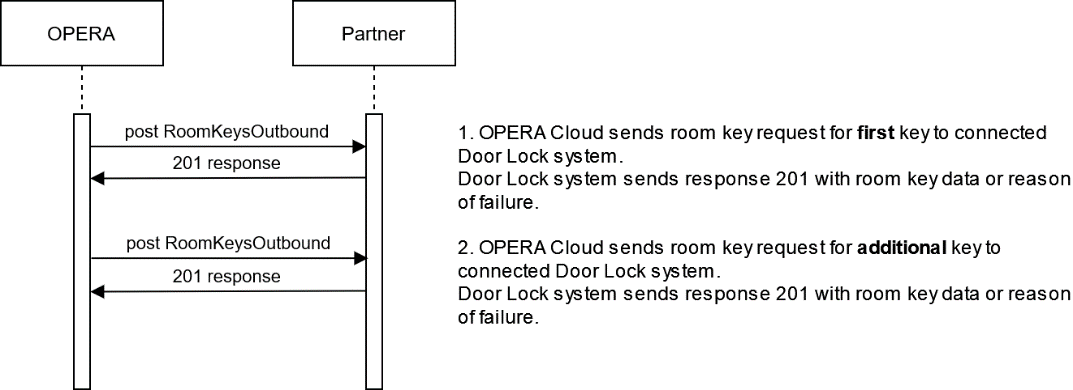
2. Description of Steps:
| Description | Sample Call | |
|---|---|---|
| 1 |
Request for a new room key or Pincode from OPERA Cloud PMS UI is sent to the door lock system. The door lock system must respond within 20 seconds with a "201" status message containing room key data or (in case of an unsuccessful request) a "201" response containing message information on why the request could not be processed. A new key can be requested at anytime. Even before the reservation checks in, the OPERA user can send a request for a new key (plus additional duplicate keys). It is expected that the door lock system supports requests for keys being valid in the future. Within the check-in process, the OPERA Cloud user is prompted to create room keys. The related "Make Key" form will open and the user can choose to create new or duplicate (additional) room key(s). After setting all room key options, such as the additional rooms and any associated Access Areas (KeyOptions) it should grant access to, the postRoomKeyOutbound API that includes the keyType value "New" and the specific encoderId will be transmitted to the door lock system. The door lock system will pass the request to the key encoder, which then processes the room key request. After the key encoder processed the request, the door lock system sends back a 201 http response message to OPERA Cloud containing the result of the request. If the request was successful, the door lock system returns as much key data information as possible, such as the activated KeyOptions (Access areas), the time the key has been generated/activated, and a short response text that appears to the user in OPERA Cloud. It is necessary to specify both the PMS 'encoderTerminal' and the Key Service system's coder (encoderId) in cases where more than one PMS workstation might be addressing one key coder. In OPERA Cloud, the Encoder ID will be configured so the PMS user can choose which encoder is activated to execute the related request. ORACLE Cloud PMS does NOT send another request command automatically should a negative response be received. The user sees the response and decides if another try should be made. With a request for a new room key (keyType: "New"), it is expected that all previously active room keys for this reservation/room must be set inactive. Note: there will be ONE separate postRoomKeysOutbound call per room key to create. The "Number of keys" value is always "1"! |
New Room Key Request POST {{HostName}}/fof/v1/hotels/{{HotelId}}/roomKeysOutbound New Room Key Response New Pincode Request POST {{HostName}}/fof/v1/hotels/{{HotelId}}/roomKeysOutbound New Pincode Response |
| 2 |
Request for an additional room key from OPERA Cloud PMS UI. At any time after having successfully requested one room key (a New key), the OPERA Cloud PMS allows you to request additional room keys for the same room/reservation. By using the same postRoomKeysOutbound operation, OPERA Cloud PMS sends the request with the keyType value "Duplicate" to the door lock system. The door lock system will pass the request to the key encoder, which then processes the room key request. After key encoder processes the request, the door lock system sends back a 201 http response message to OPERA Cloud containing the result of the request. If the request was successful, then the door lock system sends back as much key data information as possible, such as the activated KeyOptions (Access areas), the time the key has been generated/activated, and a short response text that appears to the user in OPERA Cloud. It is possible to send multiple requests for a "Duplicate" room key. OPERA Cloud PMS has no limit on sending such requests. If a Duplicate key is requested for a room or reservation where the door lock system does not have an active key, it is expected that the door lock system sends a corresponding response with a related resultText. This is a note that appears to the PMS user. |
Additional Room Key Request POST {{HostName}}/fof/v1/hotels/{{HotelId}}/roomKeysOutbound Additional Room Key Response |
Parent topic: Workflows