Workflow: OPERA Cloud PMS Creates a Guest Message and Immediately Sends the Full Message Text to the External System

OPERA Cloud PMS deletes a guest message from the PMS for an existing reservation.

Workflow Diagram
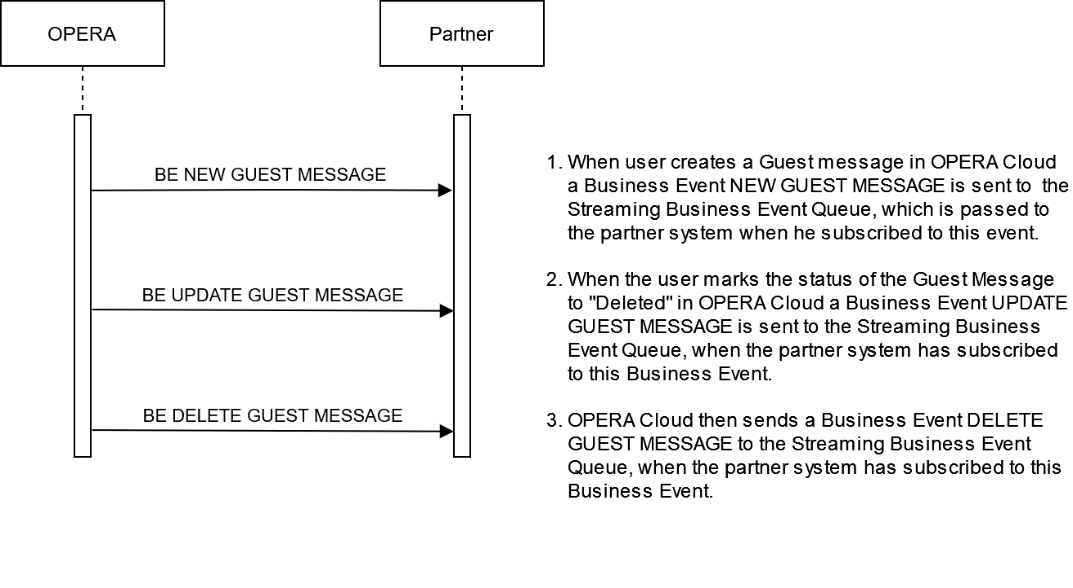

This image shows the sequence of the workflow.

Description of Steps:

  Description of Steps Operation
UC6.1

Use case: User deletes an existing Guest Message from a reservation in OPERA Cloud.

Subscribe to the Streaming Business Event DELETE GUEST MESSAGE to receive the information for an update of an existing Guest Message once it has been completed in OPERA Cloud.

The example below shows the step to create a new Guest Message in OPERA Cloud, which will trigger the NEW GUEST MESSAGE Business Event with all message information.

Note:

In OPERA Cloud, only Guest Messages with deliveryStatus ="Nr" can be deleted.

Guest Messages with deliveryStatus ="Mr" can no longer be deleted.

Streaming BE NEW GUEST MESSAGE

Create New Guest Message

Streaming BE NEW GUEST MESSAGE

JSON:

{
    "id": "43656865784565746897896967856",
    "type": "next",
    "payload": {
        "data": {
            "newEvent": {
                "metadata": {
                    "offset": "33979"
                },
                "moduleName": "RESERVATION",
                "primaryKey": "244761",
                "eventName": "NEW GUEST MESSAGE",
                "detail": [
                    {
                        "oldValue": "CHECKED IN",
                        "newValue": "CHECKED IN",
                        "elementName": "RESERVATION STATUS"
                    },
                    {
                        "oldValue": "205",
                        "newValue": "205",
                        "elementName": "ROOM"
                    },
                    {
                        "oldValue": "",
                        "newValue": "NR",
                        "elementName": "DELIVERY STATUS"
                    },
                    {
                        "oldValue": "",
                        "newValue": "Message Test, Guest",
                        "elementName": "GUEST NAME"
                    },
                    {
                        "oldValue": "",
                        "newValue": "2025-05-16",
                        "elementName": "MESSAGE DATE"
                    },
                    {
                        "oldValue": "",
                        "newValue": "35551",
                        "elementName": "MESSAGE ID"
                    },
                    {
                        "oldValue": "",
                        "newValue": "Please contact Reception desk. We have a letter for you!",
                        "elementName": "MESSAGE TEXT"
                    },
                    {
                        "oldValue": "",
                        "newValue": "TM",
                        "elementName": "MESSAGE TYPE"
                    },
                    {
                        "oldValue": "",
                        "newValue": "OHIPLABMBOESEL",
                        "elementName": "USER NAME"
                    }
                ]
            }
        }
    }
}
UC6.2

Internally OPERA Cloud first changes the deliveryStatus from "Nr" to "Mr" and then sends the UPDATE GUEST MESSAGE Business Event.

Streaming BE UPDATE GUEST MESSAGE

UPDATE Guest Message

Streaming BE UPDATE GUEST MESSAGE

JSON:

{
    "id": "43656865784565746897896967856",
    "type": "next",
    "payload": {
        "data": {
            "newEvent": {
                "metadata": {
                    "offset": "33982"
                },
                "moduleName": "RESERVATION",
                "primaryKey": "244761",
                "eventName": "UPDATE GUEST MESSAGE",
                "detail": [
                    {
                        "oldValue": "CHECKED IN",
                        "newValue": "CHECKED IN",
                        "elementName": "RESERVATION STATUS"
                    },
                    {
                        "oldValue": "205",
                        "newValue": "205",
                        "elementName": "ROOM"
                    },
                    {
                        "oldValue": "NR",
                        "newValue": "MR",
                        "elementName": "DELIVERY STATUS"
                    },
                    {
                        "oldValue": "Message Test, Guest",
                        "newValue": "Message Test, Guest",
                        "elementName": "GUEST NAME"
                    },
                    {
                        "oldValue": "2025-05-16",
                        "newValue": "2025-05-16",
                        "elementName": "MESSAGE DATE"
                    },
                    {
                        "oldValue": "35551",
                        "newValue": "35551",
                        "elementName": "MESSAGE ID"
                    },
                    {
                        "oldValue": "Please contact Reception desk. We have a letter for you!",
                        "newValue": "Please contact Reception desk. We have a letter for you!",
                        "elementName": "MESSAGE TEXT"
                    },
                    {
                        "oldValue": "TM",
                        "newValue": "TM",
                        "elementName": "MESSAGE TYPE"
                    },
                    {
                        "oldValue": "OHIPLABMBOESEL",
                        "newValue": "OHIPLABMBOESEL",
                        "elementName": "USER NAME"
                    }
                ]
            }
        }
    }
}
UC6.3

OPERA Cloud then sends the DELETE GUEST MESSAGE Business Event.

Once the Guest message has been deleted from the reservation, it is no longer visible in OPERA Cloud.

Streaming BE DELETE GUEST MESSAGE

Delete Guest Message

Streaming BE DELETE GUEST MESSAGE

JSON:

{
    "id": "43656865784565746897896967856",
    "type": "next",
    "payload": {
        "data": {
            "newEvent": {
                "metadata": {
                    "offset": "33985"
                },
                "moduleName": "RESERVATION",
                "primaryKey": "244761",
                "eventName": "DELETE GUEST MESSAGE",
                "detail": [
                    {
                        "oldValue": "CHECKED IN",
                        "newValue": "CHECKED IN",
                        "elementName": "RESERVATION STATUS"
                    },
                    {
                        "oldValue": "205",
                        "newValue": "205",
                        "elementName": "ROOM"
                    },
                    {
                        "oldValue": "MR",
                        "newValue": "",
                        "elementName": "DELIVERY STATUS"
                    },
                    {
                        "oldValue": "Message Test, Guest",
                        "newValue": "",
                        "elementName": "GUEST NAME"
                    },
                    {
                        "oldValue": "2025-05-16",
                        "newValue": "",
                        "elementName": "MESSAGE DATE"
                    },
                    {
                        "oldValue": "35551",
                        "newValue": "",
                        "elementName": "MESSAGE ID"
                    },
                    {
                        "oldValue": "Please contact Reception desk. We have a letter for you!",
                        "newValue": "",
                        "elementName": "MESSAGE TEXT"
                    },
                    {
                        "oldValue": "TM",
                        "newValue": "",
                        "elementName": "MESSAGE TYPE"
                    },
                    {
                        "oldValue": "OHIPLABMBOESEL",
                        "newValue": "",
                        "elementName": "USER NAME"
                    }
                ]
            }
        }
    }
}