Workflow: OPERA Cloud PMS Creates a Guest Message and Immediately Sends the Full Message Text to the External System
- OPERA Cloud PMS updates the status of an existing guest message linked in the PMS for a specific reservation (for example, set to "delivered" or "Not delivered").
- OPERA Cloud PMS deletes a guest message from the PMS for an existing reservation.
Workflow Diagram
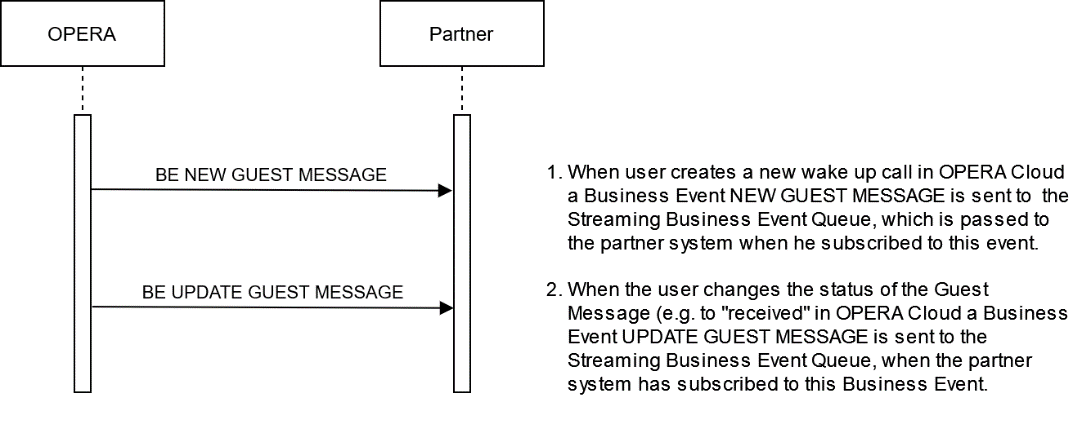
Description of Steps:
| Description of Steps | Operation | |
|---|---|---|
| UC5.1 |
Use case: A user creates a guest message in OPERA Cloud, which then sends a Business Event message to the external system containing the full Guest Message text and status. Subscribe to the Streaming Business Event NEW GUEST MESSAGE to receive the information for a new Guest Message containing the full Guest Message text and status once it has been entered in OPERA Cloud. The external system can then display the Guest Message text in the guest room. The Business Event message contains the Guest message text, which the receiving system can display to the Guest. It also contains the delivery status. { "oldValue": "", "newValue": "NR", "elementName": "DELIVERY STATUS" }, Beside the Business Event Name, the value "NR" in the "newValue": element indicates the status of the message. The element "primaryKey": contains the reservationId which must be used to send an updated status message (see above use cases UC1.3 / UC1.4). |
Streaming BE NEW GUEST MESSAGE Guest Message from OPERA UI Streaming BE New Guest Message JSON: |
| UC5.2 |
Use case: A user updates the status of an existing guest message linked to OPERA Cloud for a specific reservation (for example, set to "delivered" or "Not delivered"). The most common case for updating the Guest Message is when the guest receives a message at the Front desk of the hotel (informed that there is a message waiting), or when the Guest Message text has been adjusted. Subscribe to the Streaming Business Event UPDATE GUEST MESSAGE to receive the information for an update of an existing Guest Message once it has been completed in OPERA Cloud. The partner system receiving this Business Event verifies the element subfields "oldValue": and "newValue": to identify the data that has been updated. |
Streaming BE UPDATE GUEST MESSAGE Guest Message Delivered Streaming BE UPDATE GUEST MESSAGE JSON: |
Parent topic: Workflows