Who Should Use the Wake-Up API
Wake-up calls should only be created, modified, or deleted by systems that are directly responsible for executing wake-up calls or by middleware systems that interface with those execution systems.
This implementation guide covers the following use cases for wake-up activities between OPERA Cloud and the connected partner system.
| Use Case | API Operation | |
|---|---|---|
| 1 | Create new wake-up calls for a checked-in reservation for a specific date and wake time. | Use the POST wakeUpCalls operation |
| 2 | Create new wake-up calls for a checked-in reservation for a specific date for multiple wake times (follow-up call). | Use the POST wakeUpCalls operation |
| 3 | Create new wake-up calls for a checked-in reservation for multiple days (for example, the entire stay) for a specific wake time. | Use the POST wakeUpCalls operation |
| 4 | Create new wake-up calls for a checked-in reservation for multiple days for multiple wake times (follow-up call). | Use the POST wakeUpCalls operation |
| 5 | Update existing wake-up calls with updated status (Result). | Use the PUT wakeUpCalls operation |
| 6 | Delete existing wake-up calls. | Use the DELETE wakeUpCalls operation |
| 7 | Retrieve the current pending wake-up calls for a property or for a checked in reservation. | Use the GET wakeUpCalls operation |
| Wake-up call status notification through Streaming Business Events | ||
| 8.1 | Create a new wake-up call in OPERA Cloud UI. | Use the CREATE WAKE UP CALL Business Event |
| 8.2 |
Update wake-up call with Result Status COMPLETED in OPERA Cloud UI. Update wake-up call with Result Status NO ANSWER in OPERA Cloud UI. |
Use the UPDATE WAKE UP CALL Business Event |
| 9 | Delete a wake-up call in OPERA Cloud UI. | Use the DELETE WAKE UP CALL Business Event |
| 10.1 | Create multiple wake-up calls for the same day in OPERA Cloud UI. | Use the CREATE WAKE UP CALL Business Event |
| 10.2 | Update the wake-up time of a pending follow-up wake-up call in OPERA Cloud UI. |
Use the DELETE WAKE UP CALL Business Event Use the CREATE WAKE UP CALL Business Event |
| 10.3 | Update wake-up call with Result Status COMPLETED for multiple wake-up calls in OPERA Cloud UI. | Use the UPDATE WAKE UP CALL Business Event |
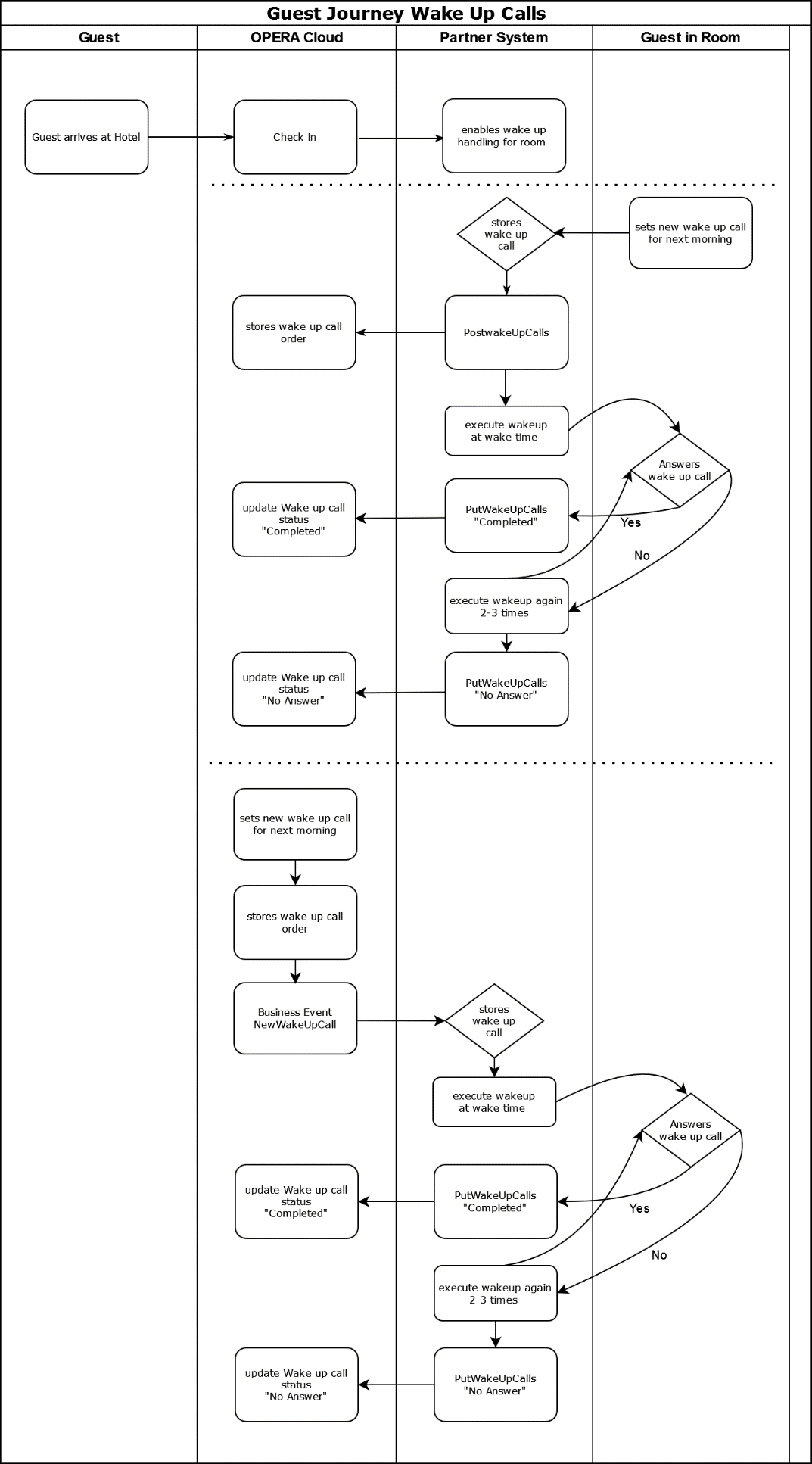
Workflow Diagram:
This functional diagram explains the typical use cases for hotel guests using wake-up calls during their stay.
|
Guest journey wake-up calls. With the guest checking in to the room, the partner system receives a notification and enables the guest to set up wakeup calls using a partner system's device (a phone, TV or other device). Option1: Guest in-house sets a wake-up call through the partner system. The partner system stores the wake-up call request internally and sends a notification to OPERA Cloud. OPERA Cloud also stores the wake-up call against the reservation. The OPERA Cloud user (that is, hotel employee) can then verify if the guest has outstanding wake-up calls. At wake-up time, the partner systems execute the wake-up call. If the guest answers the wake-up call (picks up the phone, confirms wake-up on TV, and so on), the partner system sends a notification to OPERA Cloud that the wake-up call is completed. OPERA Cloud updates the wake-up call status to "Completed." If the guest does not answer the wake-up call, the partner system can optionally re-execute the wake-up call 2 to 3 times (per defined retry times). In case the guest answers the wake-up call at re-execution, the partner system sends a notification to OPERA Cloud that the wake-up call is completed. OPERA Cloud updates the wake-up call status to "Completed." If the guest does not answer the wake-up call even after re-execution attempts, the partner system sends a status notification to OPERA Cloud that the wake-up call was not successful (Status No Answer). OPERA Cloud updates the wake-up call status to "No Answer." Option 2: OPERA Cloud user sets a wake-up call through OPERA Cloud for a guest in house. OPERA Cloud stores the wake-up call request internally. In addition, OPERA Cloud sends out a Business Event notification to the partner system. This requires the partner system to subscribe to the Streaming Business Events and specifically the Wake-Up Call Business Events. The partner system stores the wake-up call request. At wake-up time, the partner systems executes the wake-up call. If the guest answers the wake-up call (picks up the phone, confirms wake-up on TV, and so on), the partner system sends a notification to OPERA Cloud that the wake-up call is completed. OPERA Cloud updates the wake-up call status to "Completed." If the guest does not answer the wake-up call, the partner system can optionally re-execute the wake-up call 2 to 3 times (per defined retry times). In case the guest answers the wake-up call at re-execution, the partner system sends a notification to OPERA Cloud that the wake-up call is completed. OPERA Cloud updates the wake-up call status to "Completed." If the guest does not answer the wake-up call even after re-execution attempts, the partner system sends a status notification to OPERA Cloud that the wake-up call was not successful (Status No Answer). OPERA Cloud updates the wake-up call status to "No Answer." |
Parent topic: Business Context