Workflow: Adjust Wake-Up Calls for the Same Day Set in OPERA Cloud and Change Status of Wake-Up Calls in OPERA Cloud

Sequence Diagram
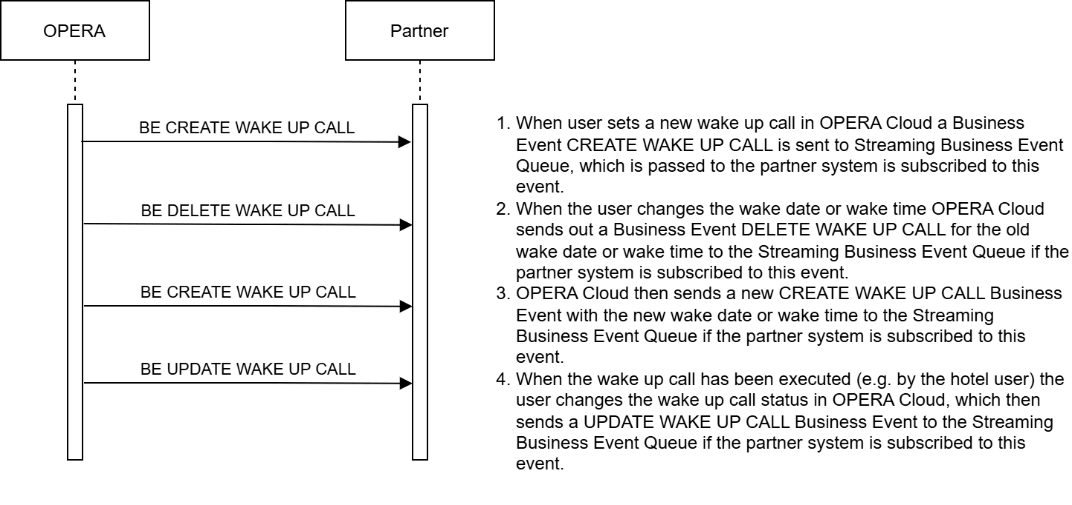
This diagram shows the workflow for a user creating and adjusting a wake-up call and then changing the status of the wake-up call in OPERA Cloud.

Description of Steps:

  Description of Steps: Operation
UC10.1

Create multiple wake-up calls for the same day in OPERA Cloud UI:

OPERA Cloud user creates multiple wake-up calls for the same day in OPERA Cloud.

When the partner system is subscribed to the Streaming Business Event CREATE WAKE UP CALL, OPERA Cloud sends out the Business Event with reservationId, Room number, wake date, and wake time to the Streaming Business Event queue right after the OPERA Cloud user created a new wake-up call request in OPERA Cloud.

The partner system then stores the wake-up call request until execution date and time.

In this example, the OPERA Cloud user sets a wake-up call with an initial wake-up time and a "follow up" wake-up time.

Note that the Business Event CREATE WAKE UP CALL has two wake-up call time elements:

WAKE-UP CALL TIME for the first wake-up set (07:00:00).

FOLLOW UP CALL TIME for the follow-up wake-up call set (07:10:00).

OPERA Cloud expects the partner system executing wake-up calls to handle both the initial wake-up call time and the follow-up call time, performing the first call at 07:00:00 and a follow-up call at 07:10:00.

In the OPERA Cloud UI, two separate wake-up calls will be listed. One wake-up for the initial wake-up time and one for the follow-up wake time.

Wake-up - New wake-up with follow-up call

{
    "id": "5777",
    "type": "next",
    "payload": {
        "data": {
            "newEvent": {
                "metadata": {
                    "offset": "262"
                },
                "primaryKey": "2484054",
                "moduleName": "RESERVATION",
                "eventName": "CREATE WAKE UP CALL",
                "detail": [
                    {
                        "oldValue": "",
                        "newValue": "07:10:00",
                        "elementName": "FOLLOW UP CALL TIME"
                    },
                    {
                        "oldValue": "",
                        "newValue": "4190677",
                        "elementName": "RESERVATION CONFIRMATION NUMBER"
                    },
                    {
                        "oldValue": "",
                        "newValue": "CHECKED IN",
                        "elementName": "RESERVATION STATUS"
                    },
                    {
                        "oldValue": "",
                        "newValue": "105",
                        "elementName": "ROOM"
                    },
                    {
                        "oldValue": "",
                        "newValue": "2025-03-18",
                        "elementName": "WAKE UP CALL DATE"
                    },
                    {
                        "oldValue": "",
                        "newValue": "",
                        "elementName": "WAKE UP CALL NOTES"
                    },
                    {
                        "oldValue": "",
                        "newValue": "PENDING",
                        "elementName": "WAKE UP CALL STATUS"
                    },
                    {
                        "oldValue": "",
                        "newValue": "07:00:00",
                        "elementName": "WAKE UP CALL TIME"
                    }
                ]
            }
        }
    }
}

UC10.2

An OPERA Cloud user updates the follow-up wake time for a pending wake-up call in the OPERA Cloud UI from 07:10 to 07:15.

If an OPERA Cloud user changes the wake-up date or time and the partner system is subscribed to the Streaming Business Event DELETE WAKE UP CALL, OPERA Cloud generates a DELETE WAKE UP CALL business event for the existing wake-up call request, covering both the initial and follow-up times.

In this example, the OPERA Cloud user changed the follow-up wake-up call (07:10:00) to a new wake time (07:15:00) in the OPERA Cloud UI.

The generated DELETE WAKE UP CALL business event includes both wake times (Wake-Up Call Time: 07:00:00 and Follow-Up Call Time: 07:10:00) and sets WAKE-UP CALL STATUS to "CANCELLED."

Wake-up: Delete old FUP wake time

{
    "id": "5777",
    "type": "next",
    "payload": {
        "data": {
            "newEvent": {
                "metadata": {
                    "offset": "263"
                },
                "primaryKey": "2484054",
                "moduleName": "RESERVATION",
                "eventName": "DELETE WAKE UP CALL",
                "detail": [
                    {
                        "oldValue": "07:10:00",
                        "newValue": "",
                        "elementName": "FOLLOW UP CALL TIME"
                    },
                    {
                        "oldValue": "4190677",
                        "newValue": "",
                        "elementName": "RESERVATION CONFIRMATION NUMBER"
                    },
                    {
                        "oldValue": "CHECKED IN",
                        "newValue": "",
                        "elementName": "RESERVATION STATUS"
                    },
                    {
                        "oldValue": "105",
                        "newValue": "",
                        "elementName": "ROOM"
                    },
                    {
                        "oldValue": "2025-03-18",
                        "newValue": "",
                        "elementName": "WAKE UP CALL DATE"
                    },
                    {
                        "oldValue": "",
                        "newValue": "",
                        "elementName": "WAKE UP CALL NOTES"
                    },
                    {
                        "oldValue": "CANCELLED",
                        "newValue": "",
                        "elementName": "WAKE UP CALL STATUS"
                    },
                    {
                        "oldValue": "07:00:00",
                        "newValue": "",
                        "elementName": "WAKE UP CALL TIME"
                    }
                ]
            }
        }
    }
}

OPERA Cloud then generates a new CREATE WAKE UP CALL Business Event with the new wake-up date / wake-up time and sends both Business Events to the Streaming Business Event queue.

The generated CREATE WAKE UP CALL Business Event contains both the unchanged initial WAKE-UP CALL TIME (07:00:00) and the changed FOLLOW UP CALL TIME (07:15:00) and has the WAKE-UP CALL STATUS = "PENDING."

In the OPERA Cloud UI, two new separate wake-up calls are created and are listed for this reservation.

The old wake-up call requests are both set to "CANCELLED" in the OPERA Cloud UI.

Wake-up - Create new FUP wake-up call

{
    "id": "5777",
    "type": "next",
    "payload": {
        "data": {
            "newEvent": {
                "metadata": {
                    "offset": "264"
                },
                "primaryKey": "2484054",
                "moduleName": "RESERVATION",
                "eventName": "CREATE WAKE UP CALL",
                "detail": [
                    {
                        "oldValue": "",
                        "newValue": "07:15:00",
                        "elementName": "FOLLOW UP CALL TIME"
                    },
                    {
                        "oldValue": "",
                        "newValue": "4190677",
                        "elementName": "RESERVATION CONFIRMATION NUMBER"
                    },
                    {
                        "oldValue": "",
                        "newValue": "CHECKED IN",
                        "elementName": "RESERVATION STATUS"
                    },
                    {
                        "oldValue": "",
                        "newValue": "105",
                        "elementName": "ROOM"
                    },
                    {
                        "oldValue": "",
                        "newValue": "2025-03-18",
                        "elementName": "WAKE UP CALL DATE"
                    },
                    {
                        "oldValue": "",
                        "newValue": "",
                        "elementName": "WAKE UP CALL NOTES"
                    },
                    {
                        "oldValue": "",
                        "newValue": "PENDING",
                        "elementName": "WAKE UP CALL STATUS"
                    },
                    {
                        "oldValue": "",
                        "newValue": "07:00:00",
                        "elementName": "WAKE UP CALL TIME"
                    }
                ]
            }
        }
    }
}
UC10.3

An OPERA Cloud user updates Wake-Up Calls in the OPERA Cloud UI with Result Status COMPLETED for multiple wake-up calls.

A common scenario is the Hotel user calls the hotel guest directly at the requested wake-up time. In this case, the user will update the wake-up status in OPERA Cloud to "COMPLETED" when the hotel guest answers the wake-up call.

With the wake-up call status changed, OPERA Cloud triggers a business Event UPDATE WAKE UP CALL with the update WAKE UP CALL STATUS = "COMPLETED" if the partner system is subscribed to this event.

In this use case, as multiple wake-up calls are stored in OPERA Cloud for the initial and the follow-up wake-up call, separate Business Events are sent to the Streaming Business Event queue.

Wake-up - Update Wake-Up call 1 Completed

{
    "id": "5777",
    "type": "next",
    "payload": {
        "data": {
            "newEvent": {
                "metadata": {
                    "offset": "273"
                },
                "primaryKey": "2484054",
                "moduleName": "RESERVATION",
                "eventName": "UPDATE WAKE UP CALL",
                "detail": [
                    {
                        "oldValue": "07:15:00",
                        "newValue": "07:15:00",
                        "elementName": "FOLLOW UP CALL TIME"
                    },
                    {
                        "oldValue": "4190677",
                        "newValue": "4190677",
                        "elementName": "RESERVATION CONFIRMATION NUMBER"
                    },
                    {
                        "oldValue": "CHECKED IN",
                        "newValue": "CHECKED IN",
                        "elementName": "RESERVATION STATUS"
                    },
                    {
                        "oldValue": "105",
                        "newValue": "105",
                        "elementName": "ROOM"
                    },
                    {
                        "oldValue": "2025-03-18",
                        "newValue": "2025-03-18",
                        "elementName": "WAKE UP CALL DATE"
                    },
                    {
                        "oldValue": "",
                        "newValue": "",
                        "elementName": "WAKE UP CALL NOTES"
                    },
                    {
                        "oldValue": "PENDING",
                        "newValue": "COMPLETED",
                        "elementName": "WAKE UP CALL STATUS"
                    },
                    {
                        "oldValue": "07:00:00",
                        "newValue": "07:00:00",
                        "elementName": "WAKE UP CALL TIME"
                    }
                ]
            }
        }
    }
}

Wake-Up - FUP Wake-Up Call Completed

{
    "id": "5777",
    "type": "next",
    "payload": {
        "data": {
            "newEvent": {
                "metadata": {
                    "offset": "274"
                },
                "primaryKey": "2484054",
                "moduleName": "RESERVATION",
                "eventName": "UPDATE WAKE UP CALL",
                "detail": [
                    {
                        "oldValue": "",
                        "newValue": "",
                        "elementName": "FOLLOW UP CALL TIME"
                    },
                    {
                        "oldValue": "4190677",
                        "newValue": "4190677",
                        "elementName": "RESERVATION CONFIRMATION NUMBER"
                    },
                    {
                        "oldValue": "CHECKED IN",
                        "newValue": "CHECKED IN",
                        "elementName": "RESERVATION STATUS"
                    },
                    {
                        "oldValue": "105",
                        "newValue": "105",
                        "elementName": "ROOM"
                    },
                    {
                        "oldValue": "2025-03-18",
                        "newValue": "2025-03-18",
                        "elementName": "WAKE UP CALL DATE"
                    },
                    {
                        "oldValue": "",
                        "newValue": "",
                        "elementName": "WAKE UP CALL NOTES"
                    },
                    {
                        "oldValue": "PENDING",
                        "newValue": "COMPLETED",
                        "elementName": "WAKE UP CALL STATUS"
                    },
                    {
                        "oldValue": "07:15:00",
                        "newValue": "07:15:00",
                        "elementName": "WAKE UP CALL TIME"
                    }
                ]
            }
        }
    }
}