Orchestration
Rather than using the detail array to update the
CRM, you can choose to orchestrate as illustrated in this
diagram:
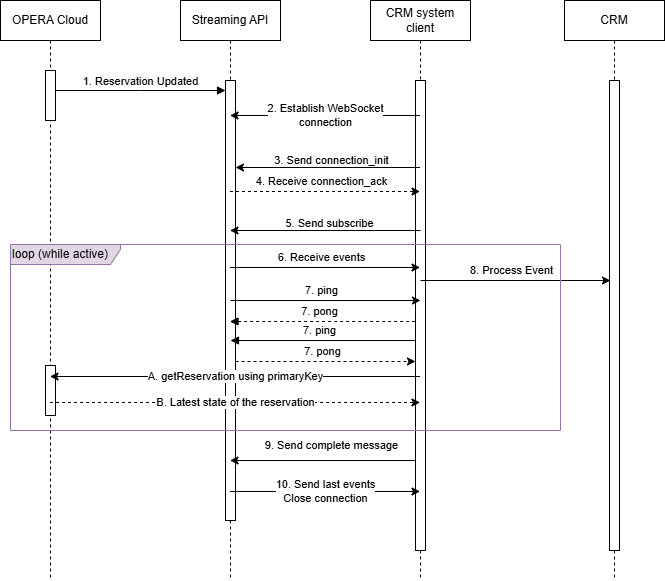
Details Steps for Orchestration
- Do not include the
detailarray in thesubscribemessage. This reduces the amount of data transmitted, which saves bandwidth and allows the application to handle a higher number of events per second. - Use the
primaryKeyandeventNamefrom the event to determine which resource has been modified. For example, ifeventNameis Update Profile, then the resource is a profile. -
Step A in the diagram: Send a synchronous API call to fetch the latest state of
the identified resource. In the case of Update Profile, the operation would be
getProfile.getProfileand requires aprofileId, which is found in theprimaryKey.
Bear in mind the API rate limits on the synchronous API calls. Also note that there is a potential for discrepancies between the event data and the data retrieved through the API call if there are rapid successive changes to the resource.