Replaying Events
Implementing the Oracle Hospitality Integration Platform (OHIP) Streaming API to replay events is essential for maintaining data consistency, especially after disruptions such as network outages. This workflow guides you through the process of reconnecting to the Streaming API and processing missed events to ensure your systems remain synchronized with OPERA Cloud.
When to Apply the Replay Use Case
This workflow is applicable when:
- Your application has experienced a disconnection from the OHIP Streaming API, resulting in missed events.
- You need to ensure that all events emitted during the downtime are received and processed to maintain data integrity.
- Your system requires a mechanism to catch up on events after a period of inactivity exceeding 24 hours.
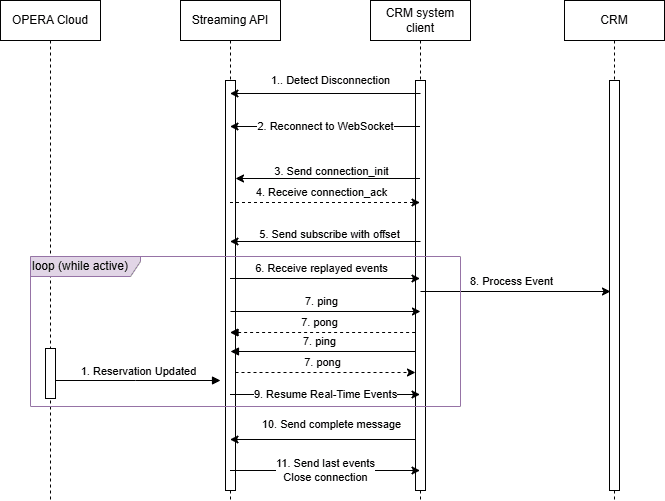
Figure 4-4 Sequence Diagram for Replaying
Detailed Steps for Replaying
- Detect Disconnection.
Monitor the WebSocket connection for any interruptions. Upon detecting a disconnection, initiate the reconnection process.
- Reconnect to WebSocket.
A WebSocket is a way to keep a live channel open between your app and the server, so you can receive updates almost instantly.
Use the hashed key (in Application Key, see "Hashing the Application Key") to build your connection URL. For example:
wss://OHIP_Gateway_URL/subscriptions?key=Hashed_Application_KeyYour client should support the "graphql-transport-ws" subprotocol, so send the header:
Sec-WebSocket-Protocol: graphql-transport-ws - Send the
connection_initmessage.Within 5 seconds of connecting, send the
connection_initmessage to initiate the connection.Sample message:{ "type": "connection_init", "payload": { "Authorization": "Bearer <Access_Token>", "x-app-key": "<Application_Key>" } } - Receive the
connection_ackmessage.Upon successful initialization, the server responds with a
connection_ackmessage, indicating readiness to accept subscription requests.Sample response:{ "type": "connection_ack" } - Send the
subscribemessage with Offset ParameterSend a subscribe message specifying the
chainCodeand theoffsetparameter set to the last successfully processed event's offset. This ensures that all events from that offset onward are replayed.Use the GraphQL schema to decide which fields to include in the request. Including the
primaryKeyis advised since this is the internal OPERA ID of the resource to which the event occurred and can optionally be used to GET the resource via the inbound API call.Ensure the
idis a unique value that will be used throughout the life of this stream, that is, until sending thecompletemessage.Sample message:{ "id": "<id>", "type": "subscribe", "payload": { "variables": { "input": { "chainCode": "<Chain_Code>" } }, "extensions": {}, "operationName": null, "query": "subscription { newEvent(input: { chainCode: \"<Chain_Code>\" offset: \"<offset>\"}) { metadata { offset uniqueEventId } moduleName eventName primaryKey detail { oldValue newValue elementName } } }" } }Optionally, you can choose to receive only the changed attributes in thedetailarray of the events you receive. To achieve this, use the below sample request:{ "id": "<id>", "type": "subscribe", "payload": { "variables": { "input": { "chainCode": "<Chain_Code>" } }, "extensions": {}, "operationName": null, "query": "subscription { newEvent(input: { chainCode: \"<Chain_Code>\" offset: \"<offset>\" delta: true }) { metadata { offset uniqueEventId } moduleName eventName primaryKey detail { oldValue newValue elementName } } }" } } - Receive Replayed events.
The server emits all events from the specified offset onward. Each event is sent as a
nextmessage containing the event data.See the sample event in Subscribing and Consuming Events.
Keep a record of the
offsetvalue; it is a string, not a number.Upon receiving an event, process the data as required by your application. This may involve updating records, triggering workflows, or other business logic.
Security and Privacy: Treat event payloads as sensitive and mask personal data in logs.
- Heartbeats and Keep alive:
Keep the connection alive and establish the line speed; it is essential to send the
pingmessage every 15 seconds.Sample message:{"type":"ping"}The server will also be sending the client
pingmessages to which the client must respond with thepongmessage.Sample message:{"type":"pong"}Note:
The server will close the connection if it does not receive apongwithin 180 seconds. In Performance Considerations, see "Maintain a Healthy Connection and Token Lifecycle."Note:
During Backpressure Mode bursts, the server can defer replying to clientpings withponguntil the burst completes. Treat continuednextmessages as proof of life. - Process Replayed Event.
Upon receiving an event, process the data as required by your application. This may involve updating records, triggering workflows, or other business logic.
Since the volume of events can be large, writing to a cache before updating a database is advised.
- Resume Real-Time Event processing.
After processing all replayed events, the system will continue to receive and process new events in real-time, ensuring ongoing data synchronization.
- Send
completemessage.When you intend to stop receiving events, send a complete message to terminate the subscription. Ensure you use the same ID as in the
subscribemessage.Sample message:{ "id": "<id>", "type": "complete" } - After sending the
completemessage, wait until the last events are received, then wait until OHIP closes the WebSocket connection. Do not close the connection from the client side.Ensure there is a minimum of 10000 ms (10 seconds) between sending the "Complete" message to close a WebSocket connection and sending the next "Subscribe" message to reopen a WebSocket connection.