7 Scaling Recommendations
To effectively scale your consumption of the Oracle Hospitality Integration Platform (OHIP) Streaming API, consider the following strategies:
Implement a Connection Status Check
Follow the Competing Consumer Pattern with the following important changes: before initiating a subscription, a consumer should:
- Ensure it has the correct application key.
- Ensure it has a valid OAuth token.
- Verify the current status of the connection to ensure that no other consumer is actively connected. This approach helps prevent conflicts and ensures that only one consumer is connected at any given time.
Steps to verify the current status of the connection:
- Connect to the Streaming API: Establish a connection to the OHIP Streaming API.
- Send an Initialization Request: Dispatch the "init" request to initiate the connection.
- Query the Connection Status: Execute the following GraphQL query to check the connection status:
query {
    connection {
        id
        status
    }
}
Evaluate the Response: If the response indicates that the "status" is "Inactive," proceed to send the "subscribe" request.
By incorporating this status check, you can manage multiple consumers effectively, ensuring that only one is active at a time.
Recommended Competing Consumer Pattern
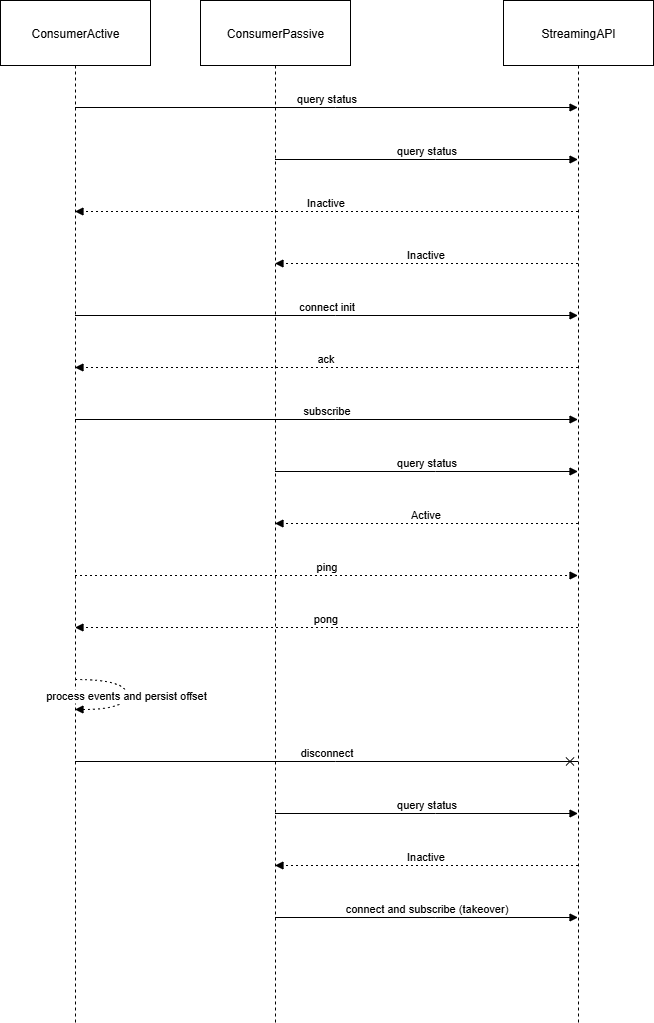
One recommended operating mode is to run two consumer instances for the same stream: one active and one passive. Both instances periodically query the connection status and only attempt to connect when the status is inactive. This preserves single-consumer ordering while enabling rapid failover.
Key behaviors:
- Both consumers periodically run the connection status query.
- If status is "Inactive," a consumer waits a short randomized delay and then attempts to connect.
- Only the first to complete init and subscribe becomes active; the other remains passive and continues polling.
- If the server returns 4409, wait the minimum lockout period plus jitter before retrying.
- The active consumer keeps the WebSocket connection alive with ping/pong frames, processes events, and persists the offset and uniqueEventId.
- On disconnect or token expiry, the passive consumer observes status change to "Inactive" and takes over.
Figure 7-1 Active and Passive Consumer Instances for the Same Stream
Maintain a Persistent Connection
To ensure continuous event consumption and minimize the risk of missing events, maintain a persistent WebSocket connection to the Streaming API.
Best Practices:
- Keep the WebSocket connection open at all times. If a disconnection occurs, reconnect promptly.
- Send a "ping" message every 15 seconds to keep the connection alive.
- Handle Token Expiry: Monitor the OAuth token's expiration time
(
exp) and renew it as needed to prevent authentication issues. - Track the time of the last disconnect (whether graceful or unplanned) and if reconnecting less than 10 seconds later, wait the remaining time before retrying.
- If the last disconnect time is unknown (for example, after a crash or restart), always wait at least 10 seconds before attempting to reconnect.
Maintaining a persistent connection helps reduce latency and supports near-real-time event delivery.
Implement Backpressure Handling
To manage high volumes of incoming events and prevent system overload, implement backpressure handling mechanisms.
Buffering and Queuing
To prevent database or downstream overload during bursts or high-volume spikes, introduce a decoupling layer between your streaming event intake and processing logic. Immediately buffer all incoming events (for example, using an in-memory message queue, Redis, or a persistent queuing platform like Apache Kafka or RabbitMQ). Your primary listener should place events onto this queue and use separate worker processes or threads to handle business logic and persistence from the queue.
This design maximizes throughput, absorbs bursts, and helps ensure no events are lost even if storage or downstream APIs have temporary outages. In Performance Considerations, see "Design the Intake Path for Ordered Processing" and "Handle Bursts and Backpressure" for guidance.
Implement rate limiting in your buffer or queue to control the flow of incoming events and prevent overwhelming your system.
For example:
- Use Kafka as an event buffer: Your OHIP consumer sends every event to a Kafka topic; multiple back-end workers read and persist or transform events in parallel.
- In-memory buffering with Redis or local queues: If using a lightweight deployment, buffer events in Redis, drain them with worker threads, and track offsets for at-least-once processing.
Dead‑Letter Queue (Consumer‑Managed)
If an event repeatedly fails processing ("poison" message), quarantine it and proceed:
- Route the raw event payload including
offset,uniqueEventId,eventName,primaryKey, plus errorCause, firstSeenAt, and retryCount to a DLQ you operate (for example, a Kafka/RabbitMQ/SQS topic/queue or durable storage). - Continue consuming subsequent events to avoid falling behind; do not stall the intake loop.
- Implement a reprocessor that can read from your DLQ, fix data or code defects, and
re‑apply business logic safely (idempotent writes and deduplication by
uniqueEventId). - Expose DLQ metrics and alerts (age, depth, top error causes). In Performance Considerations, see "Design the Intake Path for Ordered Processing" for persistence and idempotency patterns.
Monitor and Analyze Performance
Regularly monitor your system's performance to identify potential bottlenecks and optimize resource utilization.
Key metrics to monitor:
- Latency: Measure the time taken to receive and process events.
- Throughput: Track the number of events processed per unit time.
- Error Rates: Monitor the frequency and types of errors encountered.
- Lag: Monitor the events produced and events consumed to ensure your integration is keeping up.
- Connection: Monitor the connection stays open and alive and record the last disconnect time to ensure reconnects wait 10 seconds.
-
OAuth expiry: Monitor the
expin the OAuth token to disconnect cleanly and request a new OAuth token before it expires. - Buffer or queue: Monitor the queue size in any buffering or queueing system.
Tools:
-
Logging: Implement comprehensive logging to capture detailed information about
system behavior. Logging the
uniqueEventIdcan speed up troubleshooting. Log errors and differentiate between retryable and non-retryable errors using the Streaming State Chart in Use Cases. - Monitoring Dashboards: Use dashboards to visualize performance metrics and trends.
- OHIP Developer Portal Analytics: Use the Developer Portal Analytics page to monitor events produced vs events consumed and visualize whether your integration is keeping up.
By continuously monitoring and analyzing performance, you can proactively address issues and optimize your system for better scalability.
If Your Integration is Not Keeping Up
If the number of events produced exceeds the number your integration can consume, the following strategies can help:
- Ensure you have applied filters and conditions to only receive the events of interest to you.
- If you created your streaming configuration before OHIP 25.4 was released, update your streaming configuration in the Developer Portal. This will restrict the business data elements included in the payload to those in the filters, dramatically reducing the size of each message.
- Move your consumer(s) closer to the OPERA environment from which events are being consumed. The reduced latency will increase the volume of data that can be sent per second. For maximum speed, deploy your consumer(s) in Oracle Cloud Infrastructure.
- If you have attempted steps 1-3 and your consumer is still not keeping up, separate your
consumption across multiple applications:
- In the Developer Portal, subscribe one application to a subset of events and a second application to different events. This works best if some events are larger (for example, profiles) than others.
- Alternatively, in the Developer Portal, subscribe one application to all events for a subset of hotels, while a second application consumes all events for other hotels.
- Bear in mind the maximum of 100 applications.
By following these scaling recommendations, you can enhance the efficiency and reliability of your integration with the OHIP Streaming API, ensuring that your system can handle increasing volumes of events effectively.