Credit Card Guarantee through the OPERA Cloud Application (Manual Entry Into Payment Device for Tokenized Properties)
To enter a card number into the payment device:
-
From the OPERA Cloud menu, select Bookings, select Reservations, and then click Manage Reservation.
-
Search for and open the reservation.
-
Click I Want To… and select Payment Instructions. See Payment Instructions for details.
-
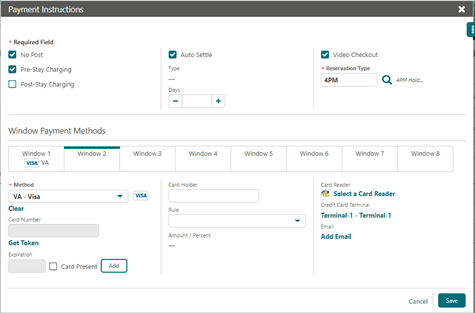
Click New/Edit Payment Instructions.
-
Select the general CP-Chip and Pin Payment Method, or a specific defined Chip and Pin Payment, such as Master Card, or VISA.
-
If the Hotel does not have a Payment device for reservations, enter the Card Number and Expiration date manually. A token request is triggered automatically.
Note:
If the Hotel has a Payment device for reservations, do not enter Card Number or Expiration data. If not already selected, select the Payment device you wish to trigger. -
Click Get Token. This step triggers the Payment device.
Parent topic: Credit Card Manual Entry