View the list of alerts for all trials you can access

Life Sciences AI Agents stores the AI-generated alerts for all the trials you have access to in the Alerts list. The alerts are prioritized based on risk severity.

For all alerts, the Alerts list shows the risk severity (Critical, High, Moderate, or Low), study name, alert name, the alert summary, and the dates the alerts were created or last updated.
To view the list of alerts for all the Ongoing Trials you have access to:
  1. Select the Alerts tab at the bottom of the page. The Alerts list opens. For example:
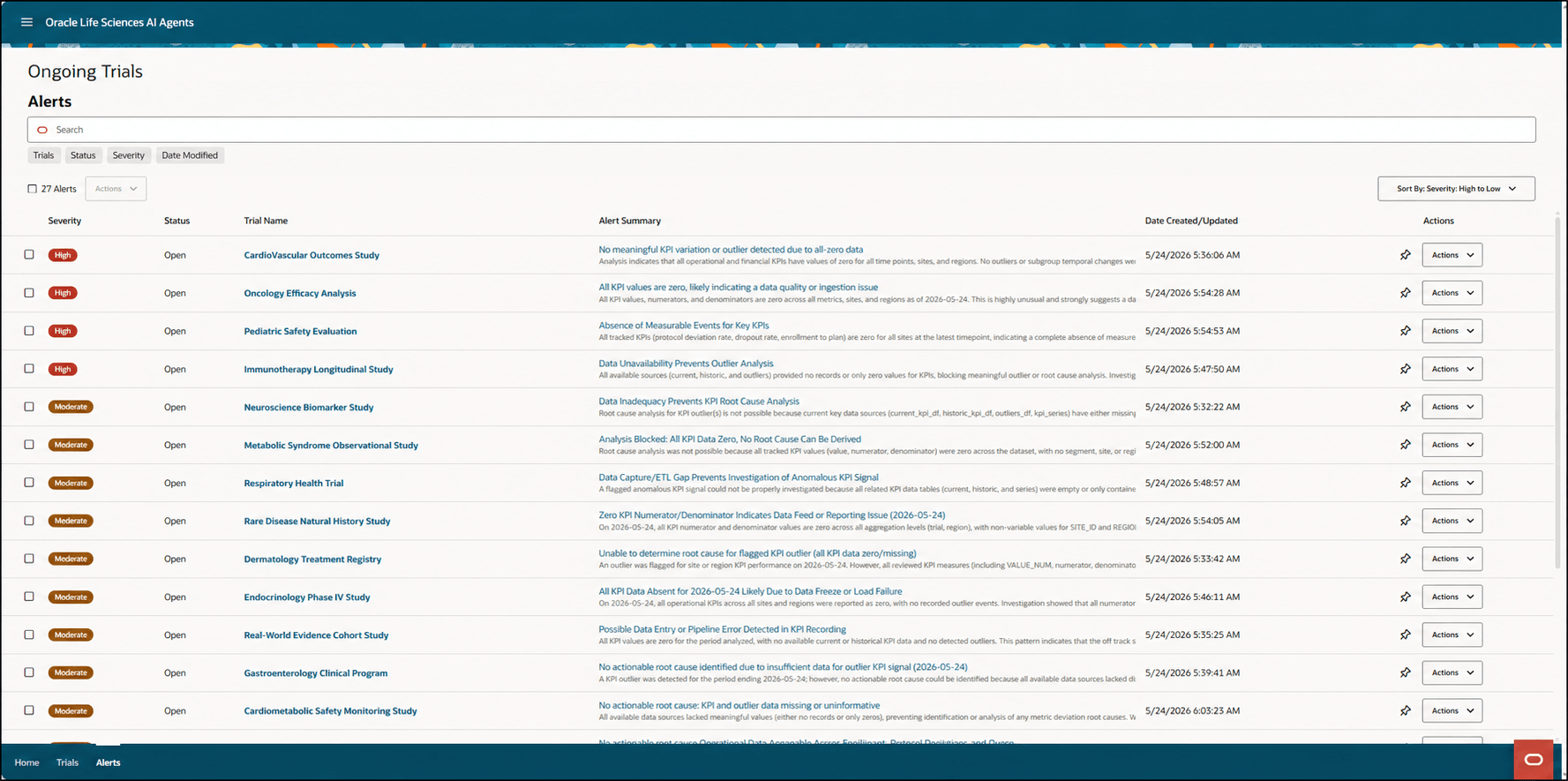
    Alerts list

  2. To search for a specific alert, enter at least three text characters in the Search field.
  3. To sort the list, select one of the following options from the Sort By drop-down menu on the right (above the Actions column):
    • Severity High to Low
    • Severity: Low to High
    • Date: Most Recent Updated
    • Trial Name: A-Z
    • Trial Name: Z-A
  4. To filter the list, select one or more of the filter options that appear below the Search field and then provide any required details. You can select multiple details for each filter.
    • Trials—Filters the alerts by trial name. Enter a trial name in the Search field or select the Trials filter and select a trial name from the drop-down menu.
    • Status—Filters the alerts by status. Enter a status in the Search field or select the Status filter and select any of the following options:
      • Open—Shows all the alerts that do not have any other status.
      • Completed—Shows only the alerts that were resolved by the AI agent.
      • Snoozed—Shows only the alerts that you snoozed.
      • Dismissed—Shows only the alerts that you dismissed.
    • Severity—Filters the alerts by risk severity. Enter a severity in the Search field or select the Severity filter and select any of the following options:
      • Low—Minor, localized, or transient issue with limited impact; generally reversible with routine follow-up and unlikely to affect safety or milestones.
      • Moderate—No immediate safety risk, but material risk to timelines or quality; major (non-critical) protocol deviations; secondary or operational data degradation; sustained under-enrollment likely to delay non-critical milestones.
      • High—Credible and significant risk to patient safety, primary endpoint integrity, or critical milestones if not addressed promptly.
      • Critical—Imminent or ongoing serious risk to patient safety or trial integrity that may warrant immediate trial halt, enrollment hold, or urgent regulatory notification.

      Note:

      The Severity filter automatically hides options that are not present in the current Alerts list.
    • Date Modified—Filters the alerts by the last updated dates. Select the Date Modified filter and then use the Calendar icon to select a Start Date (the date the alert was created) and End Date (the date the alert was last updated). Alternatively, you can enter a date in either field in MM/DD/YYYY format. Both dates are required.
  5. Select the Pin (Pin icon) icon if you want the alert to remain at the top of the list. Pinned items adjust based on the filter selections, but they remain at the top of the filtered list.