User account management
Use a new setting on your My Profile page to choose your preferred default home page.
Preferred default home page
For accounts enabled for Oracle Site Activate + Oracle eTMF, you can now choose whether the study home page in Site Activate or the TMF Viewer opens by default when you log in. On your My Profile page, use the Default home page setting to select Activate or eTMF. Activate remains the default for new and existing users until you choose another option. Note that the new Default home page setting isn’t available for Site Activate-only or Oracle eTMF-only accounts.
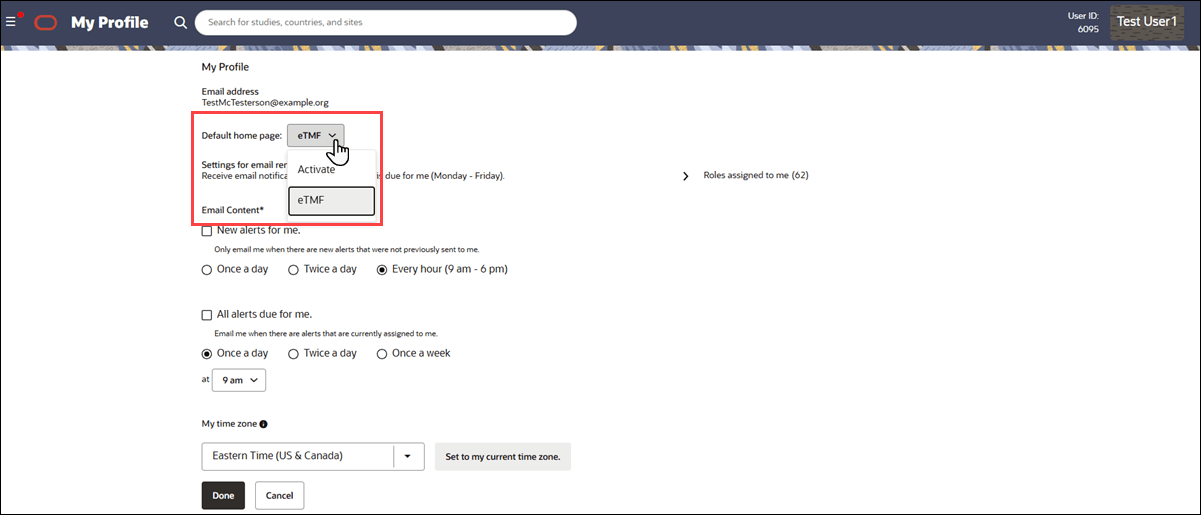
The Default home page drop-down provides context specific feedback when you make a selection that isn't compatible with your access permissions. You can select eTMF only when you have the required TMF Viewer access. Note that existing higher-priority login redirects, including supported deep links and relay states, continue to take precedence over your default home page selection.
If you select eTMF: and you don’t have permission to access the TMF Viewer, you’ll see a warning icon  to the right of the drop-down. Hover over the icon to view the following helper text: “eTMF is unavailable because you don’t have access to the TMF Viewer. This selection will not be active until you gain the required permissions.” If eTMF is selected and you later lose access, the selection remains visible in the drop-down but disabled, and you’re directed to Activate at login until access is restored.
If you select Activate: and you don’t have permission to access the TMF Viewer, you’ll see an info icon  to the right of the drop-down. Hover over the icon to view the following helper text: “eTMF is unavailable because you don’t have access to the TMF Viewer."
Epic: CHK-50117